For Complete Warranty Information, contact Spectracom NetClock Wireless Clock System Instructions
www.spectracomcorp.com / US +1.585.321.5800 1168-5001-0050 Rev. H, Copyright June, 2011
Spectracom Corporation: 1565 Jefferson Road, Rochester, NY 14623 7 of 19
4.2.5 Analog Clock Displays Incorrect Time
Perform Diagnostic #1 in order to find the last time that the clock
received the time signal. Perform Diagnostic #3 to check the gears
for the clock.
4.2.6 Desire to Verify Analog Clock Signal Quality
Perform Diagnostic #2.
4.2.7 Signal to Desired Clock Location Receives is Marginal
Reposition the transceiver or install a clock to act as a repeater.
4.2.8 Distance Between Clocks is Too Great
Install a repeater to provide additional range between clocks.
4.3
Analog Diagnostic 1
In order to enter the diagnostic mode, press Switch #1 (Figure 2-14).
The number of times the switch is pressed determines which
diagnostic is applied. The LED between the two switches will start
flashing green. The number of flashes corresponds to the diagnostic
number.
Diagnostic 1 determines how long (in number of hours) it has been
since the clock last received the communication signal. In order to
enter Diagnostic 1, press and release Switch #1 only once. The LED
should indicate green and flash once every three seconds.
1. While in diagnostic modes, the clock’s hour and minute
hands will continue to run normally.
2. The second hand will display how long it has been since
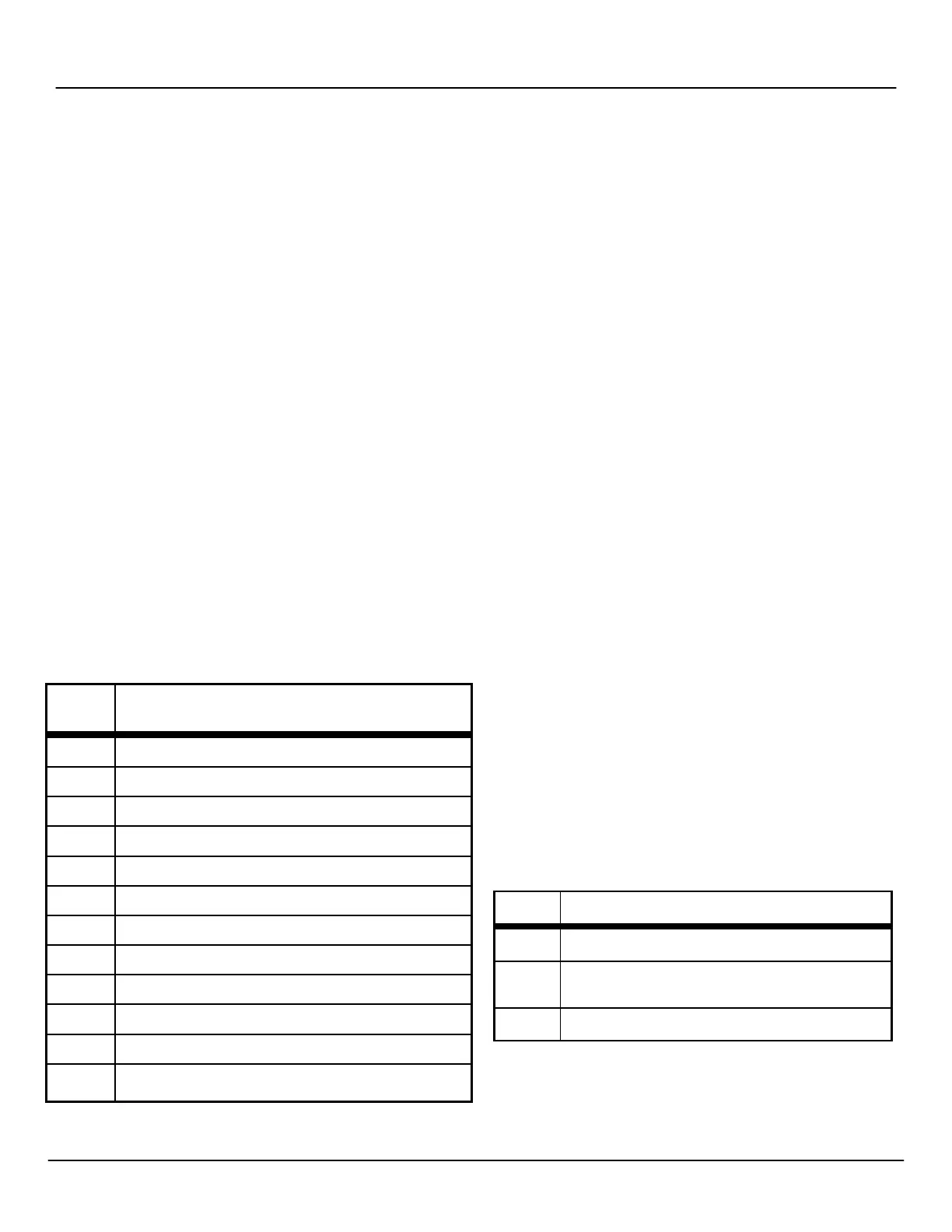
the clock received a time signal (Table 4-1).
3. After three minutes, the clock will resume normal operation.
Hand
Time Since Clock Last
Received Communication Signal
12 Within the past hour
1 Between one and two hours ago
2 Between two and three hours ago
3 Between three and four hours ago
4 Between four and five hours ago
5 Between five and six hours ago
6 Between six and seven hours ago
7 Between seven and eight hours ago
8 Between eight and nine hours ago
9 Between nine and ten hours ago
10 Between ten and eleven hours ago
11 More than eleven hours ago
Table 4-1: Second Hand Positions and Time Indications
4.4
Analog Diagnostic 2
In order to enter the diagnostic mode, press Switch #1 (Figure 2-14).
The number of times the switch is pressed determines which
diagnostic is applied. The LED between the two switches will start
flashing green. The number of flashes corresponds to the diagnostic
number.
Diagnostic 2 determines the quality of the time signal. In order to
enter Diagnostic 2, press and release Switch #1 twice. The LED
should indicate green and flash twice every three seconds.
1. While in diagnostic modes, the clock’s hour and minute
hands will continue to run normally.
2. The second hand will display the quality of the time signal
as a percentage on the dial of the clock. It will move from 1
to 10, with 1 being the best signal and 10 being the
weakest signal.
3. After three minutes, the clock will resume normal operation.
4.5
Analog Diagnostic 3
In order to enter the diagnostic mode, press Switch #1 (Figure 2-11).
The number of times the switch is pressed determines which
diagnostic is applied. The LED between the two switches will start
flashing green. The number of flashes corresponds to the diagnostic
number.
Diagnostic 3 tests the mechanical portion and some of the electronic
components of the clock. In order to enter Diagnostic 3, press and
release Switch #1 three times. The LED should indicate green and
flash three times every three seconds.
If an error occurs, the clock will flash the red LED to signal the error
code number (Table 4-2). While in Diagnostic 3, the clock will
perform the following steps:
1. Clock moves second hand to numeral 12.
2. Clock moves second hand again to numeral 12, to verify
that the hands arrived after 60 pulses.
3. Clock moves minute and hour hands to the next known
position.
4. Clock moves minute and hour hands again to the same
known position in order to verify that the hands reach the
position after 720 pulses.
5. Clock moves the hour and minute hands to numeral 12.
Diagnosis of Error Code
1, 2
Problem with the second hand. Check to see if the
hands are striking each other. Repeat the test.
3, 4, 5
Problem with the hour and/or minute hands. Check
to see if the hands are striking each other. Repeat
6
Call Spectracom Customer Service at US
+1.585.321.5800
Table 4-2: Error Codes



 To Next Page