40
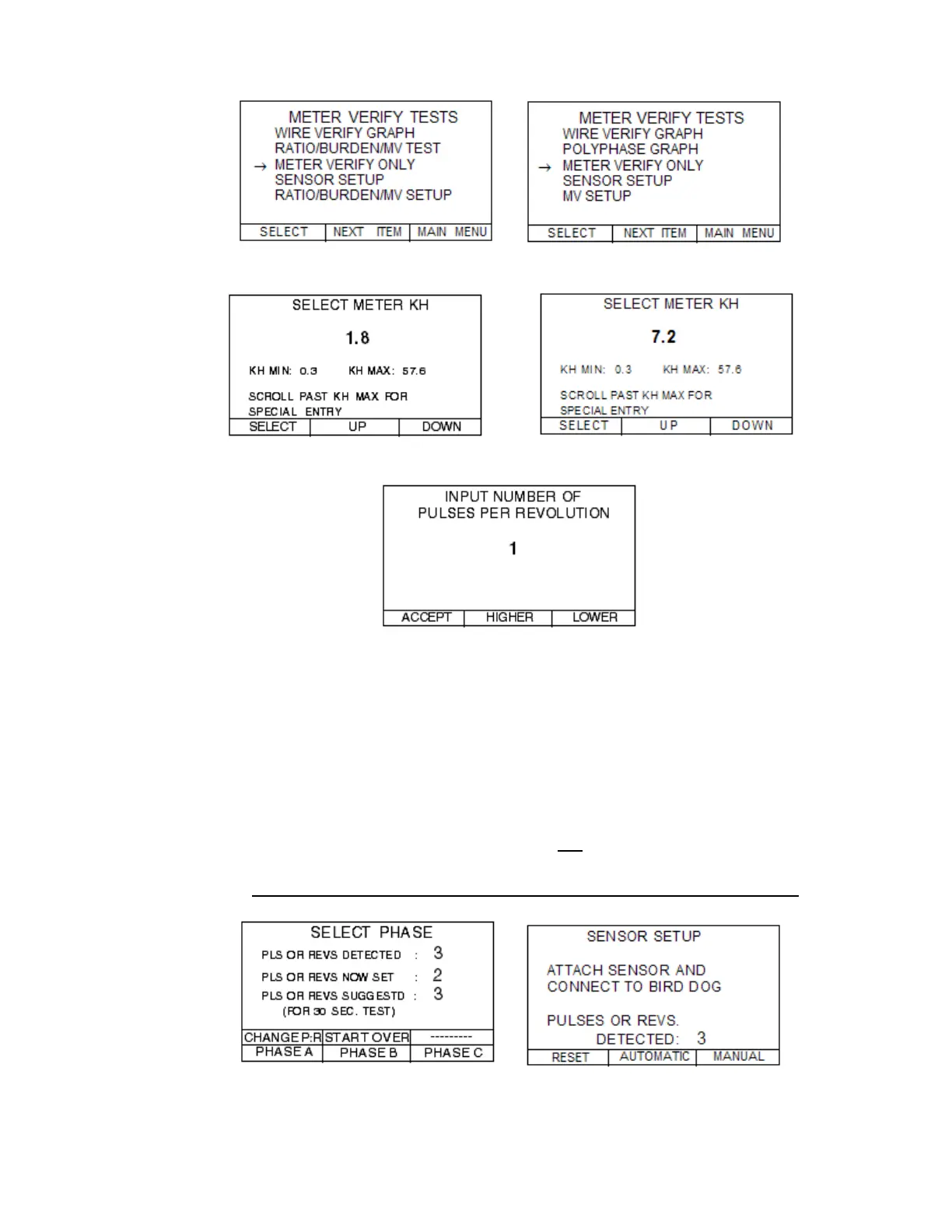
Step 6.2—SELECT the METER VERIFY ONLY.
For a Polyphase Meter For Form 1, 2 or 12 Meters
Step 6.3—Select the appropriate Kh value.
For a Polyphase Meter For a Form 2 Meter
Step 6.4—Select the NUMBER OF PULSES PER REVOLUTION.
Steps 6.5 - 6.8 for a polyphase meter
o Make sure the meter sensor is detecting pulses or revolutions (all 3 phases in the
circuit).
o Short the CT’s that you are not testing (e.g. short B & C if testing A).
o Hold down the second button for 3 seconds to select START OVER.
o Wait for 2 pulses to be detected to determine if the PLS OR REVS SUGGESTED
is the same as PLS OR REVS NOW SET.
o If the same, select PHASE A (or B or C) by pushing momentarily (less than 2
seconds) & you will be taken to Step 7.0.
o If the PLS OR REVS SUGGESTED is not the same as PLS OR REVS NOW
SET, hold down the first button for 3 seconds to select CHANGE P;R.
o For a form 1, 2 or 12 meter select AUTOMATIC and go to Step 6.8.3.
Polyphase Meter Form 1, 2, or 12 Meter



 To Next Page