Connecting IntelliPro
®
to EasyTouch
®
and IntelliTouch
®
System (Continued)
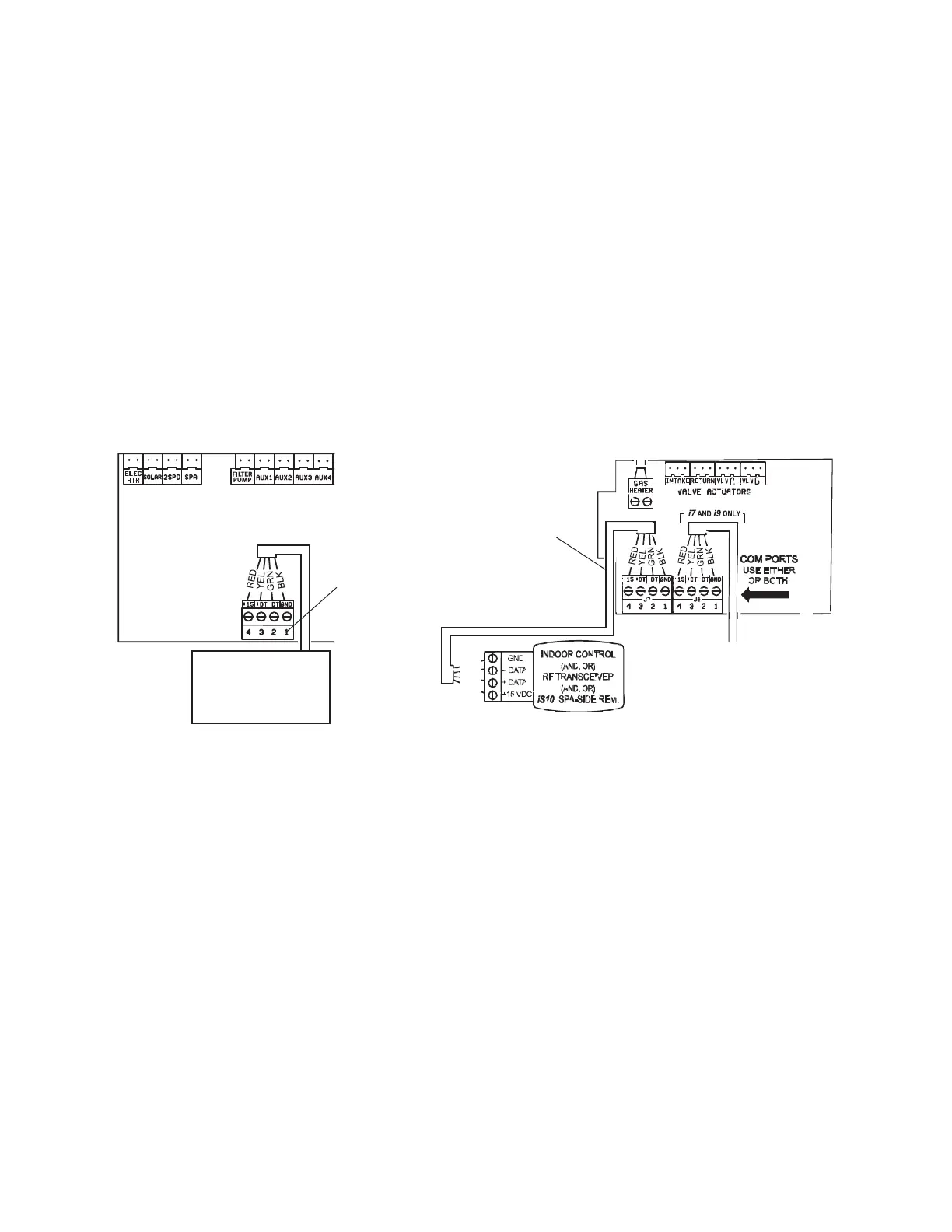
7. Strip back the cable conductors 6 mm (1/4”). Insert the two wires into the COM port screw
terminals on the EasyTouch/IntelliTouch circuit board. Secure the wires with the screws.
8. EasyTouch COM port (J20): Connect the GREEN (#2) and YELLOW (#3) wires to the
COM port screw terminals (#2 and #3). Be sure to match the color coding of the wires;
YELLOW to YELLOW and GREEN to GREEN. The Red wire is not connected. Secure the
wires with the screws.
IntelliTouch COM port (J7/8): Connect the GREEN (#2) and YELLOW (#3) wires to the
COM port (J20) screw terminals (#2 and #3). Be sure to match the color coding of the wires;
YELLOW to YELLOW and GREEN to GREEN. The Red wire is not connected. Secure the
wires with the screws.
Note: Multiple wires may be inserted into a single screw terminal.
9. Close the control panel into its original position and secure it with the two screws.
10. Install the high voltage cover panel and secure it with the two retaining screws.
11. Close the load center front door. Fasten the spring latch.
12. Switch the power on to the load center.
24
IntelliPro
®
Variable Speed Pump Installation and User’s Guide
IntelliTouch Personality board
COM PORT
(J7/J8)
EasyTouch
COMPORT
(J20)
Indoor Control Panel
IntelliChlor
IntelliPro
RF Transceiver
EasyTouch circuit board IntelliTouch circuit board



 To Next Page