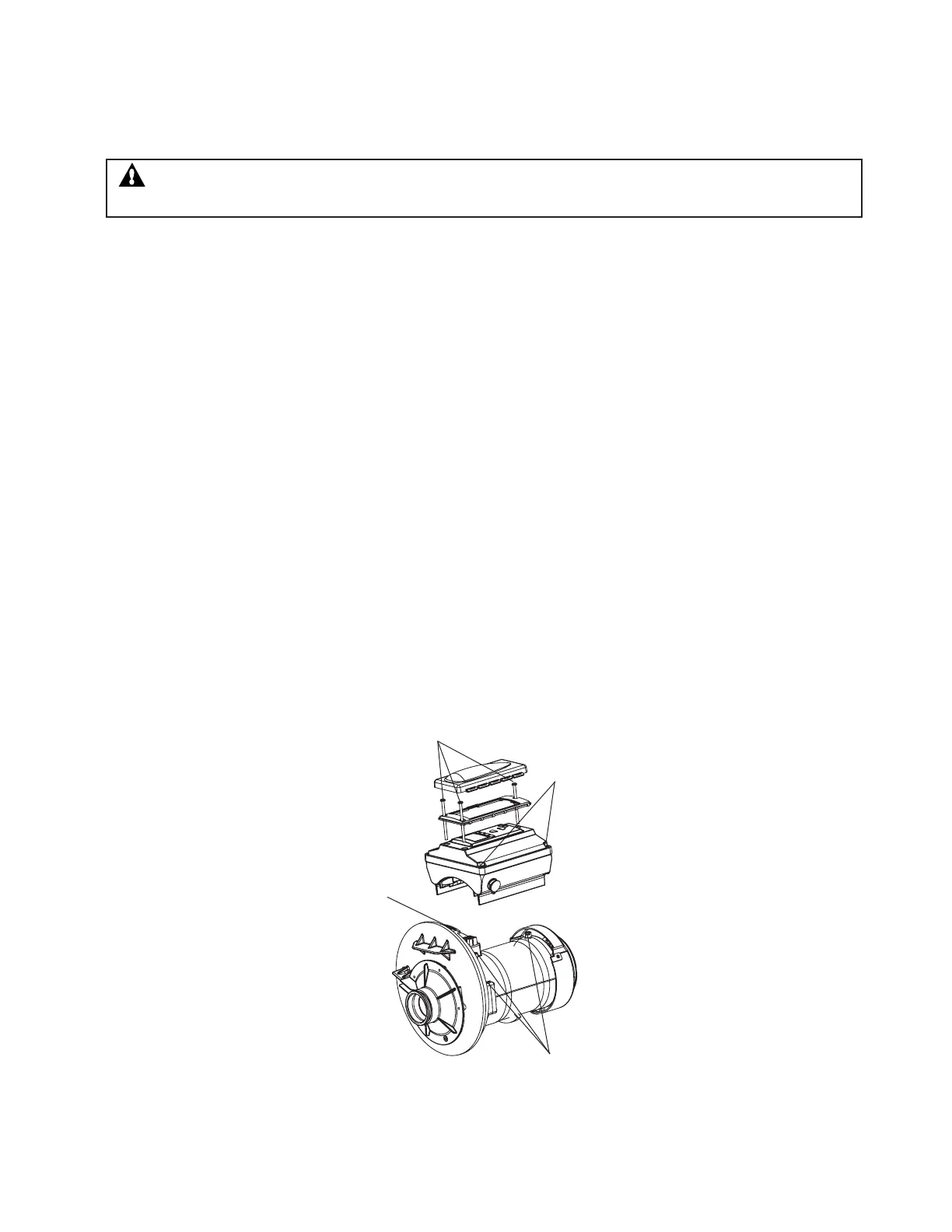
Phillips Head
Screw (3)
Do Not Remove
These Screws
Adapter Connector
and Gasket
Orange Motor Post
Caps (3)
Drive Assembly Removal and Installation
To remove the IntelliPro
®
drive assembly and control panel from the pump’s motor assembly:
1. Disconnect the RS-485 communication cable from the pump.
2. Open the control panel cover.
3. Remove the three Phillips head screws securing the drive to the motor assembly as shown.
4. Lift up the drive assembly and remove it from the motor adapter located on top of the motor assembly.
To install the IntelliPro
®
drive assembly onto the motor assembly:
1. Be sure all electrical breakers and switches are turned off before installing the drive.
2. Be sure that the gasket between the drive and motor is in place. It is critical in keeping moisture
out of the drive and motor. Replace the gasket if damaged. Do not reassemble with a damaged or
missing gasket.
3. Verify that the three (3) orange motor post caps are in position before placing the drive on the
motor assembly (see illustration below).
4. Align the drive assembly with the motor adapter and seat the drive on the motor assembly.
5. Secure and tighten the drive assembly with the three Phillips head screws.
IntelliPro
®
Variable Speed Pump Installation and User’s Guide
33
WARNING - To avoid dangerous or fatal electrical shock hazard, switch OFF power to motor before working
on pump or motor.



 To Next Page