Section 2
Operator Control Panel
This section describes the IntelliPro
®
Variable Speed pump operator controls and LEDs.
IntelliPro
®
Operator Control Panel
1
5
2
6
8
4
3
7
Quick
Clean
Time
Out
Speed
1
Speed
2
Speed
3
Speed
4
12:15
750 RPM
Running Speed 1
T 0.00 150 WATTS
4
IntelliPro
®
Variable Speed Pump Installation and User’s Guide
Controls and LEDs
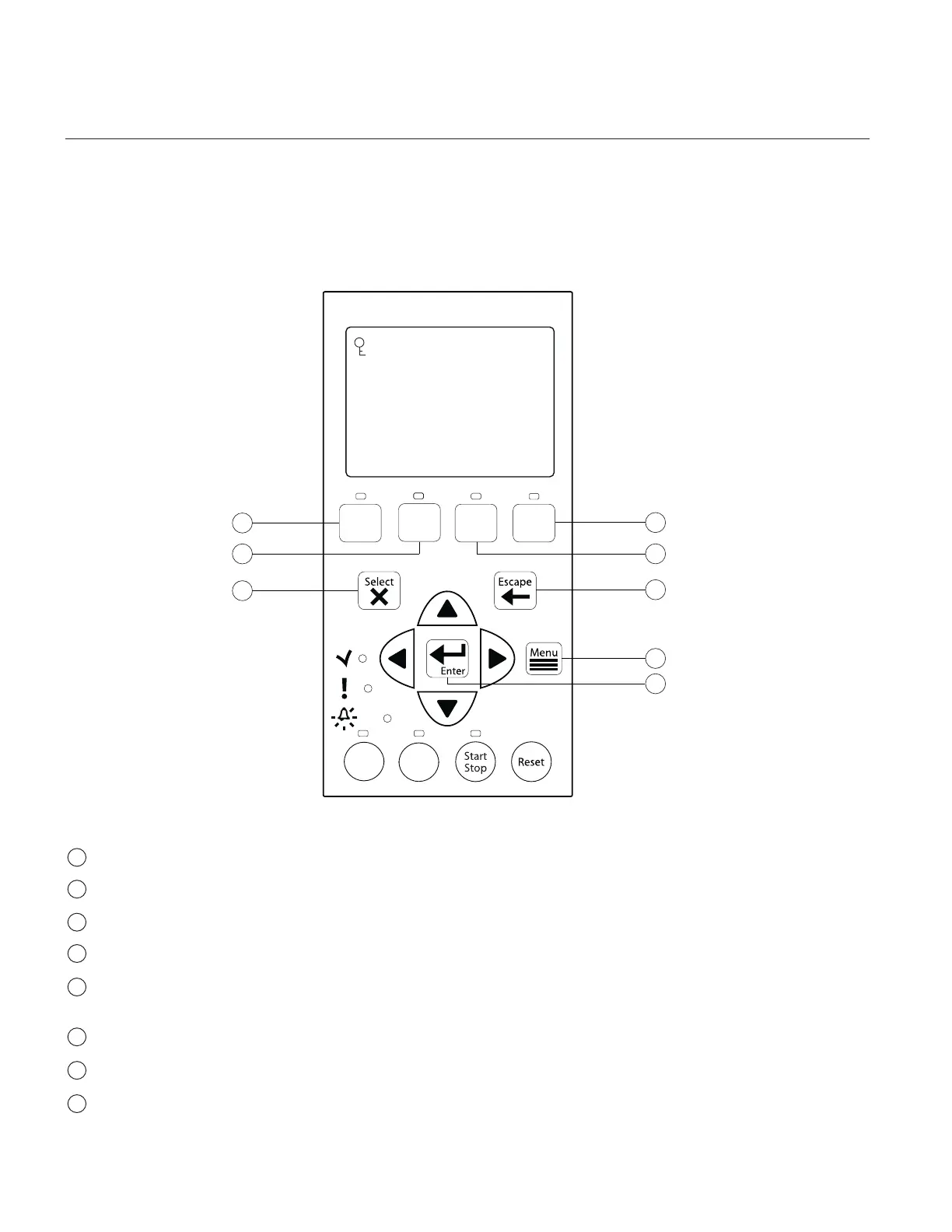
Speed 1 button/LED: Press button to select Speed 1 (750 RPM). LED on indicates Speed 1 is active.
Speed 2 button/LED: Press button to select Speed 2 (1500 RPM). LED on indicates Speed 2 is active.
Speed 3 button/LED: Press button to select Speed 3 (2350 RPM). LED on indicates Speed 3 is active.
Speed 4 button/LED: Press button to select Speed 4 (3110 RPM). LED on indicates Speed 4 is active.
Select button: Displays available menu items or enters edit mode for changing a value on line two of the
display.
Escape button: Moves to next level up in the menu structure, and/or stops editing the current setting.
Menu button: Accesses the menu items if the pump is stopped.
Enter button: Saves current menu item setting. Press this button to acknowledge alarms and warning alerts.
5
1
2
3
4
6
7
8



 To Next Page