Page 53
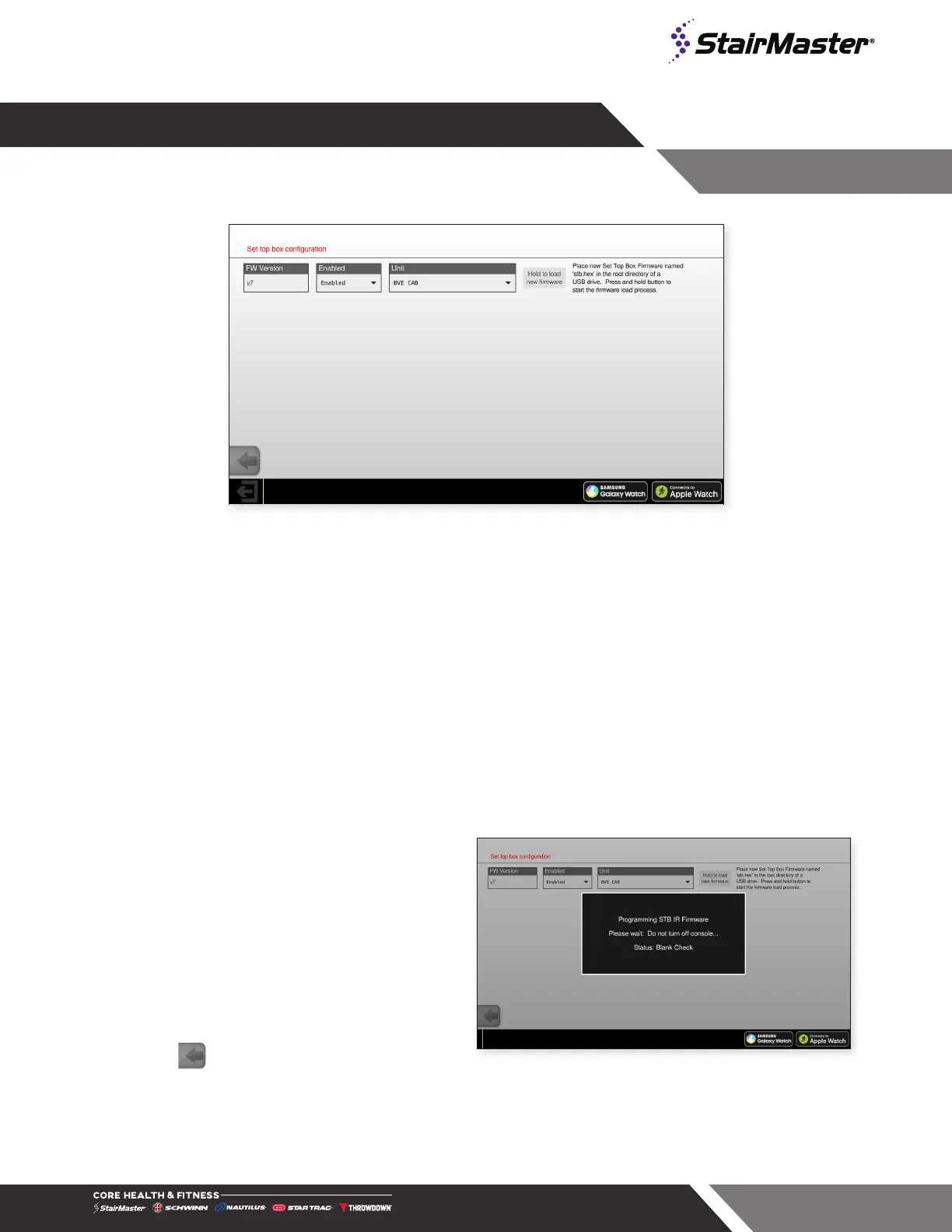
Fig. 72
Set Top Box Main Screen
Set Top Box
Select entertainment input. Selecting STB will open up the STB screen. Preset STB’s are selected from the
dropdown and by default include the following options (may change without notice):
• AMINO
• LG
If your STB is not listed on the drop down menu, you must select BVE CAB from the menu and use the CAB
add-on controller (700-0425). The CAB plugs into the CSAFE cable in place of the IR repeater. Follow the
instructions in the CAB box to set up the device or refer to document 620-8684 online.
Updating the STB Firmware
1. With unit sitting in IDLE mode, insert a USB
key with the new firmware saved as stb.hex
in the root directory of the drive.
2. Enter the Service Menu by pressing the top
left corner, top right corner and top left corner
again in succession
3. Enter the password as prompted. The
password is “218”
4. Select “Tuner” then select “STB”
5. Press the “Hold to load new firmware” button
until programming screen appears (Fig. 72).
6. When loaded, success screen will display.
7. Press to exit and go back to the Home
Screen.
Fig. 73
Firmware Update Dialog




 To Next Page