Pubn No: 30000H0K
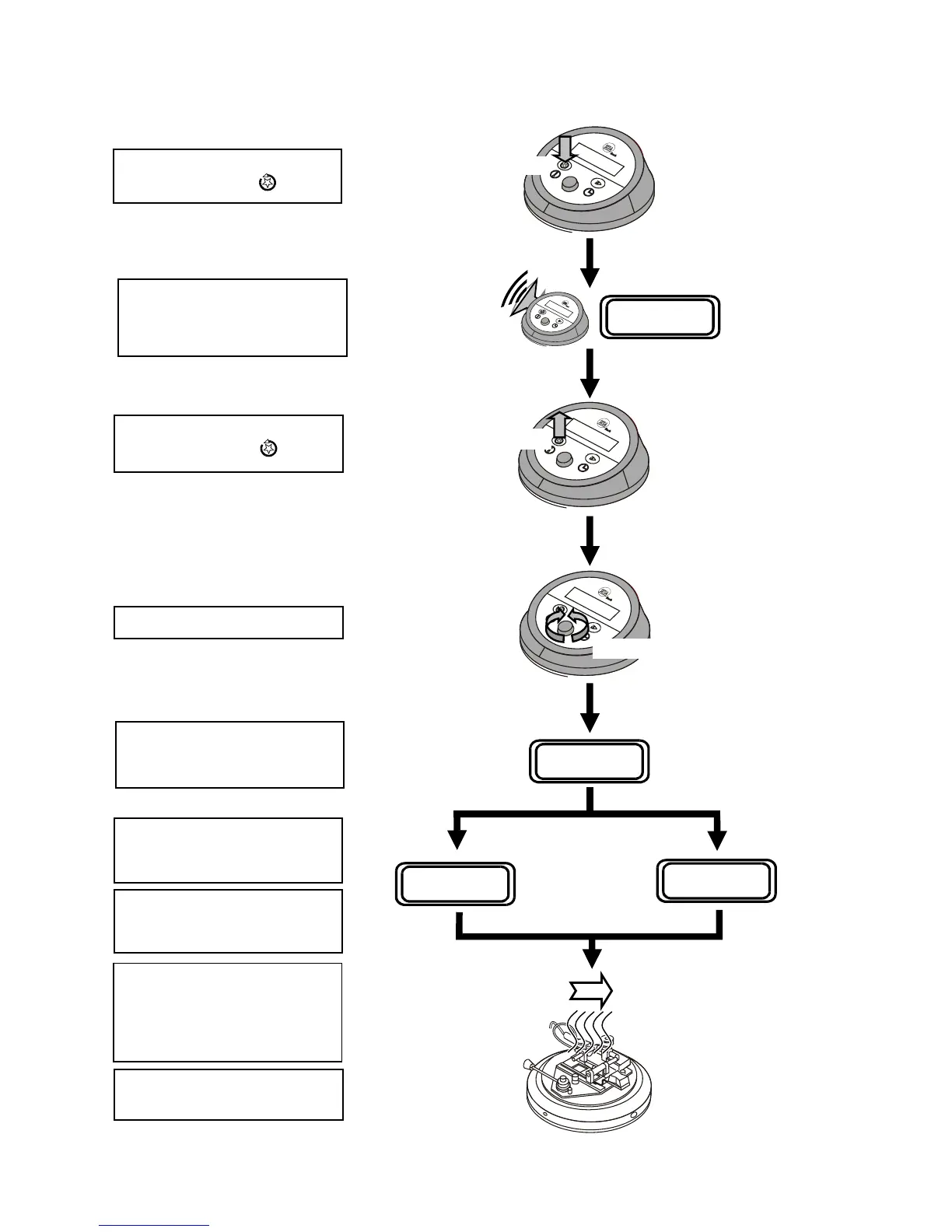
4.3.2. SETTING THE TEMPERATURE
SET TEMPERATURE
XX.X
o
C
Press & Hold Down
Release
Rotate
Press hold down the Set
Temperature Button
…..
….. until a warning beep is heard
and the display changes to show
“Set Temperature” …..
XX.X = sample cup temperature
….. then release the Set
Temperature Button
.
Rotate the Control Knob …..
….. until the expected flash point
temperature is displayed.
X
1
X
1
.X
1
= expected flash point
SET TEMPERATURE
X
1
X
1
.X
1o
C
If the Control Knob is not moved
for 4 seconds, the value shown
on the display will be saved.
XX.X
o
C TT mins
XX.X
o
C AUTO Yml
°C °C
The display will change to show
the current sample cup
temperature.
Note: Sample Size.
In Auto mode, the display will
show 2ml for expected flash
points up to and including
100°C, and 4ml above 100°C.
The Sample Cup will start to
heat up to the set temperature.
Issue K
10 Jun 2007
16


 To Next Page