6. SYSTEM MAINTENANCE
HDV300 and HDV400 benchtop horizontal digital video comparators have been designed for
years of superior service. Periodic maintenance outlined in this section should be performed to
maintain the system in peak operating condition.
Perform a daily inspection to ensure that the system is operating correctly and that proper
safety guidelines are being followed.
Periodically verify basic optical performance.
Periodically perform cleaning and lubrication.
Replace the fan filter, lenses and fuses when needed.
Schedule regular factory-authorized calibration and maintenance service to preserve proper
function and accuracy
.
6.1 Daily Inspections
On a daily basis, inspect your system for general safety and basic functionality:
Verify that the work area is clean, dry and free of debris. Remove any debris or loose items
from around the system and metrology stage.
Verify that the electrical power cord is plugged into a grounded power source and is
unobstructed.
Verify that temperature and humidity are within recommended ranges.
Allow the system to warm up to normal operating temperature before performing critical parts
measurements.
6.2 Weekly or Monthly Maintenance
On a weekly or monthly basis (based on experience), do the following:
Inspect the fan filter. If dirty, wash or replace the filter.
Inspect the system for cleanliness. If dirty, follow cleaning instructions stated under "Cleaning."
Verify that the stage control mechanisms move freely
. Lubricate as needed or every 6 months,
as stated later under "Lubrication."
Check the system for calibration against a chrome-on-glass standard.
6.3 Fan Filter Maintenance, Standard Fan
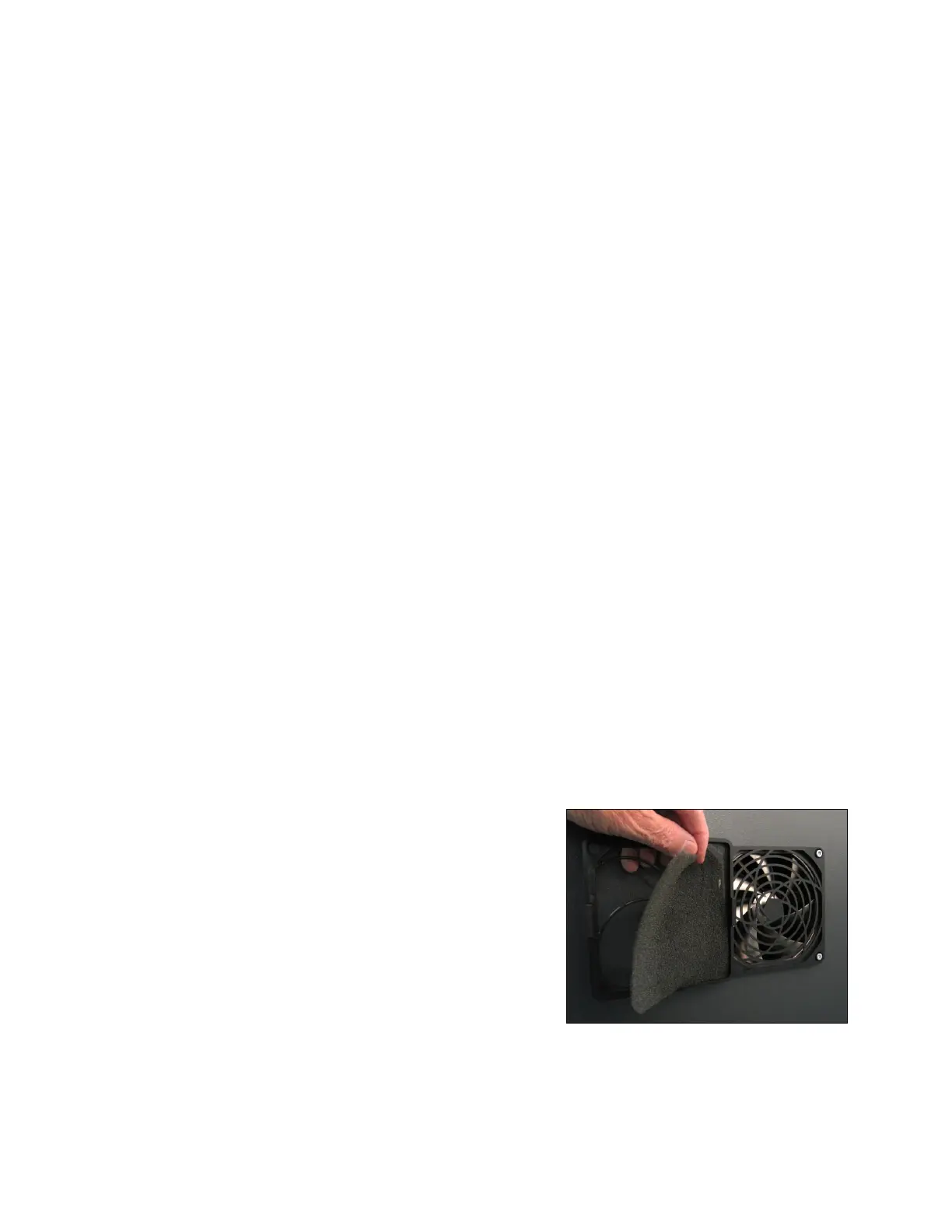
In the standard HDV300/400 configuration, the side
or back of the housing includes a 4-3/4" (120 mm fan,
which sucks in ambient air through a filter and main-
tains a slightly positive pressure inside the housing.
While the system is running, the air that comes in
contact with the electronics has passed through this
filter.
Inspect the fan filter for cleanliness at least monthly.
If found dirty, it can be washed in hot water or be
replaced. To inspect the filter, pry off the fan bezel with
a flat-blade screwdriver and remove the filter, which is
held by the bezel. To reinstall the filter, reseat it in the
bezel and press the bezel back in place.
Fan filters and the fan itself are user-replaceable
items. They are readily available from electronics distributors and in computer stores. When
purchasing a new fan, ensure that the voltage is 24V, as marked on the old fan.
Figure 12. Standard fan filter.












 To Next Page