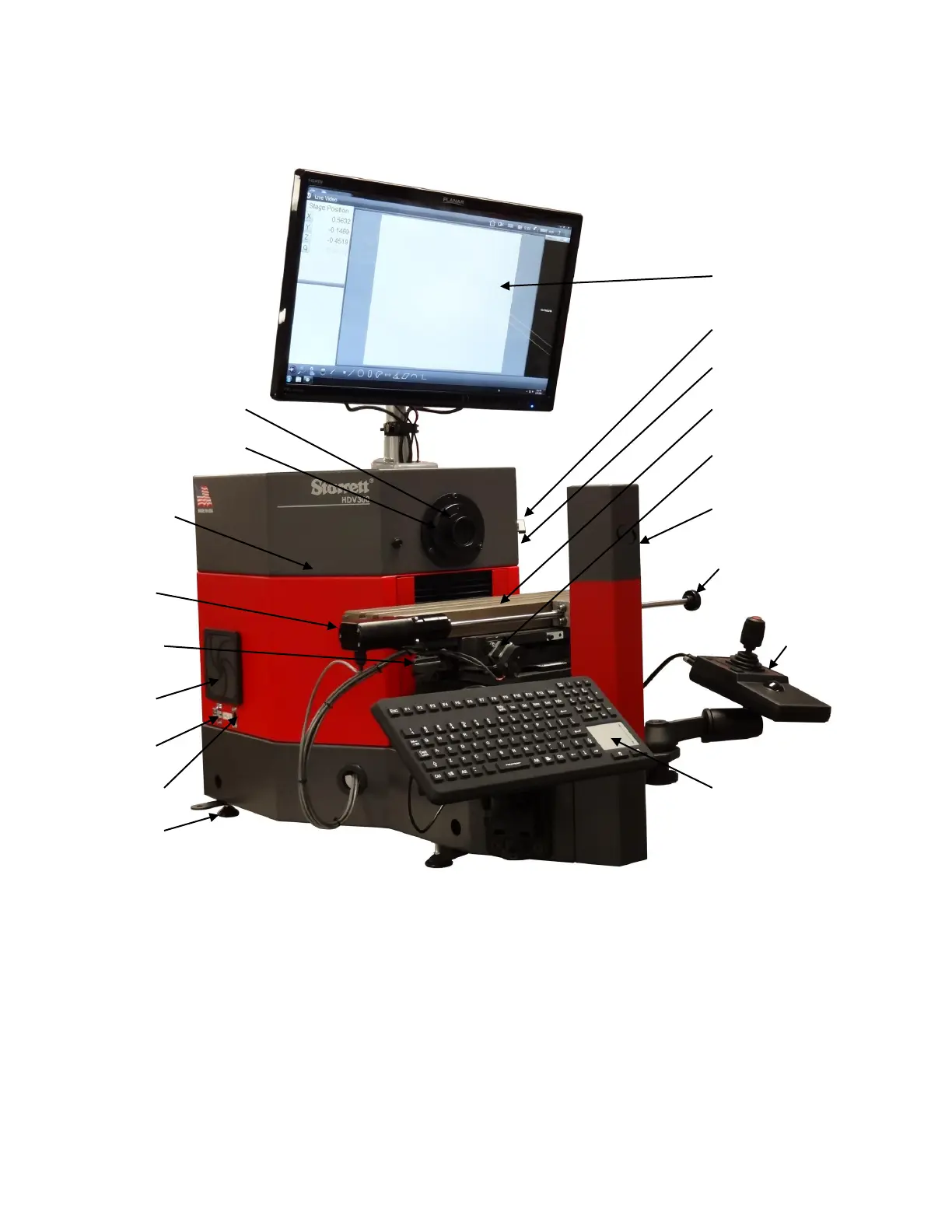
3.3 CNC System Components
Figure 3. System component overview, CNC system
3.4 Manual Position and Illumination Controls in CNC System
The CNC version of the HDV300 and HDV400 allows fully automatic operation under program control
for illumination, for right-left position of the stage (X-axis), for up-down position of the stage (Y-axis),
and for in-out position of the stage (Z-axis, used for focus adjustment). The systems also allow manual
operation for setup, for quick individual measurements, and for short runs. With the exception of one
knob for X-axis fine adjustment, such manuals controls are also via the system’s computer, but are
driven by direct operator inputs, not by previously written programs.
Illumination control of front and back illumination can be via sliders on the computer screen.
Move the sliders directly with your finger.
24” touch-screen monitor
System On-Off switch
USB ports #2 and #3
CNC X-Y stage
Z-axis drive motor
(for focus control)
LED lamp tower for
back illumination
Knob for manual
X-axis control
Housing for
computer and
M3 controller
X-axis drive
motor
Left clamp for
skew angle
Cooling fan
with filter
USB port #1
Ethernet port
Leveling feet
Sealed keyboard with
integral touchpad
User-changeable lenses
LED surface illumination
Joystick and
trackball unit for
manual control












 To Next Page