3.5 Keyboard Adjustment
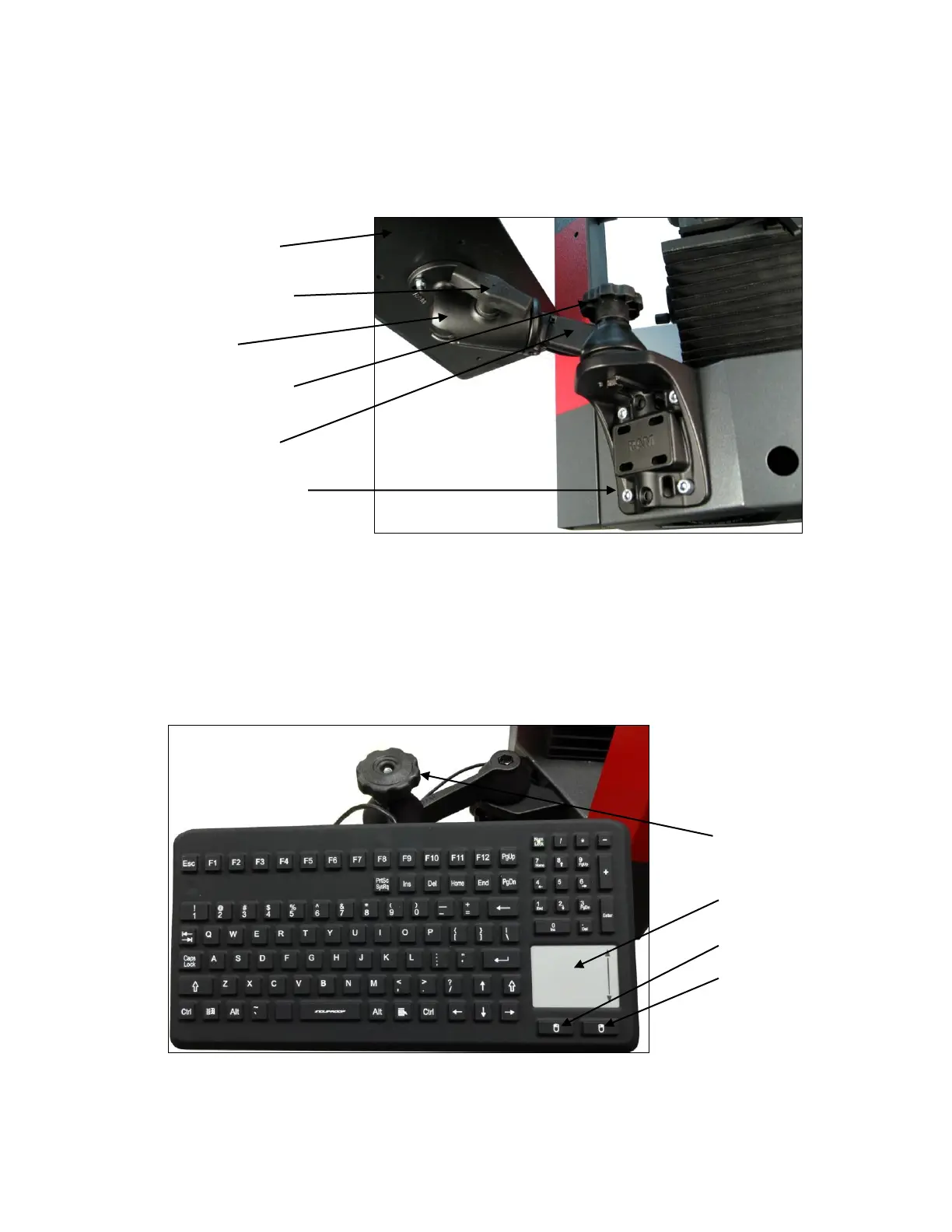
The system keyboard is secured magnetically to a tray, which is held by a ball joint at the end of a
pivoting swing-out arm, as shown in Figure 5. Adjustment of the ball joint and pivot angle sets the
keyboard angle and position.
Figure 5. Attachment and adjustment of keyboard.
3.6 Keyboard Usage
While most software control by the operator will be via the system’s 24” touch-screen monitor, use
of the keyboard is required for specific tasks, such as entering file names and paths. The
keyboard is sealed for use in harsh environments. The keyboard includes a touchpad which
provides the same functions as moving the mouse, and two adjacent buttons which provide the
same functions as the left and right mouse buttons.
Figure 6. Sealed keyboard.
Keyboard tray
Locking handle
to lock ball joint
Ball joint
Locking knob for
swing-out arm
Swing-out arm
Four M8 mounting
screws
Hand crank for
focus control
Locking knob for
swing-out arm
Touchpad for
mouse functions
Left mouse button
Right mouse button












 To Next Page