NOTICE!
P % cannot be changed at the first and last
nodes (000 %, 100 %).
1.
Press rs to select a parameter for the node.
2. Press SET.
ð
The parameter value flashes.
3.
Press rs to change the value.
4. Press SET.
ð
The change is adopted.
5. Repeat steps 1 to 4 for the other parameters.
6. Press ESC.
✓ The check list is shown.
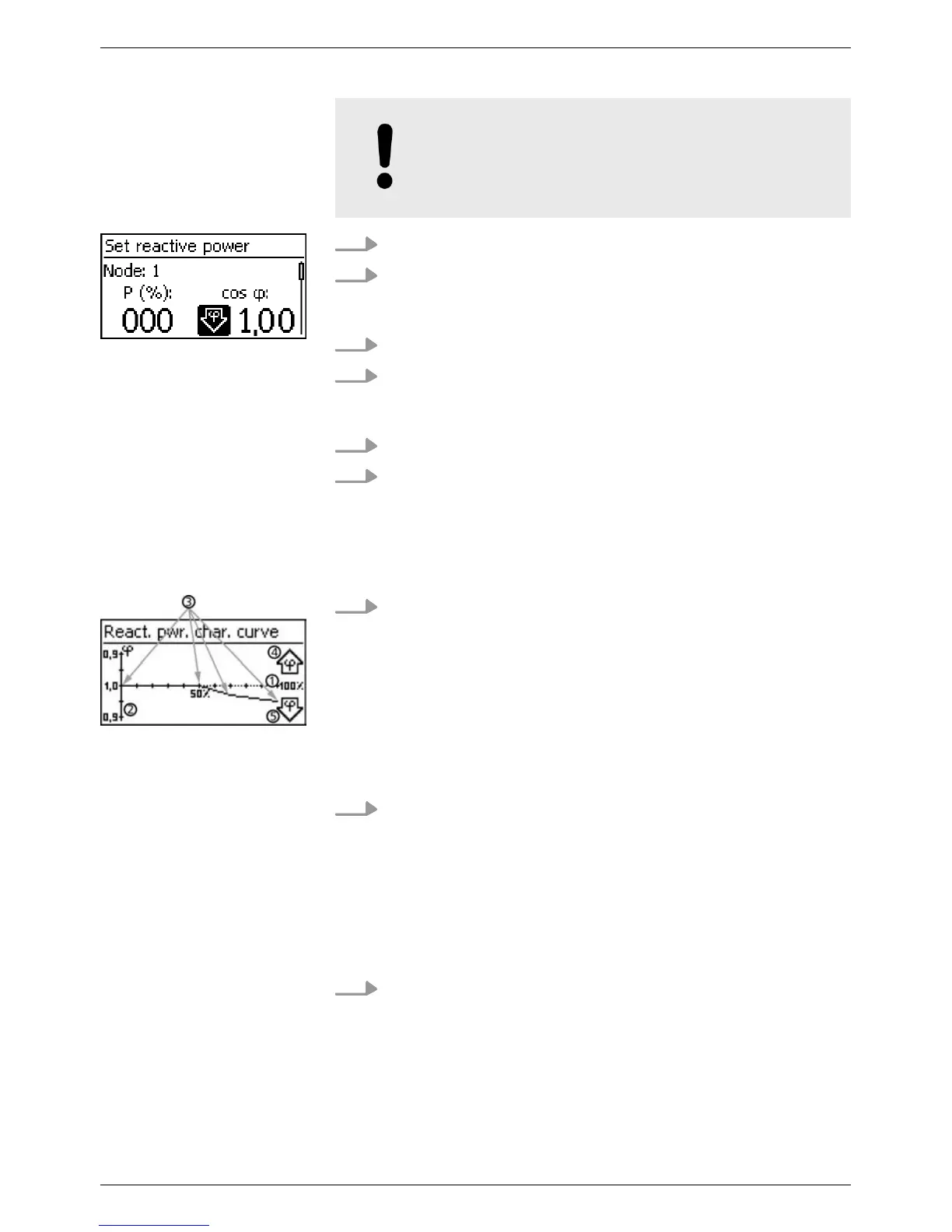
1. The previously set reactive power characteristic curve is dis-
played graphically (example in Fig. left).
① x-axis, output power P in %
② y-axis, phase shift cos φ
③ Nodes (in example: 4 nodes)
④ Arrow symbol Overexcitation
⑤ Arrow symbol Underexcitation
2. Press ESC
✓ The check list is shown.
✔ Finish has been selected in the check list and SET has been
pressed. One of 2 possible dialogues is displayed.
1. Proceed as follows, depending on the respective dialogue:
n Dialogue Settings are incomplete: Press SET and
work through the open items in the check list.
n Dialogue Are all settings correct?:
Press ESC to correct settings or
Node n
Display char. curve
Finish
EN
750.661 | Z03 | 2016-09-12
41









 To Next Page