Software
UR44 Operation Manual 13
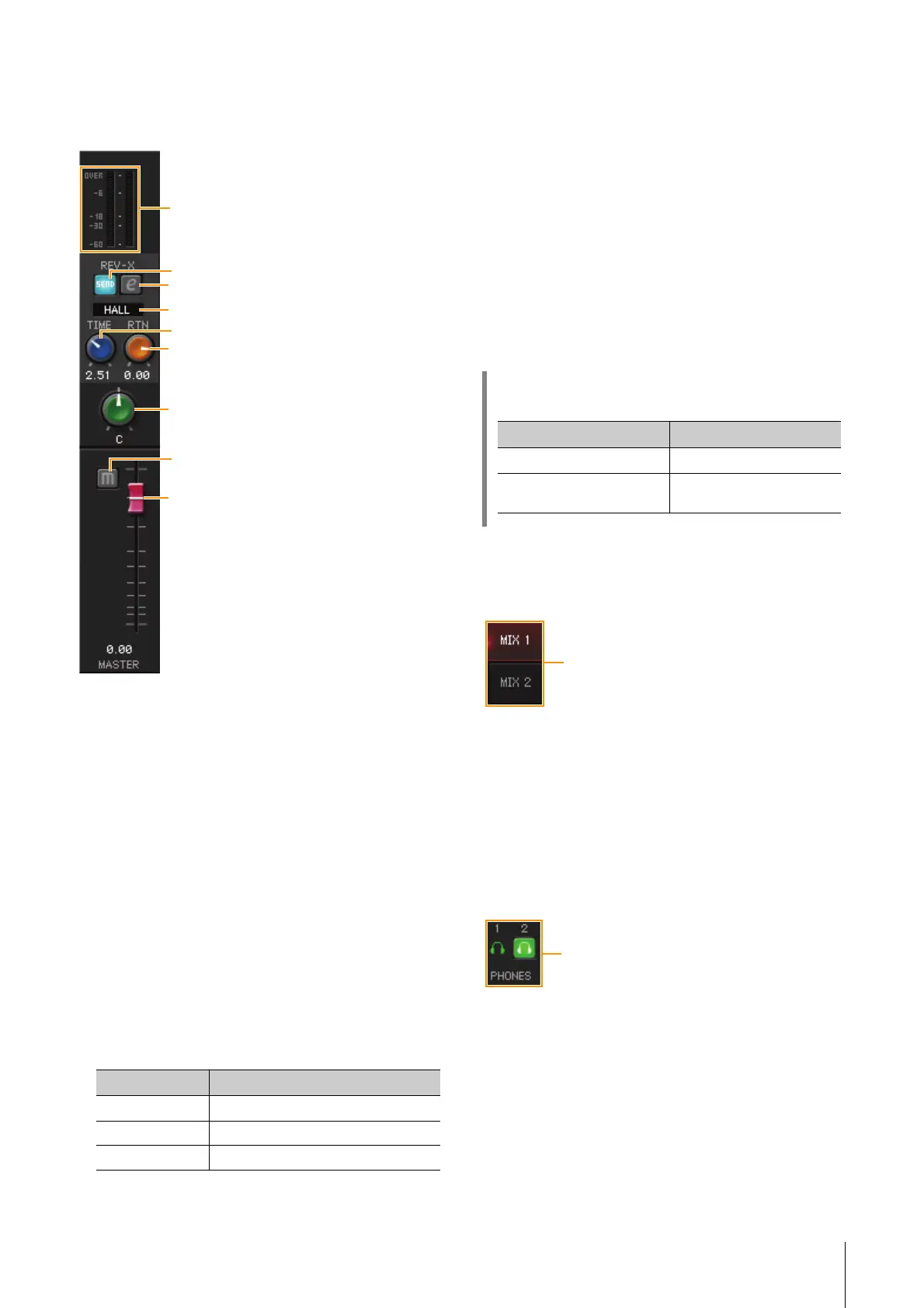
Master Area
This is the area for configuring the master channel
settings.
1 Level Meter
Indicates the signal level.
2 REV-X Send On/Off
Turns REV-X on (lit) and off (dark).
You can turn this on for either MIX 1 or MIX 2.
3 REV-X Edit
Opens (lit) and closes (dark) the “REV-X” (page 20)
setup window.
4 REV-X Type
Selects the REV-X type.
Options: Hall, Room, Plate
5 REV-X Time
Adjusts the reverb time of REV-X. This parameter links
to Room Size. The adjustable range varies depending
on REV-X type.
6 REV-X Return Level
Adjusts the return level of REV-X.
Range: -∞ dB – +6.00 dB
7 Pan
Adjusts the pan.
Range: L16 – C – R16
8 Mute
Turns the mute on (lit) and off (dark).
9 Fader
Adjusts the signal level.
Range: -∞ dB – +6.00 dB
MIX Area
This is the area for selecting the MIX you want to
configure.
1 MIX
Selects the MIX you want to configure.
You can copy the Main window settings of the MIX by
dragging and dropping.
Headphone Area
This is the area for selecting the output signal of the
headphone.
1 PHONES On/Off
Turns on (lit) and off (dark) the headphones output.
You can output the MIX selected in the MIX area to the
PHONES by turning this on.
NOTE
With [PHONES 2], either MIX 1 or MIX 2 can be selected;
[PHONES 1] is fixed to MIX 1 and cannot be changed.
REV-X type Range
Hall 0.103 sec – 31.0 sec
Room 0.152 sec – 45.3 sec
Plate 0.176 sec – 52.0 sec
HINT
Fader operations
Function Operation
Set to 0 dB Double-click the fader
Slide all channel faders at
the same time
[Ctrl]/[command] + [Shift] +
drag the fader



 To Next Page