– By pressing the button (B), you move back-
wards between the entries for each screen
or backwards between one screen and the
other.
– By pressing the button (C), you move for-
wards between the items for each screen or
forwards between one screen and the oth-
er.
– By pressing the button (D), you confirm
your selection of the item of the selected
screen.
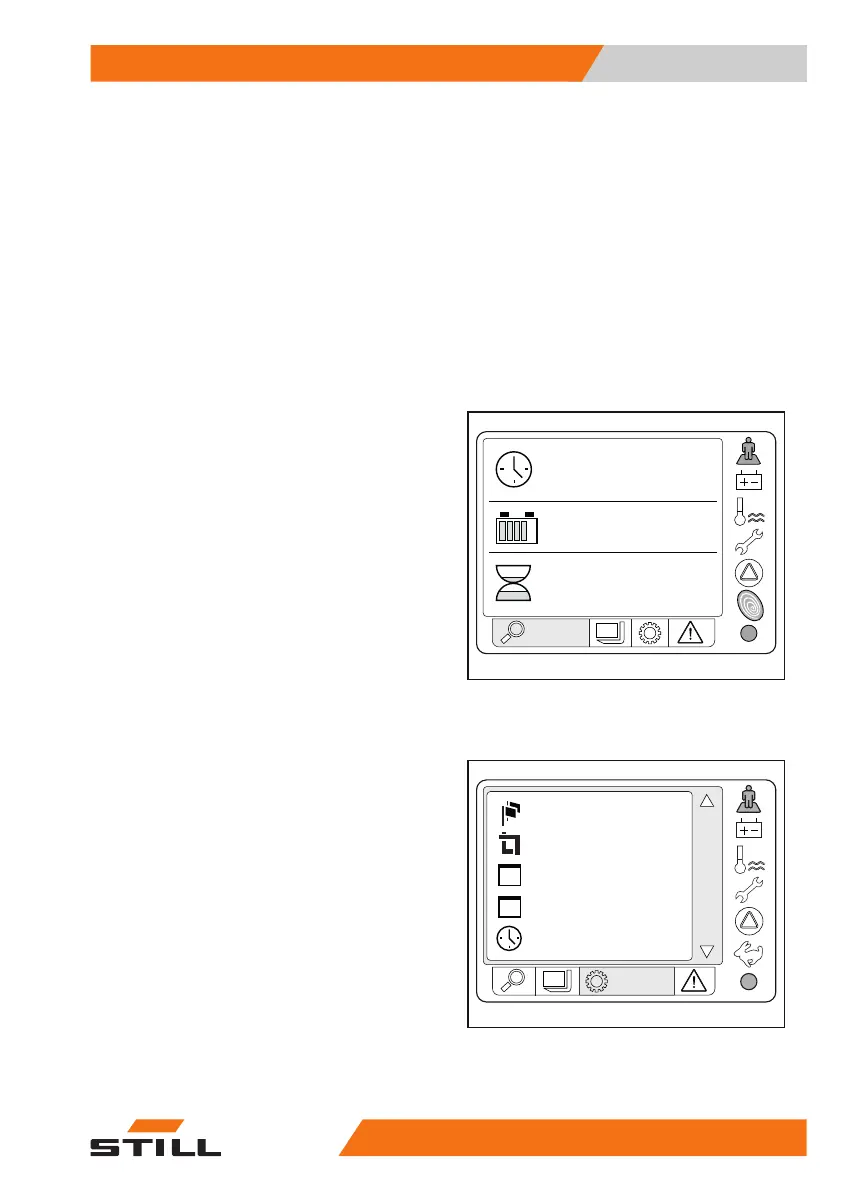
Status
– The following are displayed on the
Status
screen:
●
Clock and date
●
Battery charge level
●
Hours of work
Setting
– The following can be set on the
Setting
screen:
●
Language
●
Unit of measurement
●
Date
●
Time
●
Brightness
●
Contrast
●
Date format
Load
– The
Load
screen is only visible if the option-
al "Dynamic Load Control "(D.L.C) is fitted
OM2296
05.12.2014
hrs
5242.8
93
%
11:05
STATUS
OM2307
Time
Date
Dateformat
Units
Language
1
/
SETTING
Overview
3
Instruments and controls
3345758043484 EN - 11/2021 - 08


 To Next Page