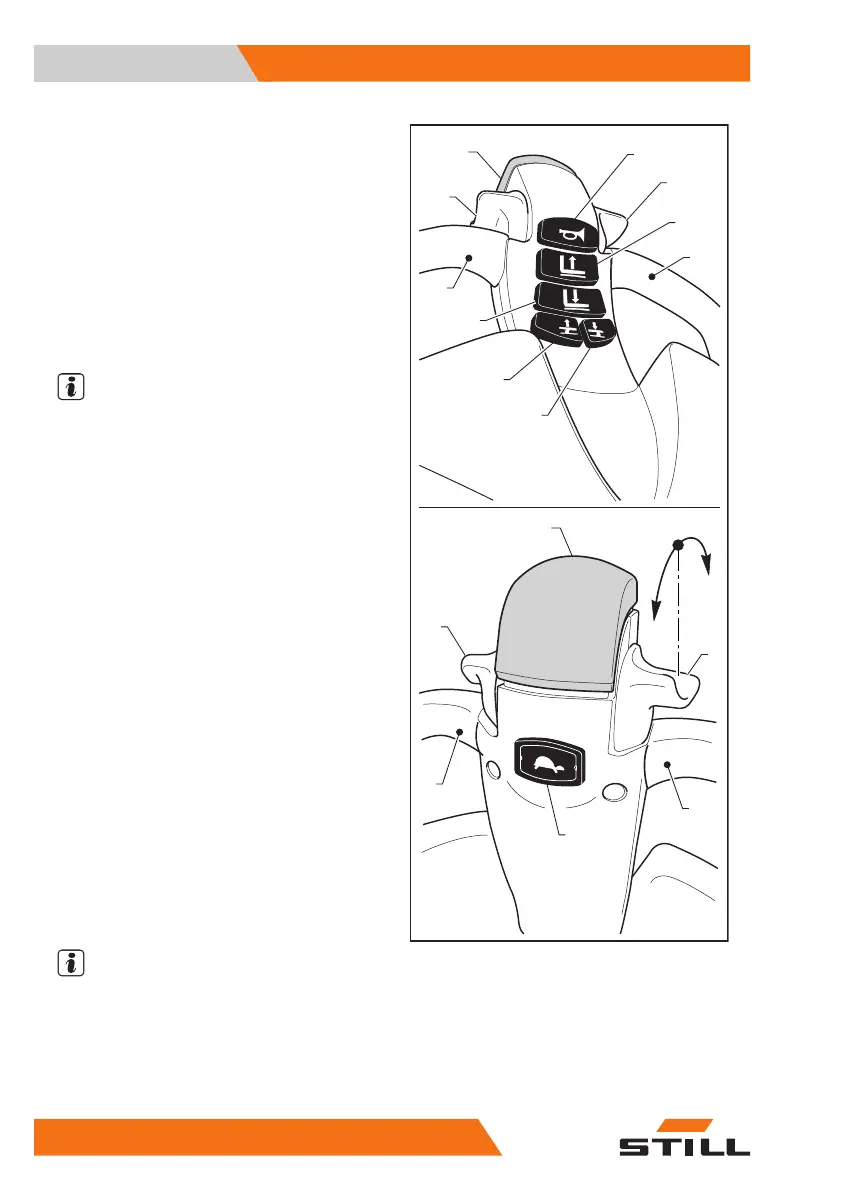
Tiller controls
1
— Tiller head handle
2 and 3
— Traction control throttle
4
— Fork lowering button
5
— Fork lifting button
6
— Horn button
7
— Anti-crush button
8
— Slow speed button (optional —
Creep Speed)
9
— Straddle lifting button (optional)
10
— Straddle lowering button (optional)
NOTE
The following controls are active with the tiller
in the "working position".
Tiller head handle (1)
●
Areas designed for holding the tiller head
during use.
Traction control throttle (2 – 3)
●
When the throttle (2 or 3) is turned in direc-
tion (A), the truck starts moving in the direc-
tion of the forks.
●
When the throttle (2 or 3) is turned in direc-
tion (B), the truck starts moving in the direc-
tion of the operator.
●
The truck speed increases or decreases ac-
cording to the angular position of the throt-
tle.
●
Releasing the throttle causes braking and
subsequently the stopping of the truck.
Fork lowering button (4)
●
Press the button (4) to lower the forks.
●
Fork movement can be stopped at any time
by releasing the button (4). The forks will
stop in the position attained.
●
The fork lowering button (4) is active only
when the tiller is angled to the working posi-
tion.
NOTE
●
The speed of the forks is proportional to
how hard the button (4) is pressed
●
When the forks are fully lowered, a reduc-
tion in the fork lowering speed is automati-
cally triggered just before the end of the
stroke (soft landing)
7
OM2279
A
B
7
2
3
5
6
3
2
8
1
1
1
9
10
4
1
Overview
3
Instruments and controls
40 45758043484 EN - 11/2021 - 08


 To Next Page