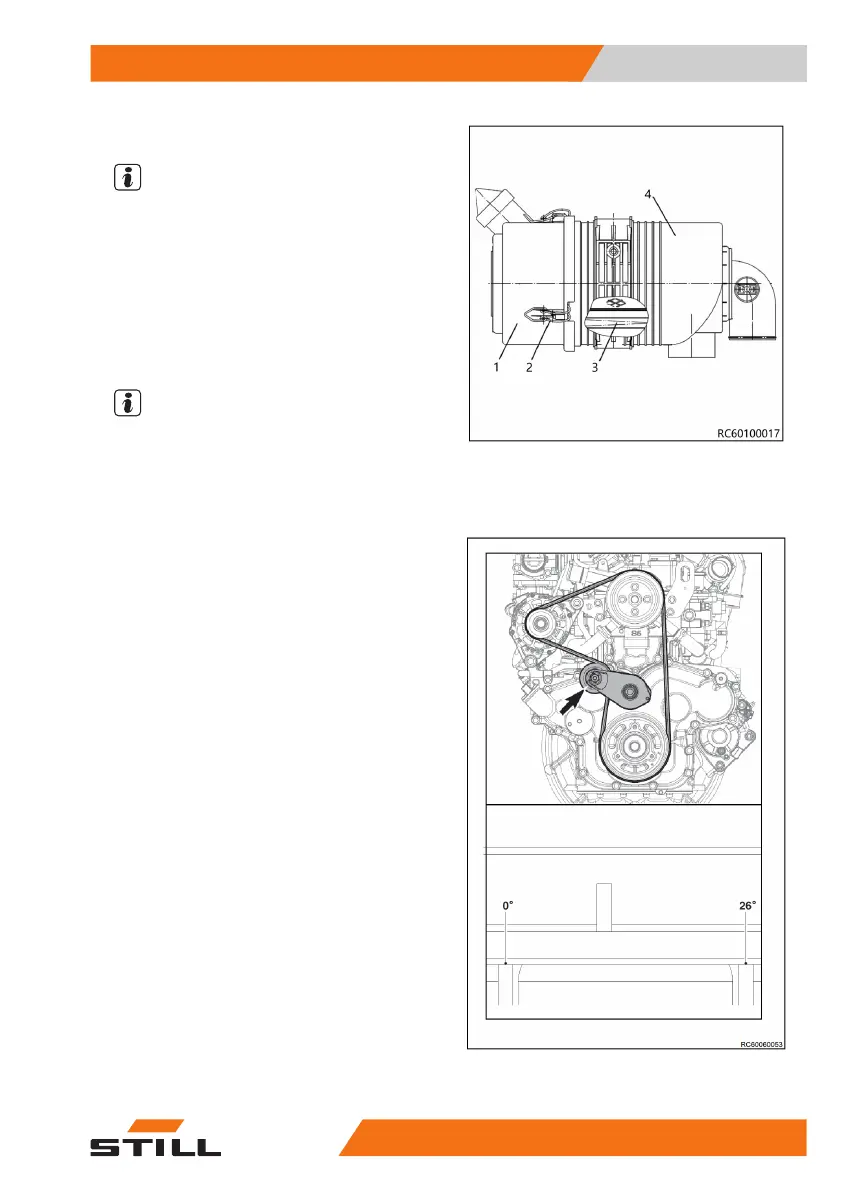
– Pull out the air filter (3)
NOTE
Clean the inside of the air filter head cover(1).
– Ensure that the filter is not damaged during
installation and that it is installed in the cor-
rect direction.
– Install the filter insert back into the air filter
housing(4).
– Reinstall the air filter cover.
NOTE
Make sure to replace the air filter insert every
500 hours.
Check the belt tension
Belt Tension
Tension needs not be adjusted separately
since an auto tensioner is applied that auto-
matically controls the tension of the belt.
●
A daily check is required to see if the point-
er of the auto tensioner indicates that it
needs to be replaced. If so, the belt must be
replaced with a new one.
●
The belt shall also be replaced in case it is
damaged or worn out due to other external
causes. It is required to check if the micro V
belt has any issues associated with crack,
oiling, overheating, or abrasion.
●
Tension needs not be measured separately
since an auto tensioner is applied that auto-
matically controls the tension of the belt. If
necessary, tension measurement shall be
conducted as chapter entitled “Tension
measurement
●
The fixed lower part of the auto tensioner
has a minimum/maximum indicator.
●
If the indicator is found to be beyond the
minimum/maximum range upon visual in-
spection, the belt layout components must
be checked.
Maintenance
5
Maintenance service
13960118011601 EN - 09/2020


 To Next Page