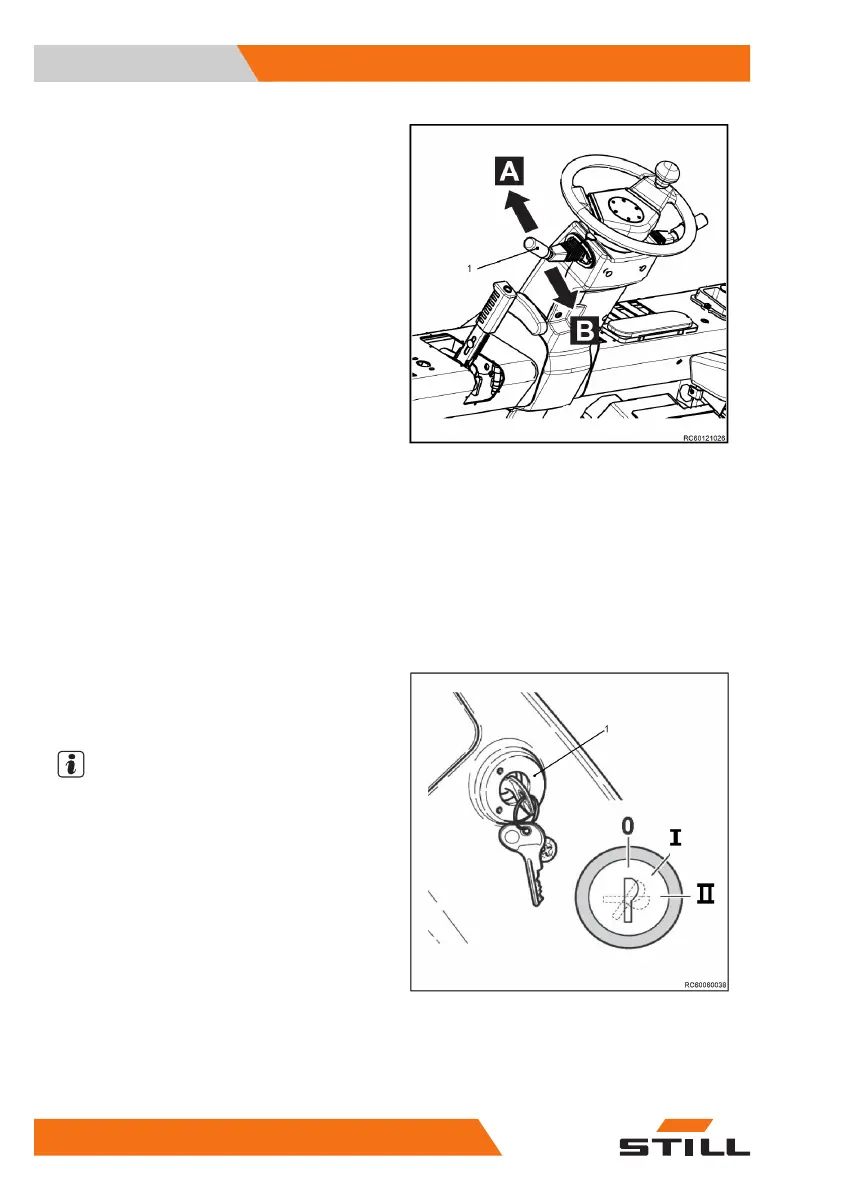
Direction selection lever
Direction selection lever (1) is used to select
the required drive direction of the truck or to
switch the drive mode to idling. The direction
selection lever offers three different positions:
●
FORWARDS
— direction selection lever
pushed forwards into position "A"
●
NEUTRAL
— direction selection lever in
centre position between "FORWARDS" and
"REVERSE"
●
REVERSE
— direction selection lever
pulled backwards into position "B"
Start the engine
– Sit in the driver's seat and fasten the seat
belt. Ensure that the cab doors or the driver
restraint system installed on the truck is
closed.
– Ensure that the direction selection lever (if
present) is in the central position (neutral).
– Insert the switch key (1) and turn it to posi-
tion "
Ⅱ
". Release the switch key as soon as
the engine starts.
NOTE
If the engine does not start, stop the starting
procedure and try again later. Wait at least
one minute between start attempts in order to
avoid running down the battery. If the engine
still does not start after three attempts, do not
try to start the engine again. Instead, contact
your authorised service centre.
Use and Operation
4
Using the truck
74 60118011601 EN - 09/2020


 To Next Page