Home
Still
Forklifts
RX60-35
Page 85 (Mini Console)
Still RX60-35 - Mini Console
470 pages
Manual
Save Page as PDF
To Next Page
To Next Page
To Previous Page
To Previous Page
Loading...
O
v
ervi
ew
s
3
Op
era
t
in
g
d
evi
c
es
a
n
d
d
i
s
pl
ay
e
l
e
m
en
ts
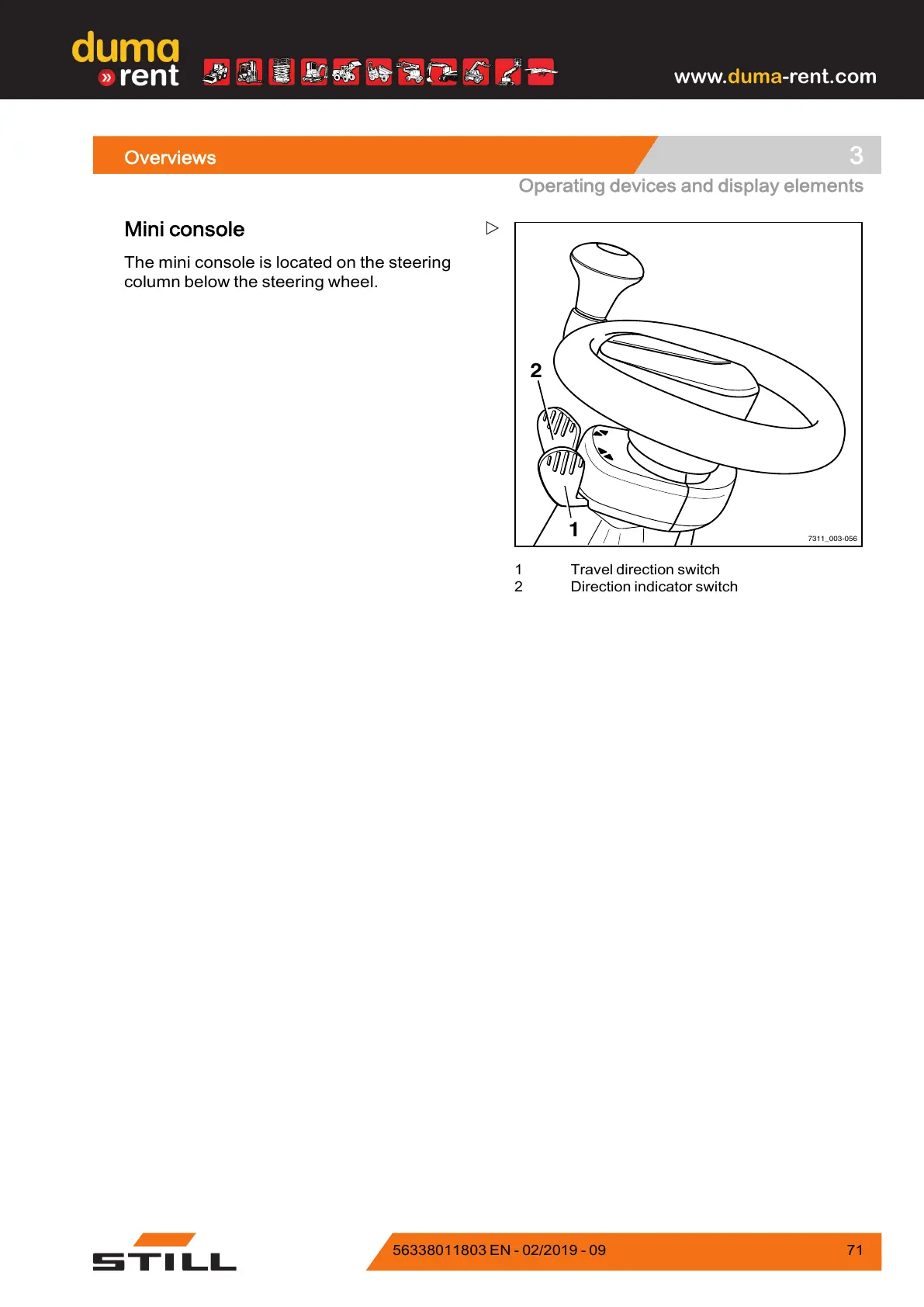
7311_003-056
1
2
1
T
ravel
d
irect
i
on
sw
i
t
ch
2
Direct
i
on
indicato
r
s
witch
Mi
ni
consol
e
Th
e
m
i
n
i
c
onsol
e
i
s
l
ocated
o
n
the
s
teering
col
u
mn
be
l
o
w
t
he
steering
w
heel.
563
38
011803
EN
-
0
2/20
19
-
0
9
7
1
www
.
duma
-r
ent.com
84
86
Table of Contents
Main Page
Table of Contents
5
Foreword
15
Your Truck
16
Description of the Truck
16
General
18
CE Labelling
19
EC Declaration of Conformity in Accordance with Machinery Directive
20
Accessories
21
Labelling Points
22
Nameplate
24
Production Number
24
Stvzo (Road Traffic Licensing Regulations) Information
25
Nameplate of a Lithium-Ion Battery
25
Using the Truck
25
Commissioning
25
Proper Usage
26
Proper Use During Towing
26
Impermissible Use
27
Place of Use
27
Parking in Temperatures below -10°C
28
Using Working Platforms
29
Information about the Documentation
30
Documentation Scope
30
Supplementary Documentation
31
Issue Date and Topicality of the Operating Instructions
32
Copyright and Trademark Rights
32
Explanation of Information Symbols Used
32
List of Abbreviations
33
Definition of Directions
35
Schematic Views
35
Environmental Considerations
37
Packaging
37
Disposal of Components and Batteries
37
Safety
39
Definition of Responsible Persons
40
Operating Company
40
Specialist
40
Drivers
41
Basic Principles for Safe Operation
43
Insurance Cover on Company Premises
43
Special Features When Using Lithium-Ion Batteries (Variant)
44
Changes and Retrofitting
47
Changes to the Overhead Guard and Roof Loads
49
Warning Regarding Non-Original Parts
50
Damage, Defects and Misuse of Safety Systems
50
Tyres
51
Medical Equipment
52
Exercise Caution When Handling Gas Springs and Accumulators
53
Length of the Fork Arms
53
Residual Risk
55
Residual Dangers, Residual Risks
55
Special Risks Associated with Using the Truck and Attachments
56
Overview of Hazards and Countermeasures
58
Danger to Employees
61
Safety Tests
62
Regular Safety Inspection of the Truck
62
Insulation Testing
62
Safety Regulations for Handling Consumables
64
Permissible Consumables
64
Oils
64
Hydraulic Fluid
65
Battery Acid
66
Disposal of Consumables
67
Emissions
68
Overviews
71
General View
72
General View of Driver's Compartment
74
Shelves and Cup Holders
75
Operating Devices and Display Elements
76
Display Operating Unit
76
Lithium-Ion Battery Display
77
Operating Devices for Hydraulic and Traction Functions
78
Multi-Lever
79
Double Mini-Lever
80
Three-Way Mini-Lever
81
Four-Way Mini-Lever
82
Joystick 4Plus
83
Fingertip
84
Mini Console
85
Operation
87
Checks and Tasks before Daily Use
88
Visual Inspections and Function Checking
88
Climbing in and out of the Truck
91
Adjusting the MSG 65/MSG 75 Driver's Seat
92
Seat Belt
96
Adjusting the Armrest
99
Adjusting the Steering Column
100
Unlocking the Emergency off Switch
101
Operating the Signal Horn
102
Driver's Cab
103
Checking the Brake System for Correct Function
104
Checking the Steering System for Correct Function
107
Checking the Emergency off Function
108
Checking the Vertical Lift Mast Position (Variant) for Correct Function
109
Zero Adjustment of the Load Measurement (Variant)
109
Switching on
111
Switching on the Key Switch
111
Access Authorisation with PIN Code (Variant)
113
Display-Operating Unit
123
Indicators
123
Adjusting the Displays
125
Symbols in the Display
127
Setting the Date or Time
132
Resetting the Daily Kilometres and Daily Operating Hours
132
Setting the Language
133
Softkeys for Operating Various Equipment Variants
133
Blue-Q Efficiency Mode
135
Functional Description
135
Switching off Additional Consumers
136
Switching Efficiency Mode Blue-Q on and off
136
Configuring Blue-Q Efficiency Mode
137
Driving
139
Safety Regulations When Driving
139
Roadways
141
Setting the Drive Programme
144
Selecting the Drive Direction
145
Actuating the Drive Direction Switch, Multiple-Lever Version
146
Actuating the Drive Direction Switch, Mini-Lever Version
146
Actuating the Vertical Rocker Switch for the "Drive Direction", Joystick 4Plus Version
147
Actuate the Drive Direction Switch, Fingertip Version
147
Actuating the Drive Direction Switch, Mini-Console Version
148
Starting Drive Mode
148
Starting Drive Mode, Dual-Pedal Version (Variant)
150
Operating the Service Brake
153
Parking Brake
154
Actuating the Mechanical Parking Brake
154
Actuate the Electric Parking Brake
156
Malfunctions in the Electric Parking Brake
162
Steering
169
Reducing Speed When Turning (Curve Speed Control)
170
Reducing Speed with a Raised Load (Variant)
171
Parking
172
Parking the Truck Securely and Switching It off
172
Wheel Chock (Variant)
173
Lifting
174
Lifting System Variants
174
Types of Lift Mast
174
Lifting System Operating Devices
175
Multi-Lever Lifting System
177
Controlling the Lifting System Using a Double Mini-Lever
178
Controlling the Lifting System Using a Triple Mini-Lever
179
Controlling the Lifting System Using a Quadruple Mini-Lever
180
Controlling the Lifting System Using the Joystick 4Plus
181
Controlling the Lifting System with the Fingertip Console
183
Changing the Fork Arms
184
Fork Extension (Variant)
186
Operation with Reversible Fork Arms (Variant)
188
Malfunctions During Lifting Mode
189
Hydraulic Blocking Function
190
Automatic Lift Cut out (Variant)
191
Lift Mast Vertical Position (Variant)
192
Handling Loads
197
Safety Regulations When Handing Loads
197
Before Taking up Load
198
Load Measurement (Variant)
199
Picking up Loads
202
Danger Area
203
Transporting Pallets
204
Transporting Suspended Loads
204
Load Pick up
205
Transporting Loads
209
Setting down Loads
210
Driving on Ascending and Descending Gradients
212
Driving on Lifts
213
Driving on Loading Bridges
214
Attachments
215
Fitting Attachments
215
Releasing the Pressure from the Hydraulic System
217
General Instructions for Controlling Attachments
221
Controlling Attachments Using Multi-Lever Operation
223
Operating Attachments Using Multi-Lever Controls and the 5Th Function
224
Controlling Attachments Using a Double Mini-Lever
226
Controlling Attachments Using the Double Mini-Lever and the 5Th Function
228
Controlling Attachments Using a Triple Mini-Lever
230
Controlling Attachments Using the Triple Mini-Lever and the 5Th Function
232
Controlling Attachments Using a Quadruple Mini-Lever
234
Controlling Attachments Using the Quadruple Mini-Lever and the 5Th Function
236
Controlling Attachments Using the Joystick 4Plus
238
Controlling Attachments with Joystick 4Plus and the 5Th Function
240
Controlling the Attachments with Fingertip
242
Controlling Attachments with Fingertip and the 5Th Function
243
Clamp Locking Mechanism (Variant)
245
Taking up a Load Using Attachments
249
Auxiliary Equipment
250
Switching the Lighting on and off
250
Switching the Working Spotlight for Reverse Travel on and off
251
Switching the Rotating Beacon on and off
251
Switching the Hazard Warning System on and off
252
Switching the Turn Indicators on and off
252
Switching the Double Working Spotlights on and off
255
STILL Safetylight (Variant)
257
Operating the Windscreen Wiper/Washer
258
Filling the Washer System
258
Fleetmanager (Variant)
259
Shock Recognition (Variant)
259
Driver Restraint Systems (Variants)
259
Ceiling Sensor (Variant)
260
Cab
266
Opening the Cab Door
266
Closing the Cab Door
267
Opening the Side Windows
267
Closing the Side Windows
267
Operating the Interior Lighting
268
Operating the Rear Window Heating
269
Radio (Variant)
269
Heating System (Variant)
270
Push-Up Roof Window (Variant)
272
Clipboard (Variant)
273
Trailer Operation
274
Towed Load
274
Coupling Pin in the Counterweight
275
Automatic Tow Coupling
277
Towing Trailers
285
Cold Store Application
287
Display Messages
290
Display Content
290
Error Code Table
290
General Messages
295
Drive-Specific Messages
304
Procedure in Emergencies
308
Emergency Shutdown
308
Procedure if Truck Tips over
309
Emergency Hammer
310
Emergency Lowering
310
Emergency Operation of the Electric Parking Brake
312
Towing
313
Connecting and Disconnecting the Battery Male Connector
316
Connecting the Battery Male Connector
316
Disconnecting the Battery Male Connector
317
Handling the Lead-Acid Battery
318
Safety Regulations for Handling the Battery
318
Maintaining the Battery
321
Checking the Battery Condition, Acid Level and Acid Density
323
Checking the Battery Charge Status
324
Charging the Battery
324
Charging the Battery with the Battery Charging Flap
327
Equalising Charging to Preserve the Battery Capacity
331
Handling the Lithium-Ion Battery
334
Safety Regulations for Handling the Lithium-Ion Battery
334
Lithium-Ion Batteries "GGS Li-Ion 80 V" 24.1 Kwh and 60 Kwh
337
Display Messages on the Display-Operating Unit
338
Regulations for Storing Lithium-Ion Batteries
338
Checking the Battery Charge Status
341
Charging the Battery
344
Replacing and Transporting the Battery
346
General Information on Replacing the Battery
346
Changing to a Different Battery Type
347
Converting to Lithium-Ion Batteries
347
Opening/Closing the Battery Cover
349
Special Notes for Installing the Lithium-Ion Battery
352
Replacing the Battery Using Forklift Truck or Pallet Truck
352
Replacing the Battery Using a Change Frame (Variant)
355
Replacing the Battery with the Hydraulic Battery Carrier
359
Transporting the Lead-Acid Battery by Crane
367
Transporting the Lithium-Ion Battery by Crane
368
Cleaning the Truck
369
Cleaning the Electrical System
371
Cleaning Load Chains
371
Cleaning the Windows
372
After Cleaning
372
Transporting the Truck
374
Transport
374
Crane Loading
376
Decommissioning
380
Decommissioning and Storing the Truck
380
Returning to Service after Decommissioning
382
Maintenance
385
Safety Regulations for Maintenance
386
General Information
386
Working on the Hydraulic Equipment
386
Working on the Electrical Equipment
386
Safety Devices
387
Set Values
387
Lifting and Jacking up
387
Working at the Front of the Truck
388
General Maintenance Information
390
Personnel Qualifications
390
Information for Carrying out Maintenance
390
Maintenance - 1000 Hours/Annually
393
Maintenance - 3000 Hours/Every Two Years
397
Ordering Spare Parts and Wearing Parts
397
Quality and Quantity of the Required Operating Materials
397
Lubrication Plan
398
Maintenance Data Table
400
Providing Access to Maintenance Points
403
Removing and Installing the Valve Cover
403
Opening the Fuse Box
403
Preserving Operational Readiness
405
Lubricating the Joints and Controls
405
Checking the Battery Interlock and Battery Cover
405
Maintaining the Seat Belt
407
Checking the Driver's Seat
408
Maintaining Wheels and Tyres
409
Servicing the Steering Axle
411
Checking the Battery
413
Checking the Fuses
413
Replacing Fuses
415
Checking the Hydraulic Oil Level
417
Checking the Hydraulic System for Leak Tightness
418
Lubricating the Lift Mast and Roller Track
419
Greasing the Automatic Tow Coupling
419
Preserving Operational Readiness for Cold Store Application
422
Replacing the Heater Filter Mat
422
1000-Hour Maintenance/Yearly Maintenance
425
Other Tasks
425
Checking the Cable Connections
425
Checking the Hydraulic Oil Level of the Hydraulic Battery Carrier
425
Lubricating the Slide Elements
427
Oiling the Catch Rails
427
Checking the Lift Cylinders and Connections for Leaks
429
Checking Fork Arms
430
Checking the Reversible Fork Arms
430
Checking the Double Pedal
431
Checking the Battery Changeover Frame
431
Technical Data
433
Dimensions
434
VDI Datasheet for RX60-25 and RX60-25/600
436
VDI Datasheet for RX60-25L and RX60-25L/600
440
VDI Datasheet for RX60-30 and RX60-35
444
VDI Datasheet for RX60-30L and RX60-30L/600
448
Ergonomic Dimensions
452
Information about the Lead-Acid Battery
453
Information about the Lithium-Ion Battery
455
Fuse Assignment
456
Fuse Assignment Standard Equipment
456
Fuse Assignment Equipment Variants
457
Related product manuals
Still RX60-30
470 pages
Still RX60 25-35
518 pages
Still RX60-25
470 pages
Still RX60-60
394 pages
Still RX50-10
374 pages
Still RX20-16
454 pages
Still RX50-13
374 pages
Still RX20-18
454 pages
Still RX20-20P
454 pages
Still RX20 14-20
600 pages
Still RX20 Series
454 pages
Still RX70 Series
406 pages



 To Next Page