®
stingersolutions.com
20
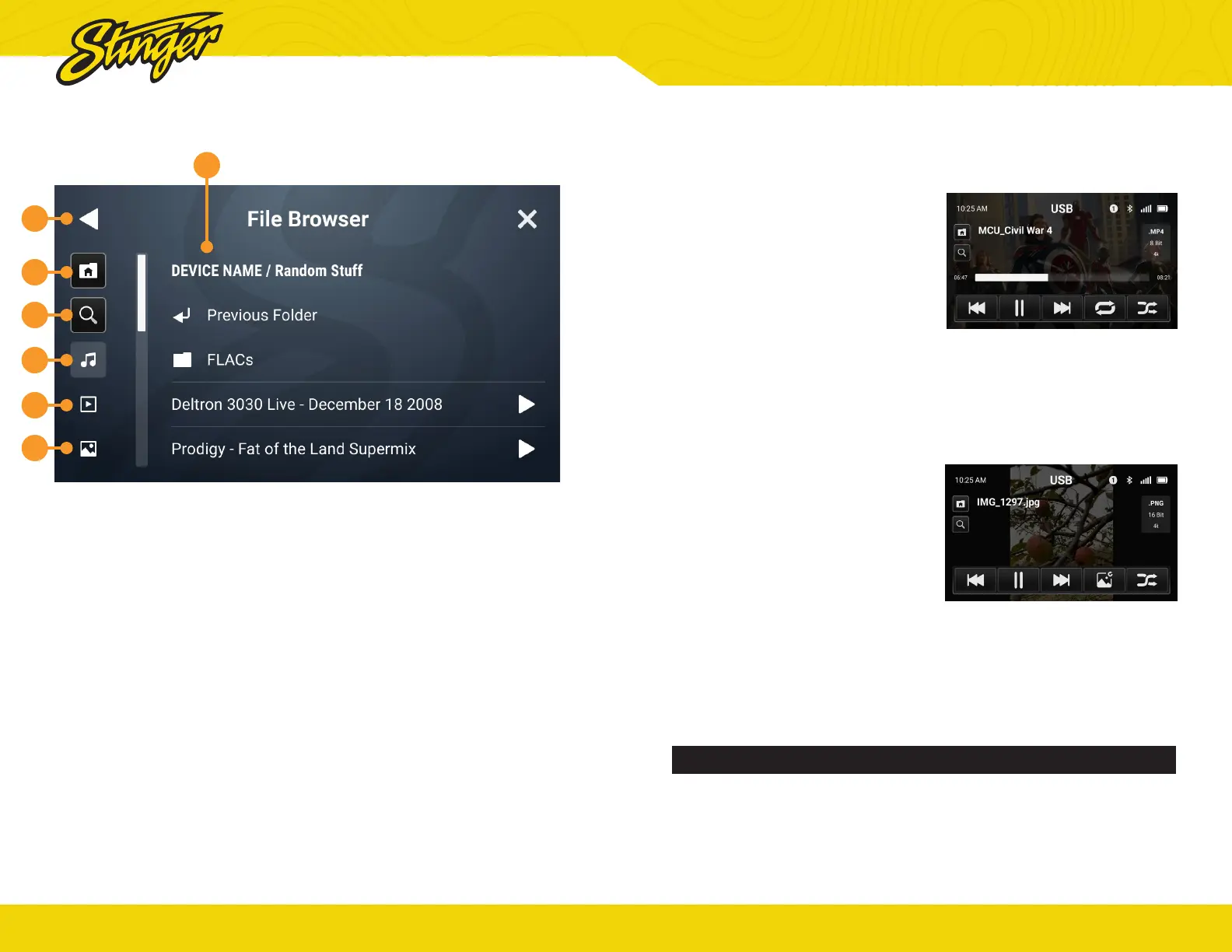
1. Photos
Touch to view stored Photo Content..
2. Video
Touch to view stored Video content.
3. Music
Touch to access stored Music content.
4. Search
Touch to search for a specic le by
name
5. Home Folder
Tap to return to main le browser.
6. Previous Folder
This will return user to preveously
accessed folder.
7. Breadcrumb / Path
Only one lter can be active at a time.
USB MEDIA
1
2
3
4
5
6
7
®
stingersolutions.com
21
USB VIDEO PLAYBACK
When playing a USB video le, the
application controls will auto-hide.
To access the application controls,
touch anywhere on the screen.
USB PHOTO VIEWING
When viewing USB images, the
application controls will auto-hide.
To access the application controls,
touch anywhere on the screen.
WARNING!
Driver is prohibited by law from viewing a video signal on any in-dash monitor while
the vehicle is in motion.


 To Next Page