®
stingersolutions.com
6
GETTING STARTED
POWER UP!
With vehicle ignition in the ON or ACC
position, the radio will automatically
power on.
The source will automatically default
to the last source used prior to
powering down your IE268.
You can adjust the audio volume at
start-up in Audio Settings on page
43.
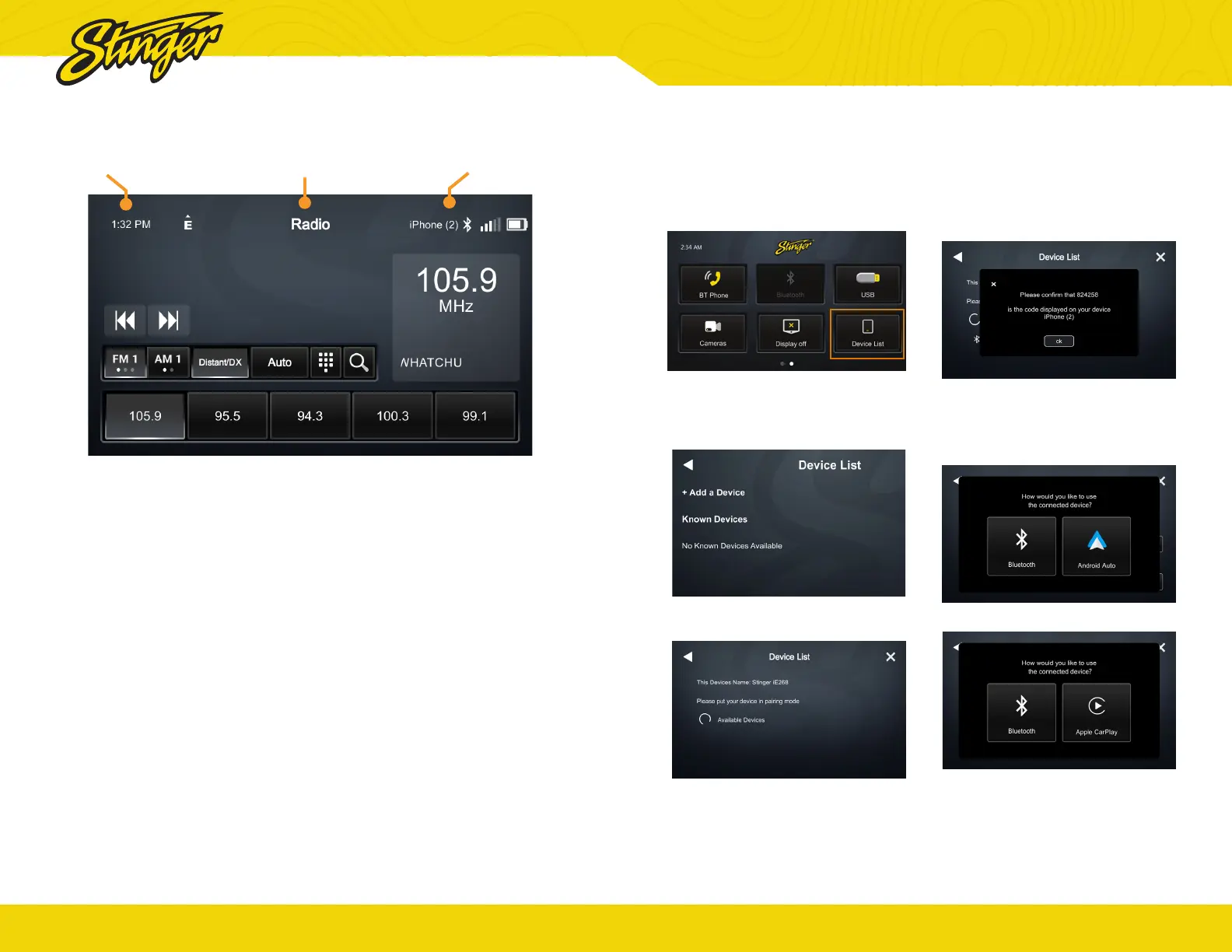
The Information Bar is located at
the top of the screen. Depending
on the SOURCE, it will provide
information or content sensitive
controls. Also, displays time, phone
info and Andoid Auto or Carplay
connection status.
To select a SOURCE, press the
HOME button. Sources that are not
currently available are grayed out.
Display Off
Press Home Button > Swipe left >
Display Off to turn off your iE268.
You can also short press the Power
button on the face to power off
display.
This is useful at night to prevent
eye fatigue
Tap anywhere on the screen to turn
the display back on.
Clock
Source / Info
Connected Devices
®
stingersolutions.com
7
If your device does not appear in the
device list, conrm it is discoverable
and tap Available Devices to rescan.
4. Conrm PIN Code on the head
unit screen and the device.
5. Select the connection type
you want to use with your device
(bluetooth / phone projection).
If you choose phone projection,
your phone projection application
will launch automatically.
GET CONNECTED
1.
Swipe left on the homescreen
and tap Device List.
2. Make sure your device is in
pairing mode and tap +Add a
Device.
3. Select your device from the list.


 To Next Page