®
stingersolutions.com
18
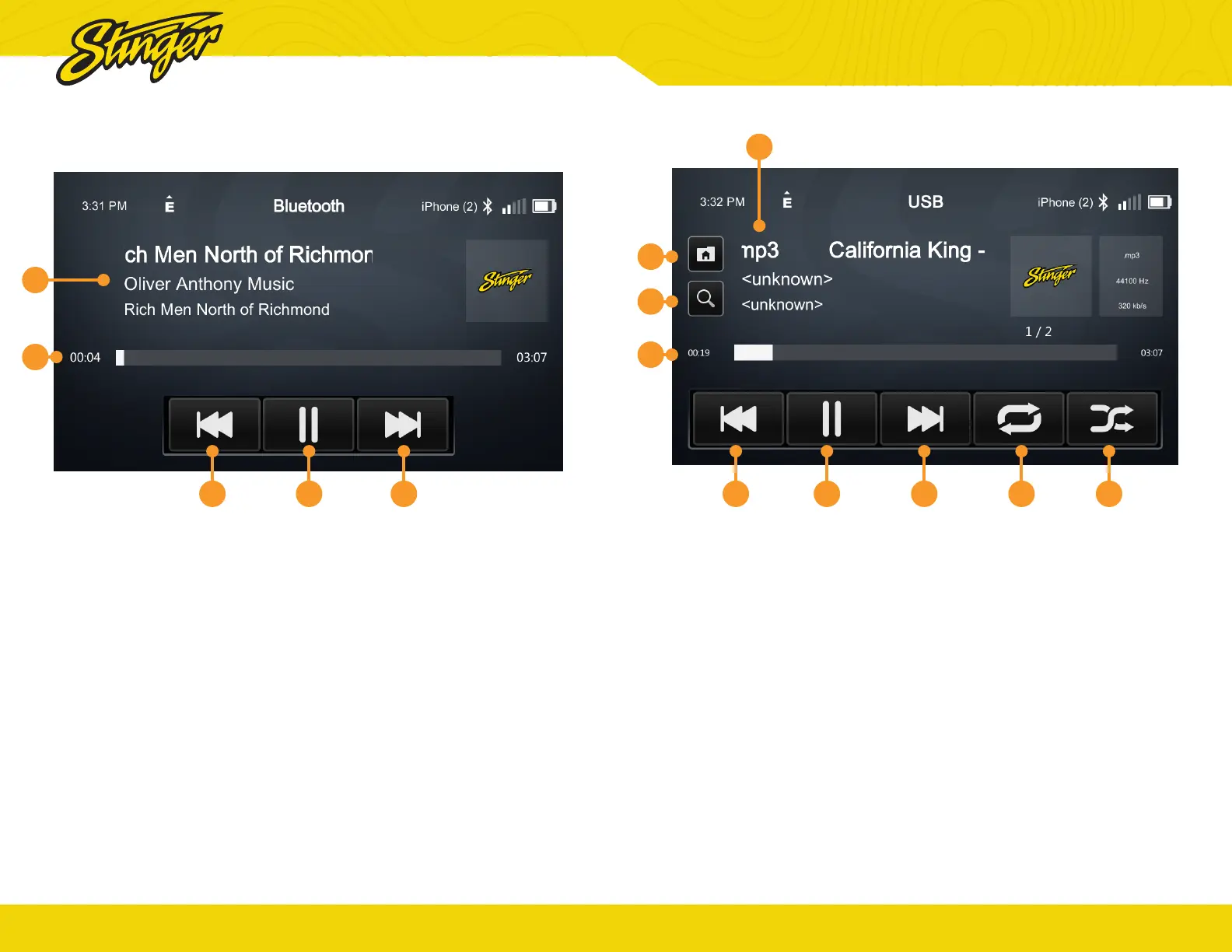
Press the HOME BUTTON > BT Music to select the Bluetooth Music source.
1. Playback Progress Indicator
Shows progress in current track.
2. Song / Program Information
Displays information for the current
track.
3. Previous Track/Program
Touch to play the previous track
or program.
4. Play/Pause
Touch to play or pause audio
playback.
5. Next Track/Program
Touch to advance to the next track
or program.
BLUETOOTH MUSIC
3 4 5
1
2
®
stingersolutions.com
19
Press the HOME BUTTON > USB Media to select the USB Media source.
1. Playback Progress Indicator
Shows progress in current file,
touch anywhere on the bar to
immediately navigate to that
segment of the le.
2. Song / Program Information
4. Previous File
Touch to play the previous le that
is the same media type.
5. Play/Pause
Touch to play or pause playback
6. Next File
Touch to playback to the next le
that is the same media type.
7. Toggle Randomize Modes
8. Toggle Replay Modes
9. File Browser
From the USB Root Menu you can
browse Audio, Video, and Image
les.
Touch to select a le to view/play.
10. Search for File
USB MEDIA
4 5 6 8 7
1
9
10
2


 To Next Page