®
stingersolutions.com
24
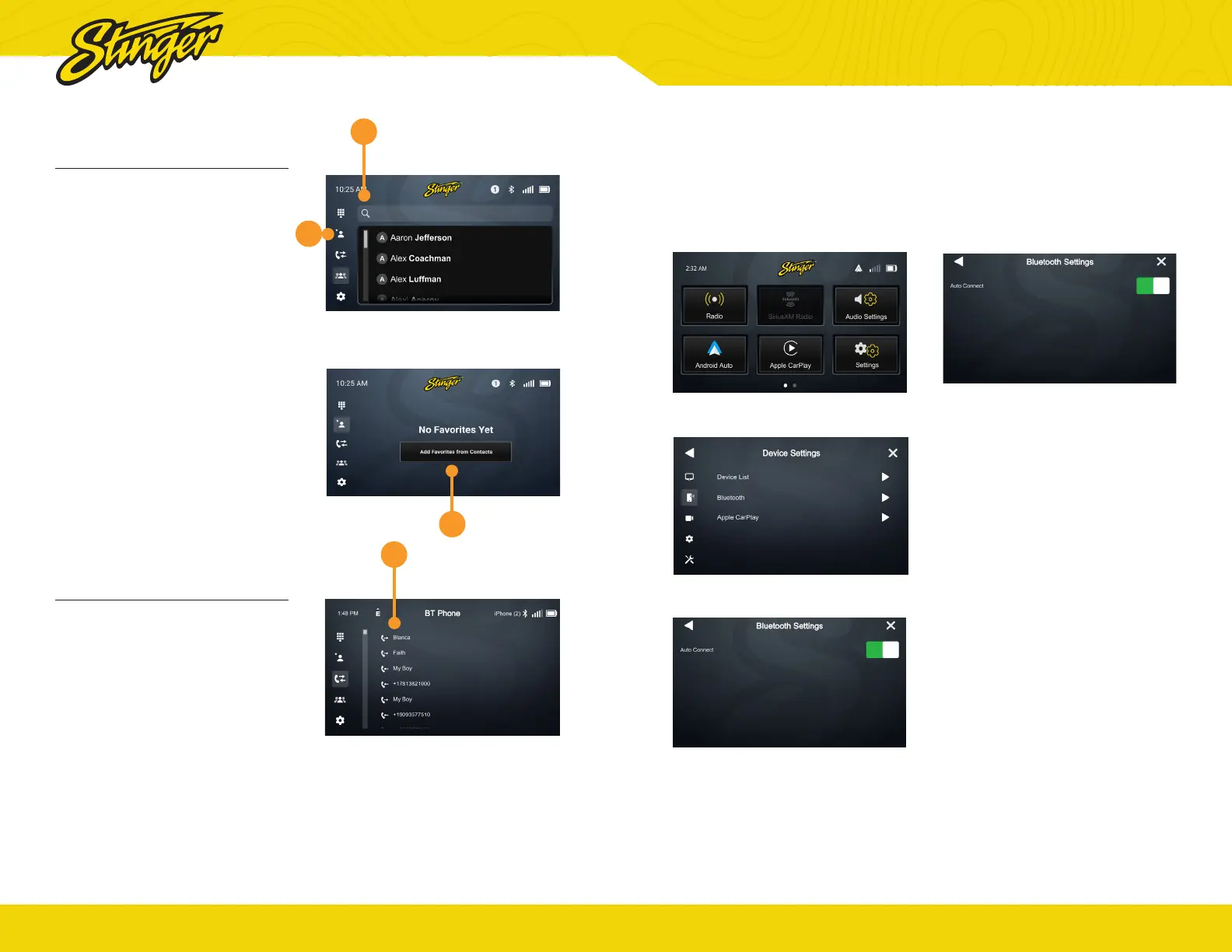
Contacts
While a device is paired, Contacts
can be accessed by selecting
Contacts from the Phone main
menu. It may take several minutes
to load all contacts. When a
contact is selected from the list, all
associated numbers (Home/Work/
Mobile, etc.) will be displayed on the
right side of the screen. Touch the
number you want to dial.
1. Favorites
The Favorites list can be accessed
from the Phone main menu.
2. Setting Favorites
To add a contact number to
the Favorites list, touch the Add
Favorites from Contacts button.
3. Search Contacts
To Search your contact list, select
the SEARCH icon on the Phone
Selector area.
Call Log
The Call Log lists recently dialed,
received, and missed calls.
1. Dialing a Number From Call Log
Tap the contact or phone number
to dial a number.
3
1
2
1
®
stingersolutions.com
25
4. You can disable this feature by
toggling Autoconnect OFF
Adjusting Autoconnect
1. Start by clicking on the setting
icon from the IE268 home screen.
2. Select the Device Setting icon in
settings menu.
3. Tap the arrow icon to the right
of Bluetooth.
Autoconnect Settings


 To Next Page