®
stingersolutions.com
28
SYSTEM SETTINGS
Press the HOME BUTTON > Settings to access the IE268 Head Unit Settings.
1. DISPLAY OPTIONS
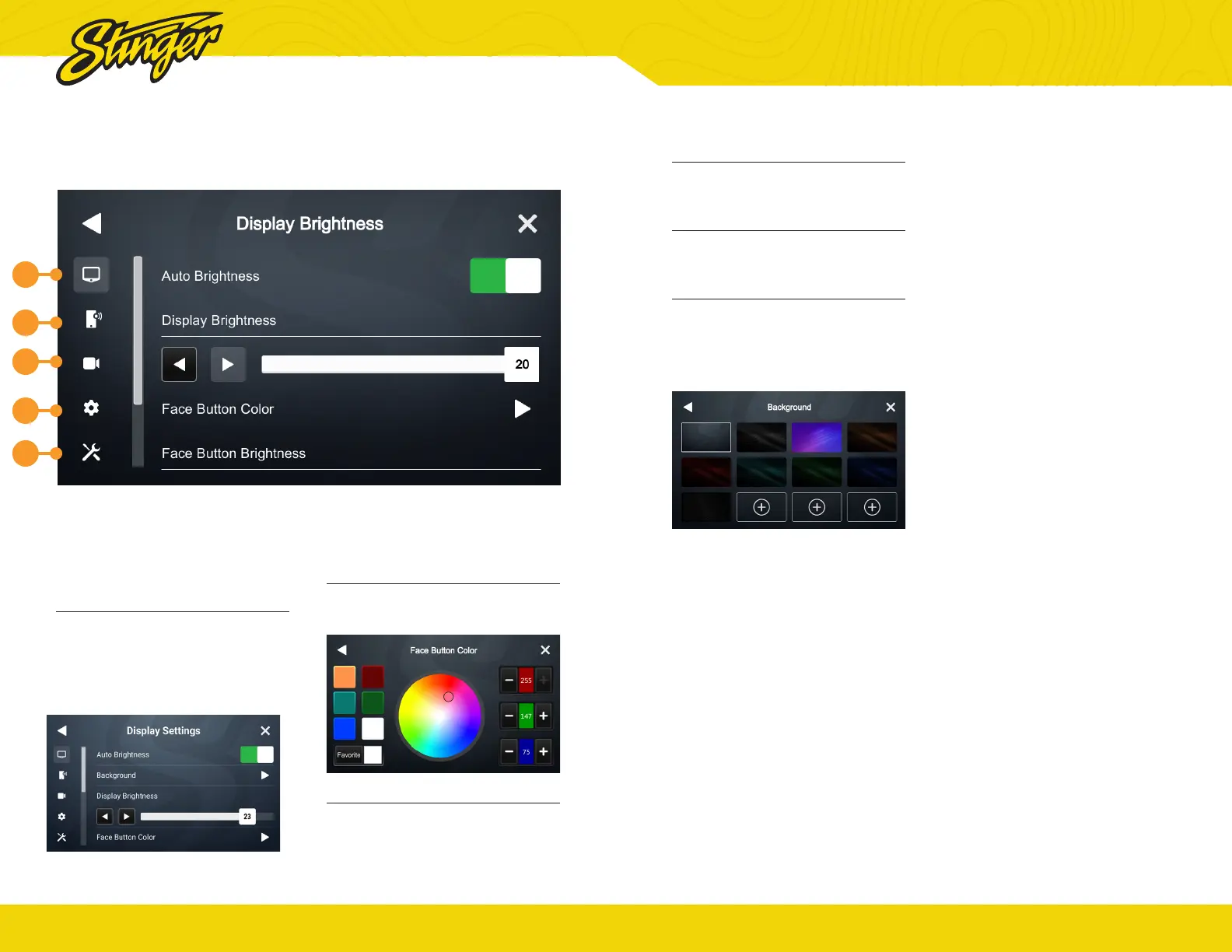
Auto Brightness
Your IE268 unit can adjust
brightness to suit external
conditions. Toggle on/off. Only
works if illumination wire is
connected.
Display Brightness
Adjust overall display brightness
with arrows or the slider control.
Face Button Color
Select the face button color you
like and hold “Favorite” to save that
color.
1
2
3
5
4
®
stingersolutions.com
29
Face Button Brightness
Adjust face button brightness with
arrows or the slider control.
System Highlights
Change the highlight colors for
active buttons & system controls.
Background
You can select from one of nine
available backgrounds or upload
one of your own.
Make sure a thumb drive with a
compatible image (1024 x 600 Jpg/
Png) is inserted into an available
USB port.
Tap one of the available + Buttons
and a pop up menu showing
available images will appear.
Select the desired background
and tap ADD


 To Next Page