45 MA_VEB100-2-4-5_A5-3_230123_en.doc
- When you have finished changing the parameter, you can exit the parameter by
pressing the OK button again and call up the next
category/subcategory/parameter by pressing the B +/- and D +/- buttons.
- When you have finished programming the parameters, you must exit the
technician level by pressing the P key so that the changed values are saved!
Ready" appears in the display.
- The machine is now ready for use!
4.3.2 Speed
- Select parameter t 08 00 with keys "B and D" and confirm with "OK".
- Use the keys A - D to enter the desired speed.
- VEB100-2 = 1800 rpm.
- Confirm with "OK".
4.3.3 Direction of motor rotation
1 = clockwise rotation
2 = counterclockwise rotation
- Select parameter t 08 05 with keys "B and D" and confirm with "OK".
- Select "1" for clockwise rotation.
4.3.4 Softstart
- Select parameter t 05 00 with keys "B and D" and confirm with "OK".
- Enter the value 200rpm and confirm with "OK".
- Select parameter t 05 01 and confirm with "OK".
- Set the value for soft start stitches 1 - 99 and confirm with "OK".
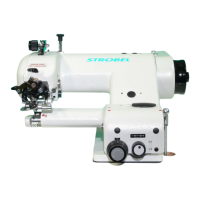
Fig. 27
Light at no. 1 is on, soft
start is active. Number of
softstart stitches can be set
with t 05 01.
2 stitches are the basic
setting.
Light at no. 1 is off,
softstart is deactivated.



 To Next Page