23
English
6. Operation
6.2 System Setting
➊
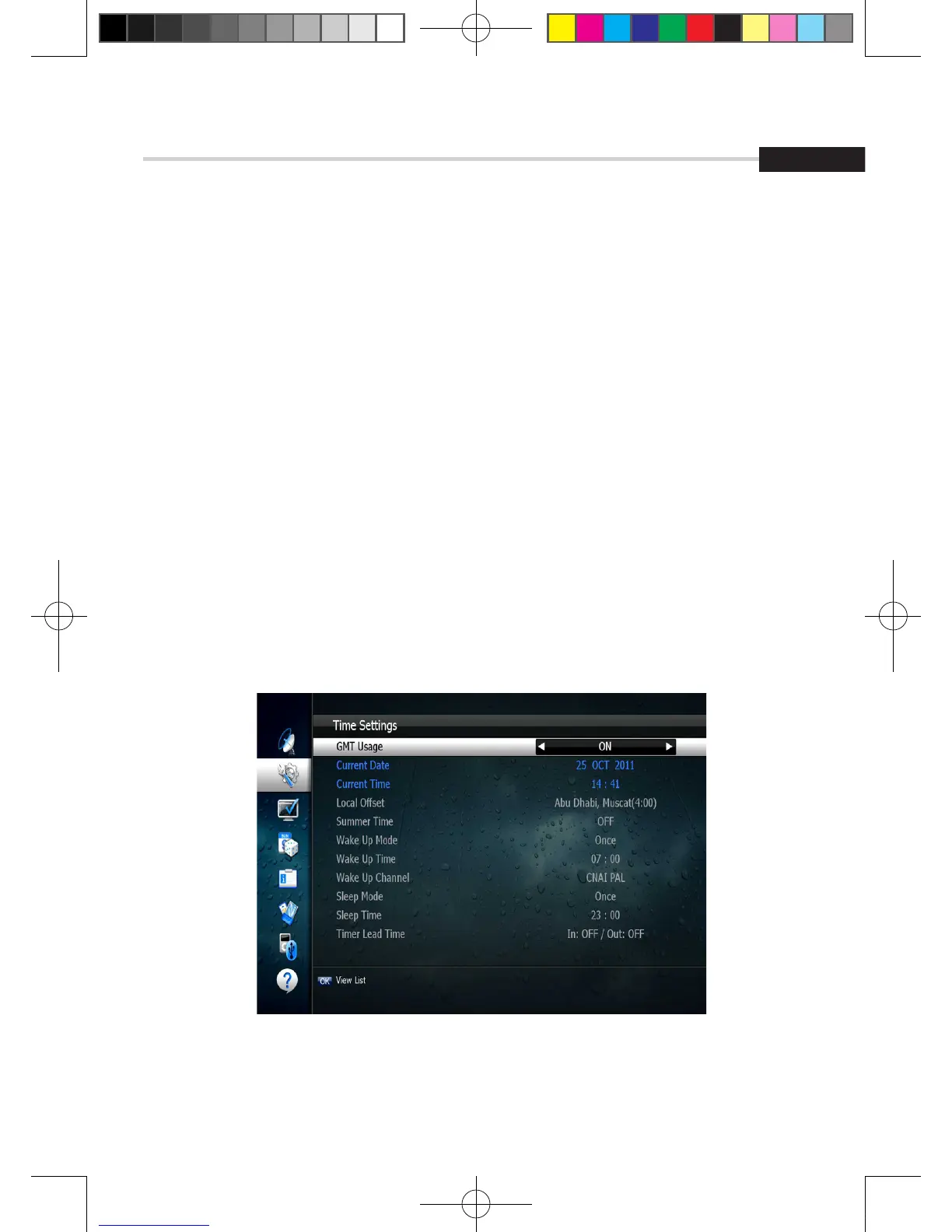
Time Settings
This submenu allows you to set your local time, wake up time, wake up channel and sleep time.
< Figure 6.2.1>
▪ GMT Usage: Set this ON for the local time to be determined by adjusting the time
difference with the GMT (Greenwich Meantime) according to your location.
▪ Current Date: If GMT Usage is OFF, you can modify the date by pressing OK.
▪ Current Time: If GMT Usage is OFF, you can modify the time using the NUMERIC buttons.
▪ Summer Time: Select the period during which Summer Time is in force.
▪ Local Offset: If GMT Usage is ON, Local time is GMT time + Local Offset.
▪ Wake Up Mode: Select the wake up frequency. (Off/Once/Daily/Mon~Fri)
▪ Wake Up Time: Set the wake up time using the NUMERIC buttons.
▪ Wake Up Channel: Press OK to set the wake up channel.
▪ Sleep Mode: Select the Sleep frequency. (Off/Once/Daily/Mon~Fri)
▪ Sleep Time: Set the sleep time using the NUMERIC buttons.
▪ Timer Lead Time: Press OK to set the Timer Lead In And Lead Out Time.
Figure 6.2.1
[2013.01.04]SRT4922A 매뉴얼_english_AUS.indd 23 2013-01-04 오후 4:49:50



 To Next Page