16
6. Operation
6.1
Getting Started
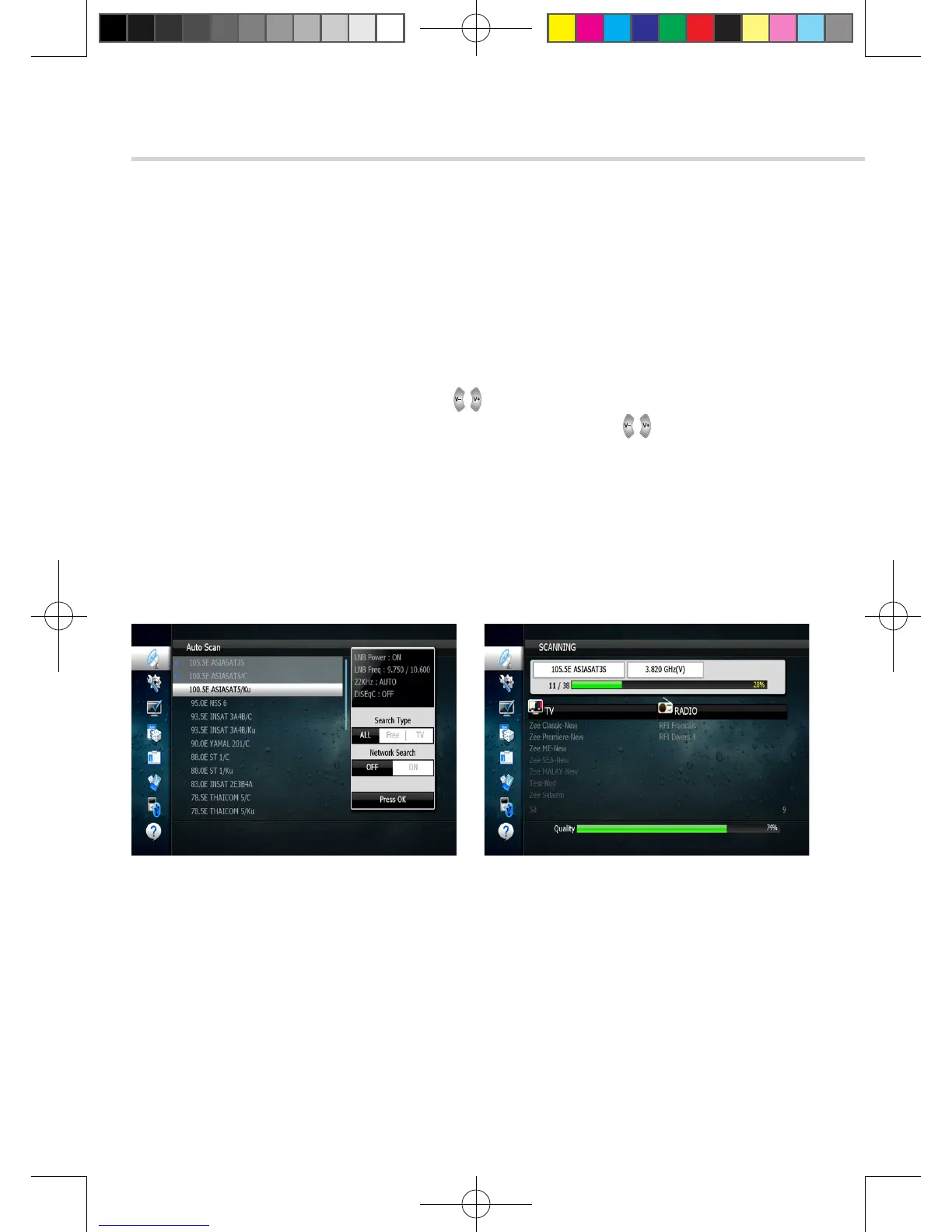
Figure 6.1.8 Figure 6.1.9
➌
Satellite Scan
Through this function, the receiver searches for all the available channels and saves them in
memory.
▣ Auto Scan <Figure 6.1.8>
1. Select the satellites you want to search by pressing the OK button on the remote.
You can select more satellites by pressing the button and OK button on the remote.
▪ Search Type: Select the type of channel search you want by presssing buttons on the remote.
▫ All: To search all the Free To Air and scrambled channels, TV & Radio channels.
▫ Free: To search Free To Air channels only.
▫ TV: To search TV channels only.
▪ Network Search: Select Network Search ON/OFF to find more transponders through NIT Search.
▪ Scan: Begin channel search of the selected satellite.
2. Press OK under ‘SCAN’ to scan the selected satellites. <Figure 6.1.9>
[2013.01.04]SRT4922A 매뉴얼_english_AUS.indd 16 2013-01-04 오후 4:49:47



 To Next Page