STRONG HD STB User’s Manual
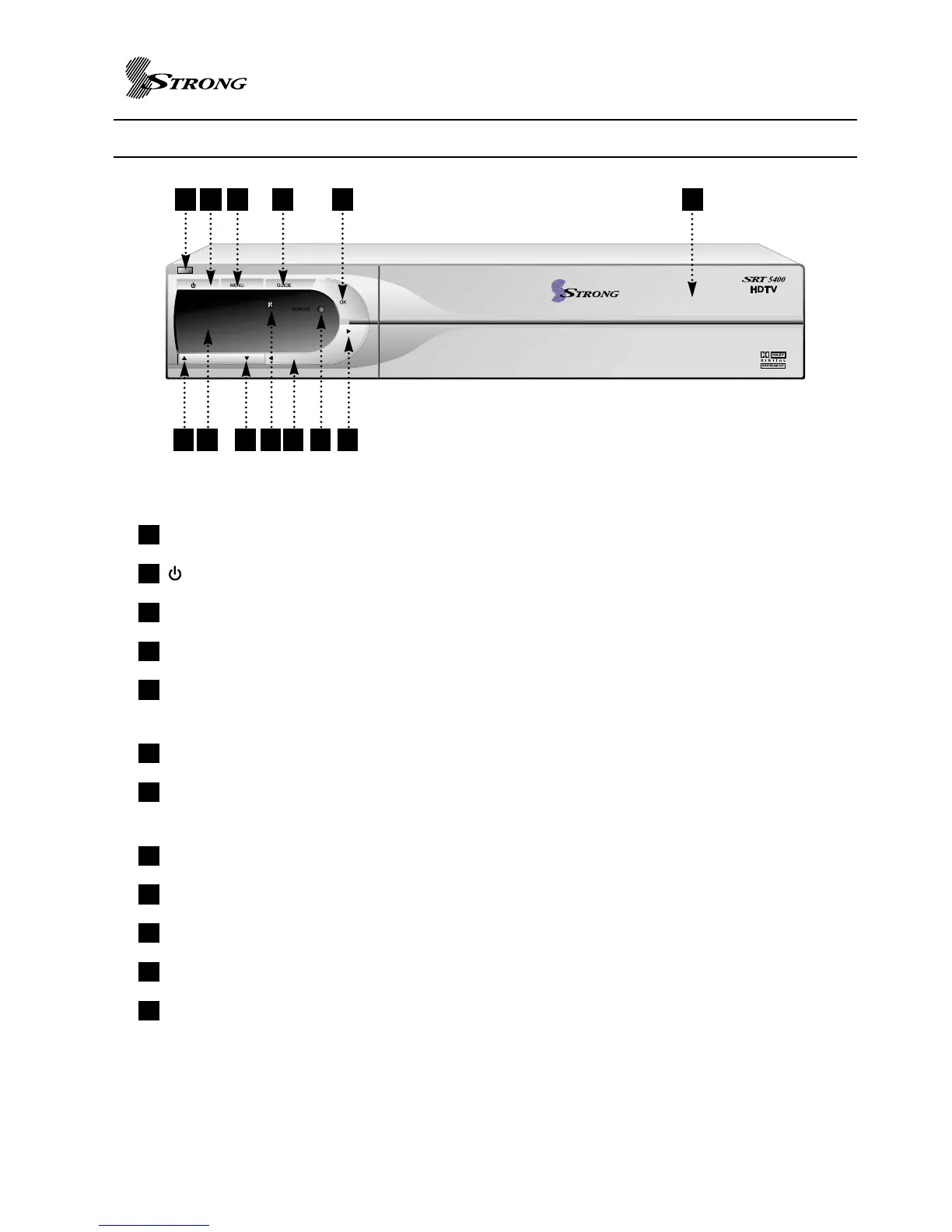
FRONT PANEL VIEW
4
Standby LED : Standby mode LED
: Turn on/off power.
MENU : To access the main menu or to go back upper level.
GUIDE : To view program information
OK : Used to select item and complete numeric value entry or modify values in the menu
entry.
CH UP : Move cursor up from set up menu or channel up.
Digit LED display : This will display the current channel or certain programming functions
when using the menus.
CH DOWN : Move cursor down from set up menu or channel down.
IR : Infrared remote control sensor.
VOL UP : Volume ‘up’ adjustment
LAMP : Light on power on mode.
VOL DOWN : Volume ‘down’ adjustment
Front Panel buttons and menu allow for control of the SRT 5400 without the remote control unit
except the function of FAVORITES, INFO and some advanced features.
12
11
10
9
8
7
6
5
4
3
2
1
6 87 9 10
1211
12
1 2 3 4 5



 To Next Page