STRONG HD STB User’s Manual
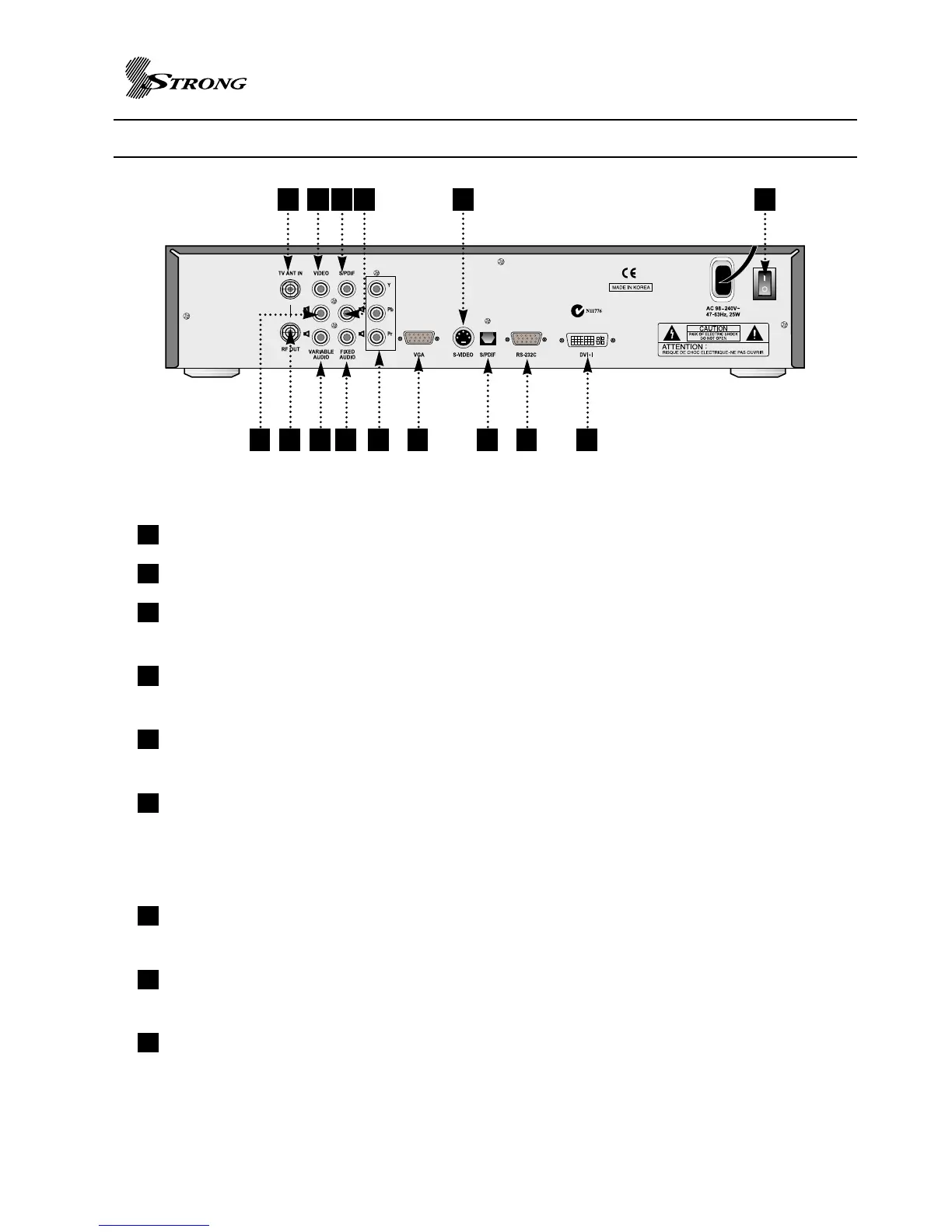
REAR PANEL VIEW
5
TV ANT IN : RF input for connecting the STB to a terrestrial antenna using a coaxial cable.
RF Out : To Connect to another set top box or recording device e. g. VCR / TV.
VIDEO (YELLOW) : Composite video jack for connecting the STB to your television using
standard RCA cable.
Variable Audio - L (WHITE) : Left RCA audio jack for connecting the STB to your television
audio input using standard RCA cable.
Variable Audio - R (RED) : Right RCA audio jack for connecting the STB to your television
audio input using standard RCA cable.
S/PDIF COAXIAL : Digital audio output for connecting the STB to your AV receiver or Dolby
Digital decoder using digital coaxial cable. Set this output to AC-3 Dolby
Digital or Stereo PCM in the STB setup menu or by the SAP button on
the remote control.
FIXED Audio - R (RED) : Right RCA audio jack for connecting the STB to your VCR audio
input using standard RCA cable.
FIXED Audio - L (WHITE) : Left RCA audio jack for connecting the STB to your VCR audio
input using standard RCA cable.
YPbPr OUT(Component) : Component RCA video jacks for connecting the STB to your
television using coaxial cables.
9
8
7
6
5
4
3
2
1
4 52 7 9
14131210
15
6 831 11



 To Next Page