STRONG HD STB User’s Manual
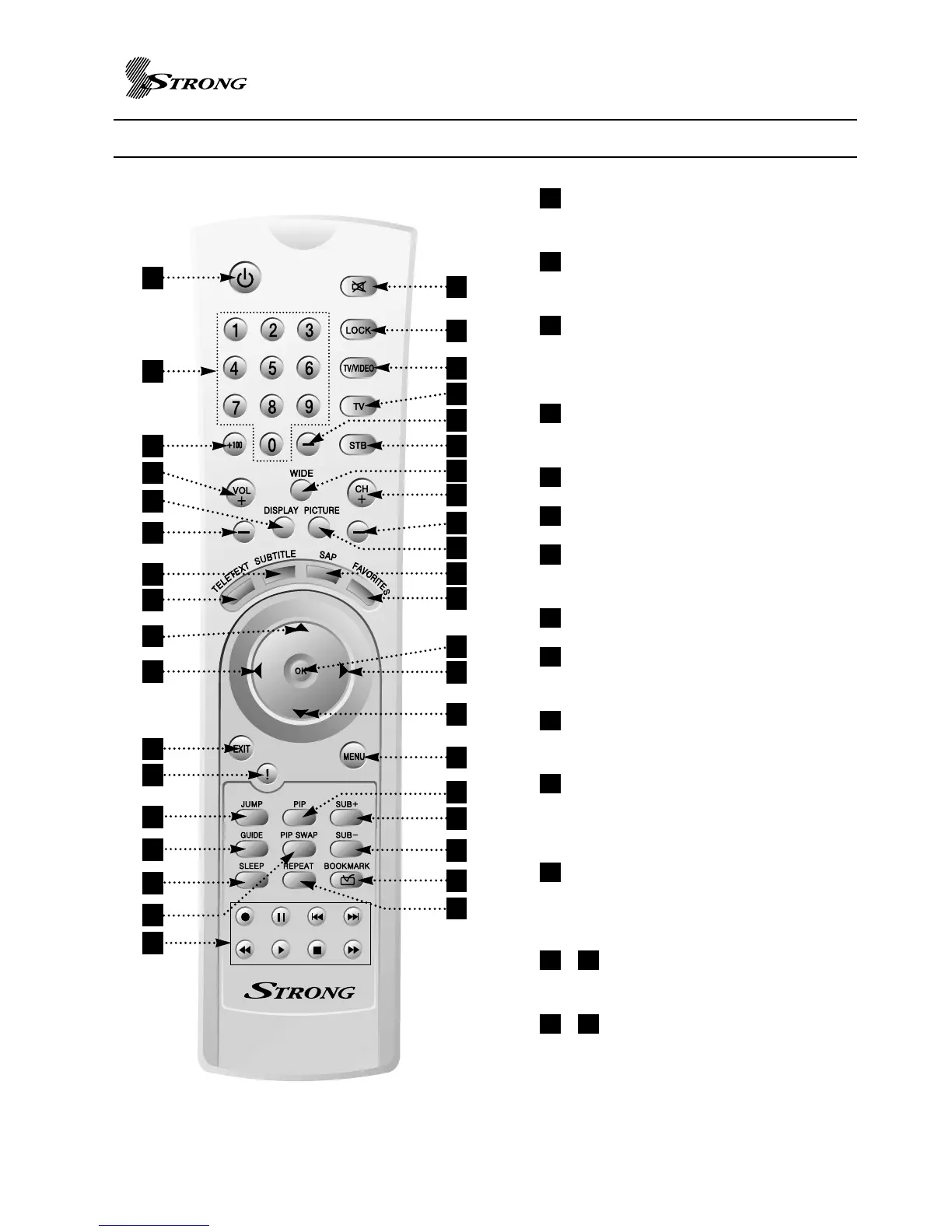
REMOTE CONTROL BUTTONS
7
1
2
4
6
7
8
9
14
16
12
20
22
25
26
29
30
34
36
38
18
3
5
13
15
19
17
21
23
28
27
31
33
35
32
37
POWER : Switch the STB between
operation and standby mode.
MUTE : Turns the audio on and off.
Line L, R output is not affected.
0 ~ 9 : Used to select channel
directly or set setup values like
password.
LOCK : Used to turn on/off –
Channel Lock.
+100 : Not Used
TV/VIDEO : Not Used
TV : Switch remote control unit to
television control mode.
dash button (-) : Not Used
STB : Switch remote control unit to
STB control mode.
WIDE : Aspect Ratio selection of
16:9 and 4:3
DISPLAY : Used to select
1080i/720p/576p/576i video mode
directly.
PICTURE : Zoom mode selection
including preview mode on picture
view (not for Composite or S-Video)
/ VOL + / VOL- : Used to volume
up and down.
/ CH +/CH- : Service up to down
through the available services.
1614
1513
12
11
10
9
8
7
6
5
4
3
2
1
11
10
24



 To Next Page