11
EVAPORATOR COIL FAN DISCHARGE / TXV (THERMOSTATIC EXPANSION VALVE)
1. Evaporator Coil Fan Discharge
• When Main Power Switch is turned on,
refrigeration assembly will energize (see
CASE START-UP & REFRIGERATION
ASSEMBLY ACCESS section).
• Evaporator coil fans should turn on.
From inside of the case, check for
discharge air from front baffle to confirm
that the fans are functioning properly.
• When the case is in a start up mode or
has been idle for a long period of time,
the unit will require 75 minutes of run
time to pull-down temperature.
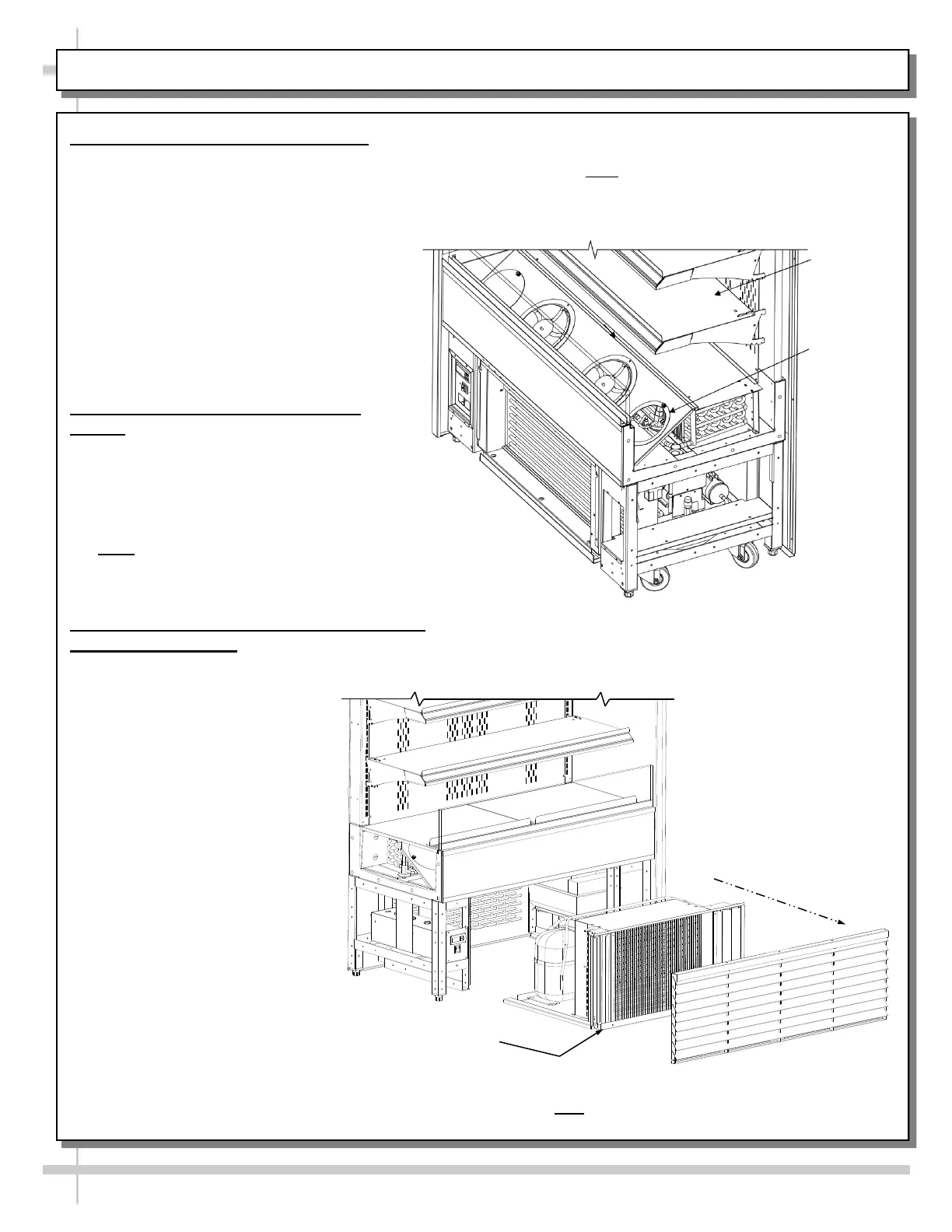
• See below illustration.
2. TXV (Thermostatic Expansion
Valve)
• TXV is under TXV access panel.
• Decking must be removed for access.
• TXV cover must also be removed for
access (remove two thumb screws).
• See illustration below.
• Note: Standard cases have TXV at
customer-left. For cases with
EnergyWise, TXV is at customer-right.
3. Sliding Condenser Package Out From
Underside Of Case
• At shipment, removal of compressor pan
shipment screws may be necessary to access
condenser package. See
illustration below-left.
• Refrigeration assembly base
rests on plastic glides.
• Slide condenser package out
from under case.
Case Shown with End Panel, Decking, and TXV
Cover Removed. Note: Illustration Above Has
TXV at Customer Right. Your Case (If Standard /
Non-EnergyWise Refrigeration Package) Will
Have TXV Accessible at Customer-Left.
Decking
TXV Cover
(Shown
Removed)
Compressor Pan
Shipment Screw
Above View Shows Condenser Package Slid Out From
Under Case. Note: Illustration Shown May Not Reflect
Every Feature Or Option of Your Particular Case.









 To Next Page