27
WARNING! TURN OFF CASE BEFORE PERFORMING PREVENTIVE MAINTENANCE!
QUARTERLY PREVENTIVE MAINTENANCE INSTRUCTIONS
Tub, Coil, Drain, Fan Blades, Motors, Brackets:
Caution! Do Not Clean or Perform Service On Unit While It Is Energized!
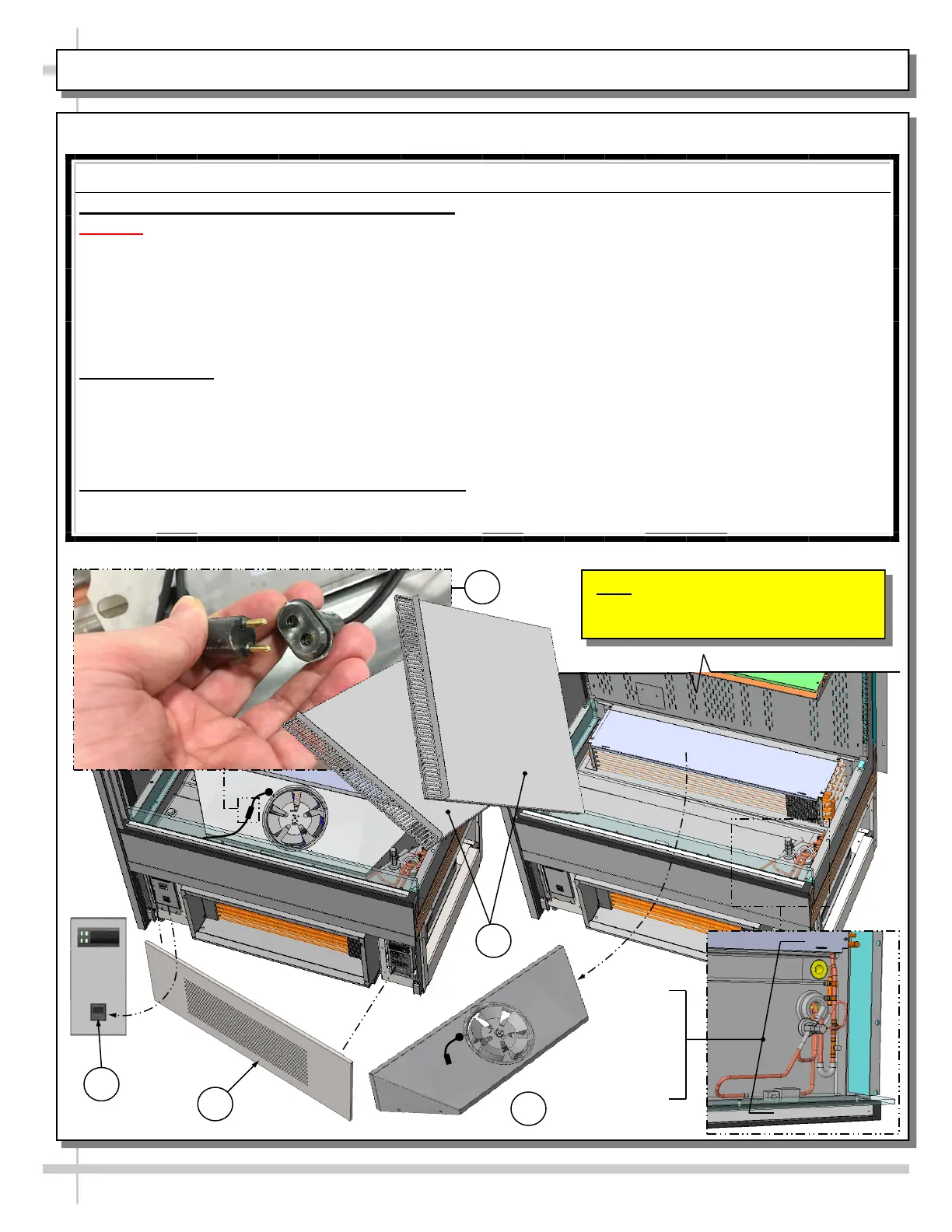
1. Remove front panel (to access controls). No screw removal is required. Place in safe place away from
foot traffic.
2. Turn off main power switch (located near Carel® Temperature Controller).
3. Remove both deck pans/sub-deck. Place in safe place away from foot traffic.
4. Remove electrical tape (if any) and disconnect power cord that energized fan panel.
5. Grasp underside of fan shroud assembly (above trough). Lift upward and away from case. Place in
safe place away from foot traffic.
Cleaning Process:
• Use vacuum to remove excessive residue AND to remove dust in coil.
• Use clean cloth and/or nylon brush with warm water and mild soap solution to clean tub, drain, trough,
TXV, lines, solenoid, coil & coil tubes. See enlarged view of components to be cleaned (lower-right).
• Remove debris that may clog drain.
• Wipe down fan blades, motors and brackets with moist cloth.
Returning Components / Restoring Power To Case:
• Replace/reconnect components in reverse order they were removed or disconnected.
• Turn main power switch back on. Check that fans are operational.
PREVENTIVE MAINTENANCE - TO BE PERFORMED BY TRAINED SERVICE PROVIDERS ONLY - 1 of 5
Note: Model B4732 (Unit Shown) May
Not Exactly Reflect Every Feature or
Option of Your Particular Case.
2
1
4
3
5
Enlarged
View Of
Components
To Be
Cleaned









 To Next Page