EasyManua.ls Logo

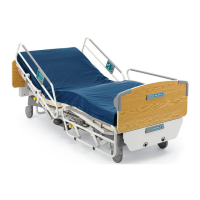
Stryker FL28C - Service Manual

Stryker FL28C
58 pages
Print Icon
To Next Page IconTo Next Page
Loading...
TECHNICAL ASSISTANCE AND PARTS
Canada: 1 888 233-6888
United States: 1 800 327 0770
Outside Canada and the United States: Contact your local representative
Manufactured by Stryker
72-1079E MM FL28C REV A February 2009
F15-44-B Printed in Canada
MAINTENANCE MANUAL
ELECTRIC MED/SURG BED
Model FL28C

Table of Contents

Other manuals for Stryker FL28C

Questions and Answers

  • J
    Jeff SantosAug 19, 2025
    Why does the Stryker FL28C Medical Equipment scale display OVERLOAD or show incorrect weight?
    • T
      Thomas WilsonAug 20, 2025
      The scale might display 'OVERLOAD' or an incorrect weight because the weight on the bed exceeds its 500 lb (227 kg) capacity. If the patient exceeds this weight, do not use the scale. If the patient's weight is within the limit, zero the scale after removing the patient. This issue can also occur if equipment was added to the bed without using the proper add/remove equipment procedure. Also, check if one or more load cell cables are not properly connected or completely disconnected from the scale control board.
  • S
    Stephanie KaneAug 21, 2025
    What to do if Stryker FL28C has no power to bed?
    • R
      rhondamcintoshAug 22, 2025
      First, verify the power cord is securely connected to both the power connector and the wall outlet. Next, ensure the bed power switch, located at the head end of the bed, is turned on. Inspect the power cord for any damage and replace it if necessary. Check the two fuses inside the power connector to ensure they are operational. Finally, confirm that the wall outlet is providing power.
  • C
    Carl JohnsonAug 25, 2025
    What to do if Stryker Medical Equipment scale display (optional) does not turn on when the scale is activated?
    • P
      Phillip TravisAug 25, 2025
      Try pressing the ENTER key twice. If that doesn't work, turn the main power switch off and then back on. Also, lift the foot board and gently replace it, ensuring it's completely pushed down so the connectors align correctly. Check the points of the “No power to bed” problem. Finally, ensure the scale user interface cable is properly connected to the scale control board (J6 connector).
  • R
    rwoodAug 26, 2025
    What to do if Stryker Medical Equipment bed exit system (optional) does not work at all or alarm goes off when bed exit is activated?
    • E
      Edward ParkerAug 26, 2025
      First, check the points of the “No power to bed” problem. Also, verify that one or more load cell cables are properly connected to the scale control board.
  • N
    Nicole KellyAug 28, 2025
    What to do if Stryker FL28C Medical Equipment nurse call (optional) or bed exit (optional) signal does not reach the nurse desk?
    • H
      haliAug 28, 2025
      Check the points of the “No power to bed” problem. Verify the connecting cable and the wall outlet.
  • G
    gailphillipsAug 30, 2025
    What to do if Stryker FL28C Medical Equipment has no bed up or down motion when the siderail or foot board command is used?
    • P
      Patrick HughesAug 30, 2025
      First, check if the total lockout is activated (indicated by an illuminated LED padlock icon) and deactivate it if it is. Verify the siderail control panel cable is properly connected to the bed receptacle under the mattress support. Also, check the points of the “No power to bed” problem.
  • K
    Krystal HarperSep 1, 2025
    What to do if Stryker FL28C Medical Equipment has no fowler up or down motion when the siderail or foot board command is used?
    • M
      Matthew GlassSep 1, 2025
      Check if the Fowler lockout is activated (LED padlock on) and deactivate it. Also, check if the total lockout is activated (LED padlock on) and deactivate it. Ensure the siderail control panel cable is properly connected to the bed connector under the mattress support. Finally, check the points of the “No power to bed” problem.
  • J
    Jamie BaileySep 3, 2025
    What to do if Stryker Medical Equipment has no Knee Gatch up or down motion when the siderail or foot board command is used?
    • C
      Carla KingSep 3, 2025
      Ensure that the Knee Gatch lockout is not activated (LED padlock on); if it is, deactivate it. Also, check if the total lockout is activated (LED padlock on) and deactivate it if necessary. Verify that the cable of the siderail control panel is properly connected to the bed connector under the mattress support. Finally, check the points of the “No power to bed” problem.
  • J
    jacksonjenniferSep 6, 2025
    What to do if Stryker FL28C Medical Equipment fowler does not fully raise?
    • J
      Justin KempSep 6, 2025
      This can occur if the CPR handle was used to partially lower the Fowler. To fix this, completely lower the Fowler using either the CPR handle or the Fowler down control. This will allow the Fowler motor to reset itself.
  • D
    daughertymelissaSep 8, 2025
    What to do if Stryker Medical Equipment bed exit system (optional) does not operate properly?
    • C
      Corey PottsSep 8, 2025
      Verify that the load cell cables are properly connected to the scale control board.

Summary

Introduction and Safety Information

Specifications and Technical Support

Bed specifications, contact info for technical assistance, and warnings.

Safety Precautions and Symbols

Static discharge precautions, warning/caution definitions, and symbol meanings.

Warranty and Service Procedures

Details warranty coverage and steps to obtain service or order parts.

Preventative Maintenance Procedures

Cleaning, Lubrication, and General Care

Instructions for bed cleaning, mattress care, and component lubrication.

Annual Maintenance Checklist and Spare Parts

Annual inspection checklist and list of recommended spare parts for the FL28C bed.

Troubleshooting Guide

Diagnosing and Resolving Bed Malfunctions

Guide to identify and fix common bed operational problems, listing symptoms and checks.

Maintenance Procedures: Siderails and Foot Board

Siderail Assembly and Rail Replacements

Step-by-step guides for replacing siderail assemblies, rails, and mechanisms.

Siderail Membrane and Foot Board Service

Procedures for replacing siderail membranes, speakerphone, and foot end control panel.

Maintenance Procedures: Mattress Support and Actuators

Mattress Support Section Replacements

Detailed procedures for replacing foot, thigh, seat, and head sections of the mattress support.

Actuator Replacements and Adjustments

Guides for replacing Fowler, Knee Gatch, and Hi-Lo actuators, including critical adjustments.

Maintenance Procedures: Electronics and Scale

Control Board and Power Component Replacements

Procedures for replacing motor control, nurse call, and power-related electronic components.

Scale System Component Service

Instructions for replacing scale control board, bed exit buzzer, toroidal transformer, and load cells.

Scale System Calibration

Verifying and Calibrating Scale Accuracy

Detailed instructions for checking scale accuracy and performing the full calibration process.

Maintenance Procedures: Functional Components

Auto Contour and CPR Switch Replacements

Procedures for replacing auto contour and CPR micro switches to ensure proper functionality.

CPR Activation Cable and Pneumatic Cylinder Service

Guides for replacing CPR activation cables and pneumatic cylinders for emergency features.

Base System Maintenance Procedures

Pedals, Wheels, and Caster Replacements

Procedures for replacing base components like pedals, steer wheel casters, and bed casters.

Brake Rod Replacement

Steps for replacing the brake rod, including testing the brakes post-replacement.

Appendices

Circuit Diagrams

Electrical circuit diagrams for motor control, power supply, communication, and scale systems.

Error Code Interpretation

Explanation of scale system error codes and troubleshooting guidance for persistent issues.

Stryker FL28C Specifications

General IconGeneral
BrandStryker
ModelFL28C
CategoryMedical Equipment
LanguageEnglish

Related product manuals