33
English
Diving with microbubble (MB) levels
F
NOTE:
Whereas the quantitative information relative to L0 can be seen by pressing the right button,
qualitative information is always visible on the display in form of the nitrogen loading bar. In
particular, when the L0 no-stop time is less than three minutes, the nitrogen bar will flash. This
will help you avoid entering inadvertently into decompression.
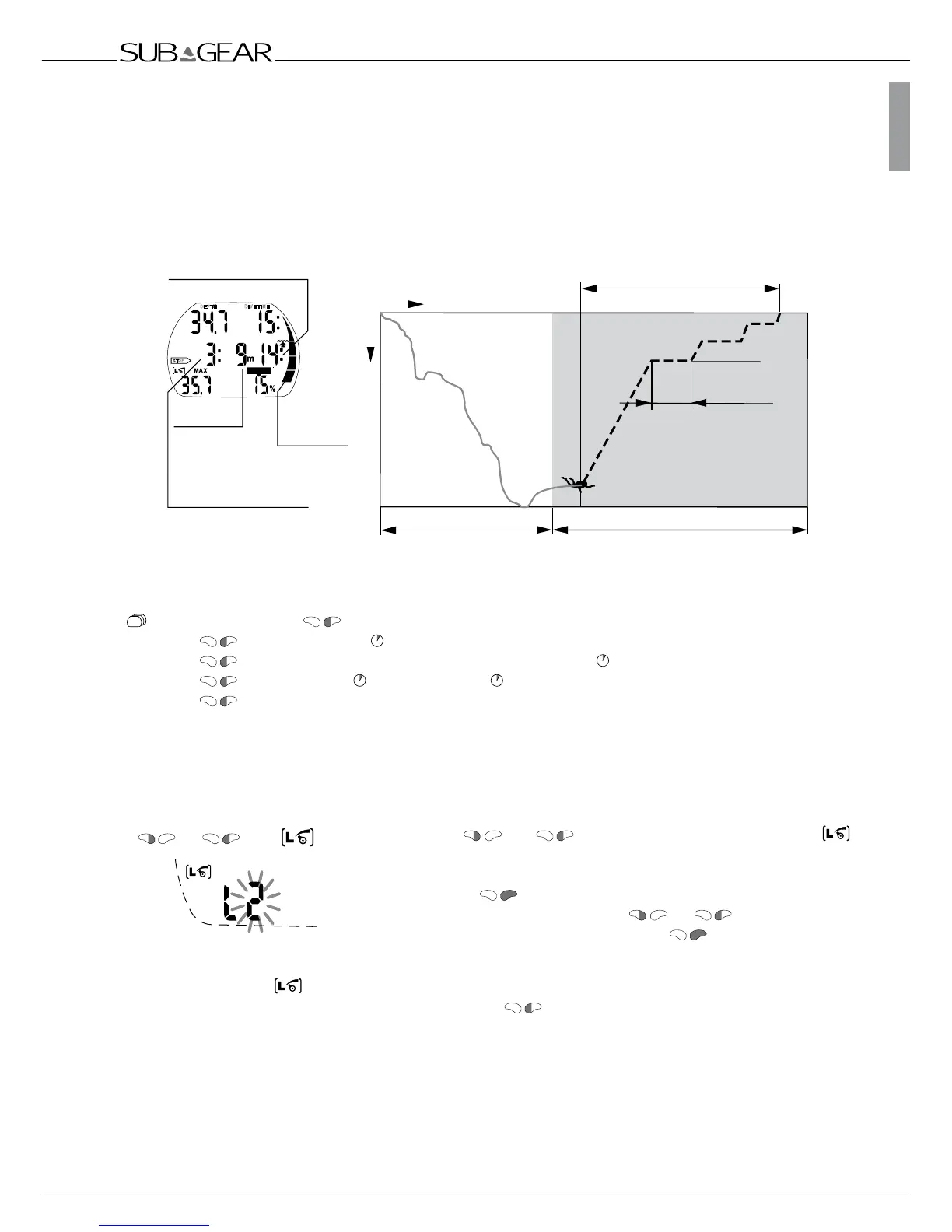
8.2.2 Display during level stop phase
Lowest level
stop depth
Total ascent time (14min)
3min
Level stop duration
MB no-stop phase
Time
Depth
Level stop duration
The duration of a level stop
at a given level stop depth
is displayed.
Level stop
depth
The deepest level
stop is displayed.
Total ascent time
including level stops
Level stop phase
To complete the dive without cascading
to a lower MB level all requested
level stops must be observed.
35.7m
9m/30ft
6m/20ft
3m/10ft
STOP
S
L
O
W
CNS O
2
%
DEPTH
DIVE TIME
Nitrogen
loading bar
relative to LO
Tank pressure > Temperature
> MB level active
> No-stop time or deco information relative to L0
> Temperature and time of day
> (Tank pressure)…
8.3 Preparation for a dive with MB levels
8.3.1 Setting the MB level
To change the MB level XP-H must be in user mode (time of day display).
1. Push
or until the symbol for MB levels
appears.
2. Confirm that you wish to change the displayed MB level by
pushing
.
3. Change MB level by pushing or .
4.
Confirm the selected MB level with .
Without confirmation the display will disappear after 3 minutes and your entries will not be accepted.
XP-H will display the
symbol to confirm that an MB level beyond L0 (L1-L5) has been chosen.
During the dive the MB level is shown by pressing 2x . If however a level stop is ignored, the
new MB level is shown .
F
NOTE:
MB levels have an influence on the dive planner.
or until



 To Next Page