S One User’s Manual
Basic Operation 2-3
The S One cutters can work with a knife, pen or pouncing tool (optional).
Once a tool has been changed, the tool parameters must be reset or checked.
All the different tools have one parameter name in common: the pressure.
Each tool has also its specific parameters.
Tool parameters can be changed by either changing them in the current user or simply by
changing the user (see section 2.4).
ATTENTION: The S One cutters will only perform according to specifications if a
genuine Summa knife, pen or pouncing tool is installed. Do not replace the
standard knife, pen or pouncing tool with products from other manufacturers.
WARNING: Each keystroke can initiate an internal test or movement of the head
or media. Keep fingers and other body parts away from the cutting area. There are
hazardous moving parts.
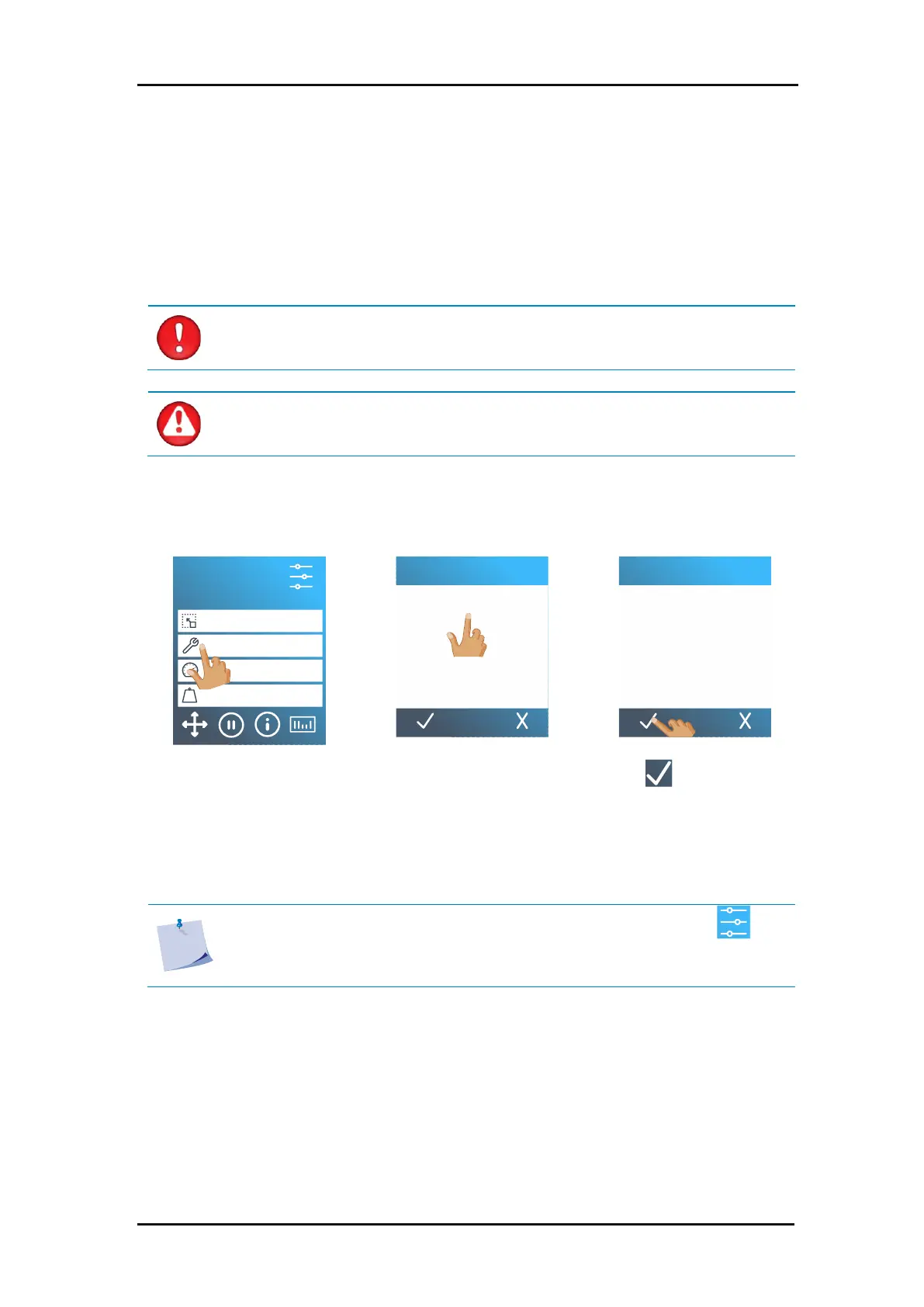
1. Power on the cutter and load the media.
4. Press
to select the tool
that is highlighted on
screen.
If the tool type was changed, then the cutter will prompt the user to install the new tool.
Note: If no media is loaded, then access the tool menu by pressing . The
cutter will prompt the user after the media is loaded for a tool change if
necessary. (see section 4).
S1D160
50000 x 145 mm
Knife
700 mm/s
90 g
Configuration 1
LAN 192.168.10.2
2.2 How to Set Tool Parameters
2.2.1 Setting the tool type


 To Next Page