EasyManua.ls Logo

Summa S One Series - Page 63

Summa S One Series
89 pages
Print Icon
To Next Page IconTo Next Page
To Previous Page IconTo Previous Page
Loading...
S One User’s Manual
OPOS 3-9
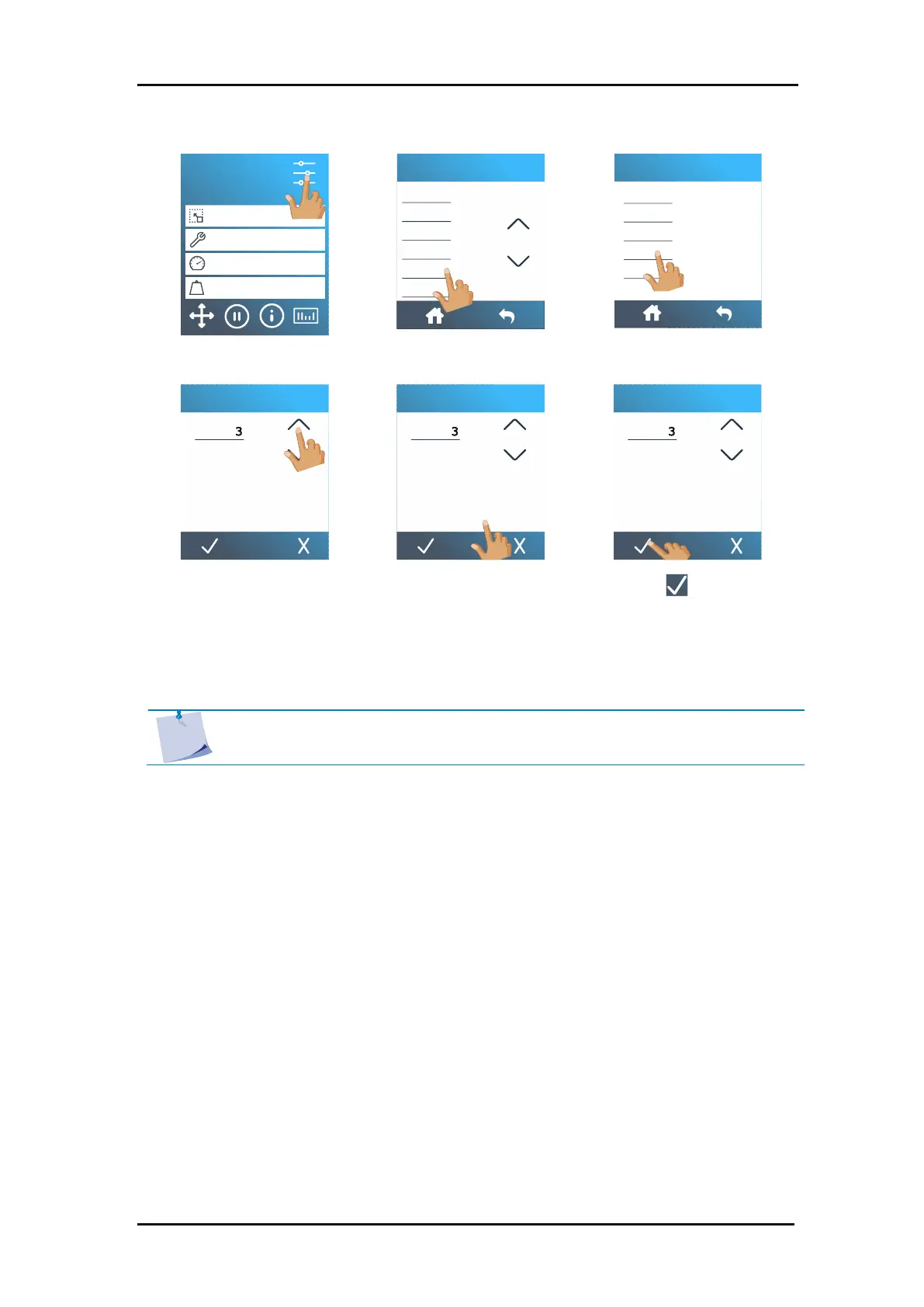
9. Press Settings.
10. Press Actions.
11. Press replot.
12. Change the value by
pressing the arrows.
13. Or just fill in the value.
14. Press to confirm.
OPOS will sense the marks for the second contour and then cut that contour. This process of
sensing and cutting will repeat itself automatically until all remaining contours have been cut.
S1D160
50000 x 145 mm
Knife
700 mm/s
90 g
Configuration 1
LAN 192.168.10.2
Knife pressure
Knife offset
FlexCut
Tool
Actions
Settings
Load
Replot
Load extended
Confidence test
Reset
Actions
Replot
1 2 3 0
4 5 6 .
7 8 9 C
0
Replot
1 2 3 0
4 5 6 .
7 8 9 C
0
Replot
1 2 3 0
4 5 6 .
7 8 9 C
0
NOTE: If the cut off command is used, the recut distance should be at least 30
mm larger than the cut off distance.

Table of Contents