- 24 -
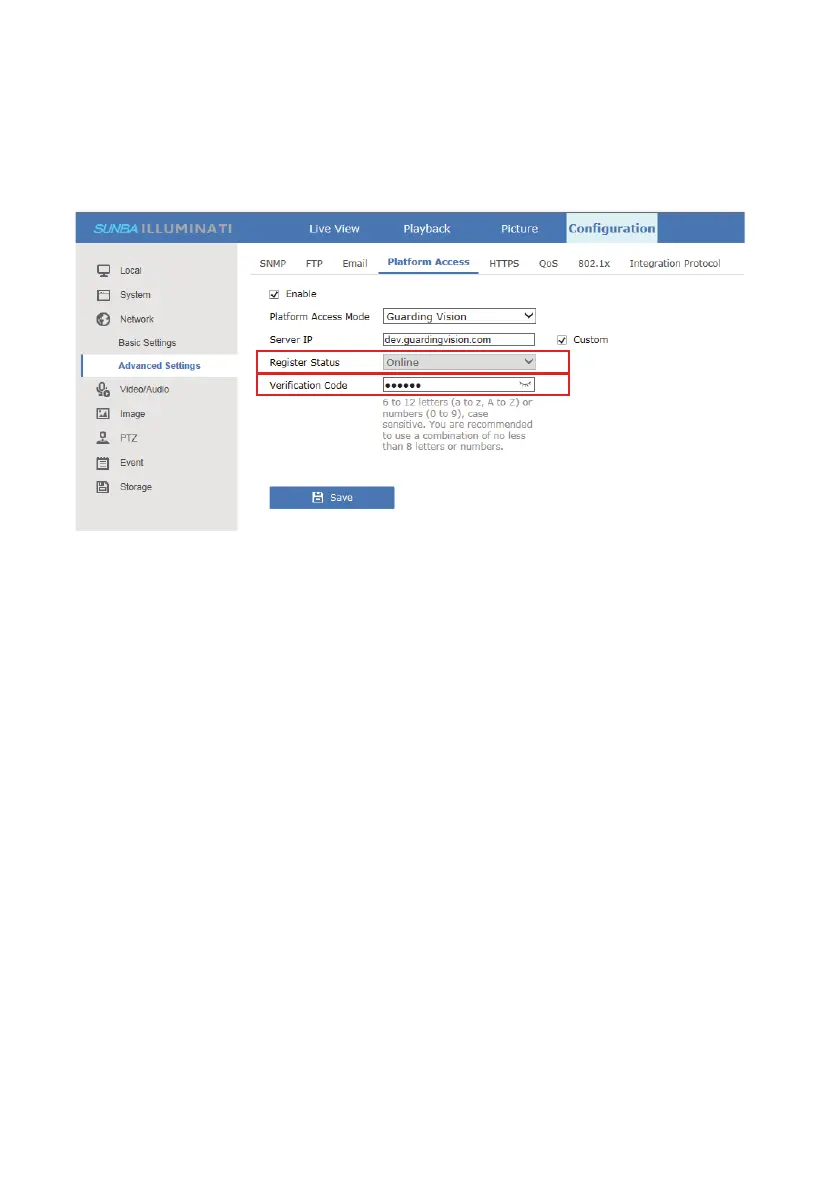
Add the camera serial number and the cloud platform verification code.
In Configuration-Network-Advanced Settings-Platform Access, a
verification code must be added upfront before you are able to use the P2P
function for remote access.
This is a very conventional way of remotely connecting IP cameras. By
definition, port forwarding will enable remote access by mapping traffic
through specific ports to specific device on the LAN (Local Area Network).
For Sunba Illuminati, both HTTP/ONVIF port (80) and TCP/Media port
(8000) need to be forwarded. However, this method is not the most secured
way for remote control. And it is suggested to establish a firewall to deny
unauthorized access. We do not recommend using this as the preferred
way of remotely accessing your IP camera.
8.2 Port Forwarding
Please use the following URL along with any 3rd party RTSP service provider to
establish a remote broadcast stream:
rtsp://[username]:[password]@[ip]:[port]/[codec]/[channel]/[subtype]/av_stream
Below is an example of an IP camera with H.264, an IP of 192.168.1.10 and the
default username and password.
rtsp://admin:Admin12345@192.168.1.10:554/h264/ch1/main/av_stream
where 554 is the default RTSP port
h264 is the encoding format, and can be replaced by h265 or mpeg4
8.3 RTSP



 To Next Page