- 31 -
There are 3 types of user levels with different ranges of permissions:
1) An administrator gets access to all features by default.
2) An operator is able to access main features of the camera customized by the
administrator.
3) A user can only watch live view of the camera but cannot perform PTZ
actions.
To login the camera through an ONVIF program/device, you need to input the
camera’s IP, ONVIF username/password you set above as well as the ONVIF
port. The ONVIF port for Sunba Illuminati is the same as the HTTP port. The
default value is 80.
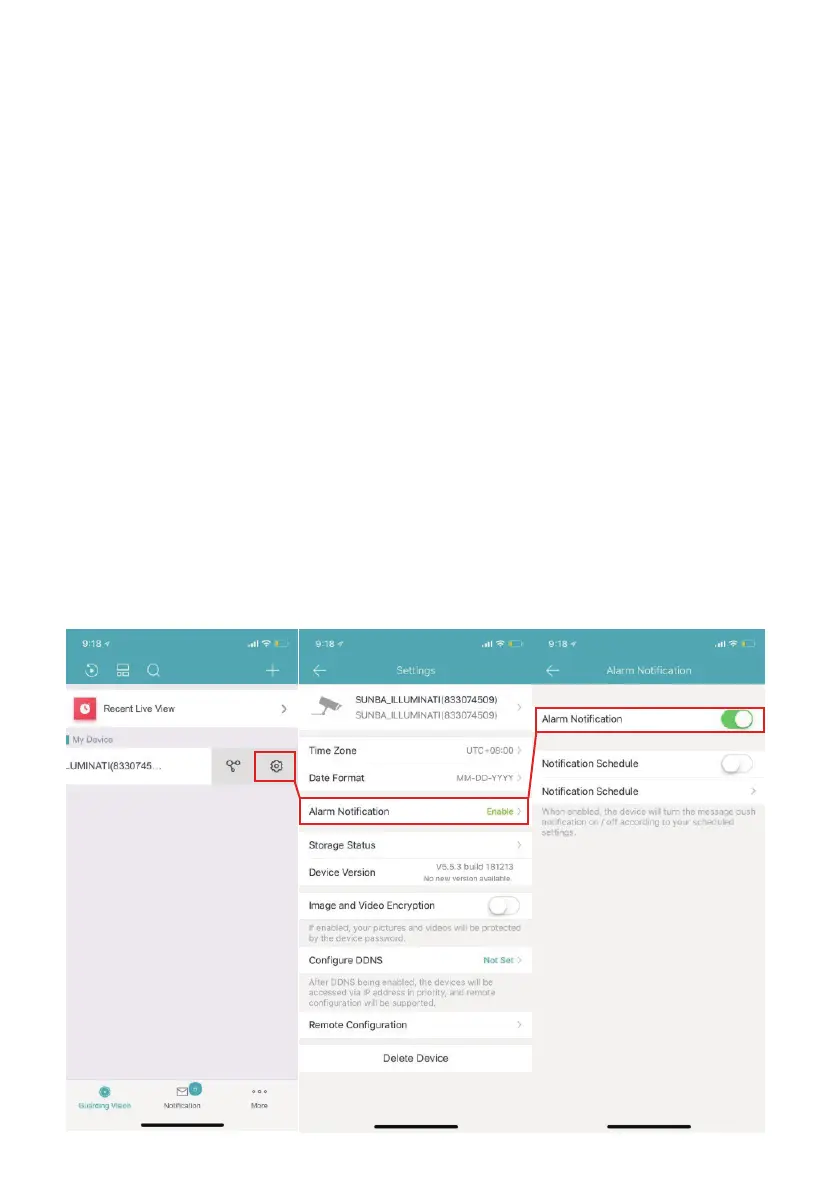
14. Smartphone Push Notification
After you setup the camera on your smartphone by following Chapter 3.3,
there are a few additional steps before enable the push notification:
1) Ensure you have registered a cloud account withIn the Guarding Vision
app instead of storing the device info locally as the notification will be sent
from the cloud server.
2) Ensure the smartphone has enabled the notification permission for the
Guarding Vision app. With iOS, go to Settings-Notifications and select
“Allow Notifications”. The steps of managing notification for android
smartphone vary between different devices.



 To Next Page