- 29 -
[Server Address] The FTP service address, please enter without the “ftp://” prefix.
[Port] Enter the port of your FTP server. The default value is usually 21.
[Directory Structure] You can choose to save captured pictures in the root
directory, parent directory or child directory. For parent directory and child
directory, you will be asked to specify the name of the directory.
[Picture Filing Interval] Choose how long you would want to write a new folder in
your FTP server. All pictures captured during the save time interval will be saved
in one file. If you choose 1 day, then all pictures from 1 day will be saved in an
individual folder.
[Picture Name] Customize the name of the picture file.
Please check “upload picture” to enable picture upload to the FTP server.
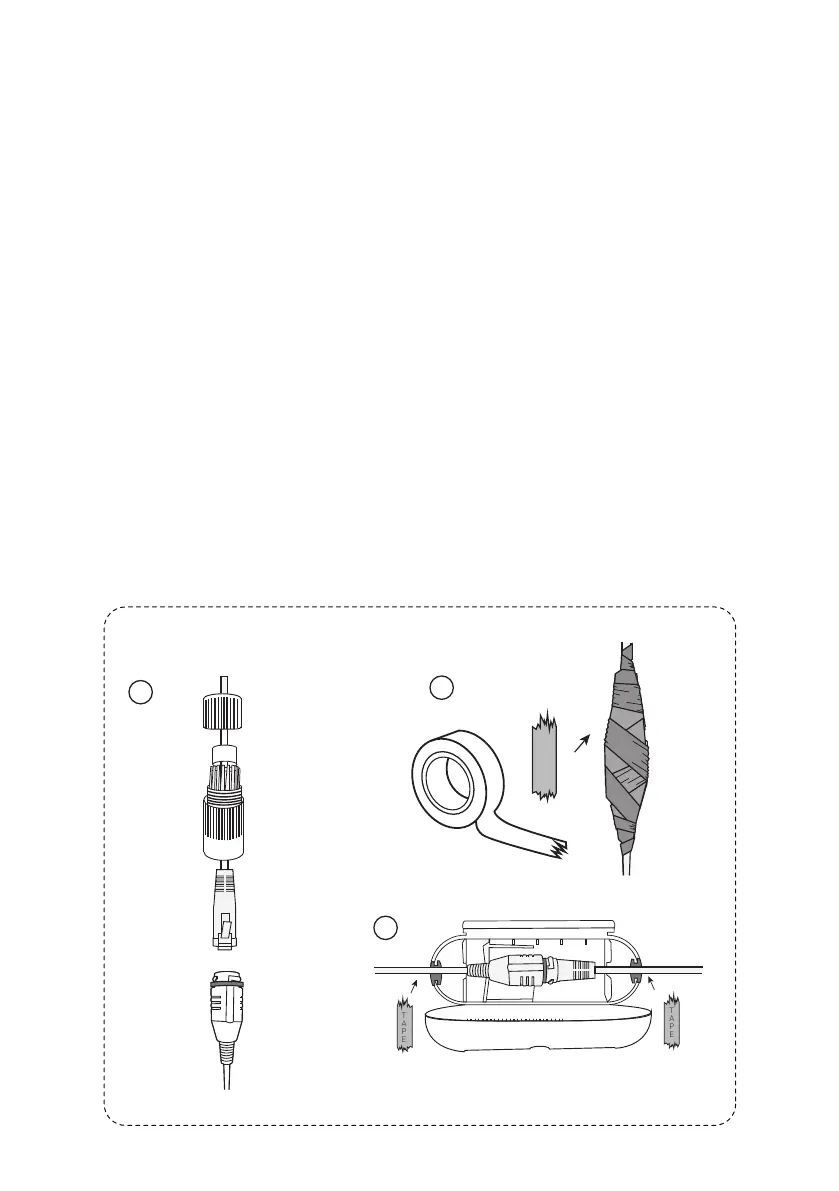
The camera itself is IP 66 Waterproof Rating. However, the cable connect-
-ors may still have exposures to water under different applications. It is
always recommended for users to take precautions to protect the cable
connectors of the camera.
Below are 3 popular methods:
12. Waterproof Measures
1
2
3
TAPE
TAPE



 To Next Page