- 05 -
The camera is set to DHCP mode by default, meaning the router will
automatically assign a matching IP to the camera. Therefore, the camera
should be in “online” status once it has been powered and connected to
the router.
Default Username/Password:
Username: admin
Password: Admin12345
Note: Please pay attention to the capitalized A in the password field.
3. Camera Management
3.1 Camera Management by Web
The following browsers are supported:
Internet Explorer 11 (Windows)
Chrome (Windows)
Firefox (Windows 7)
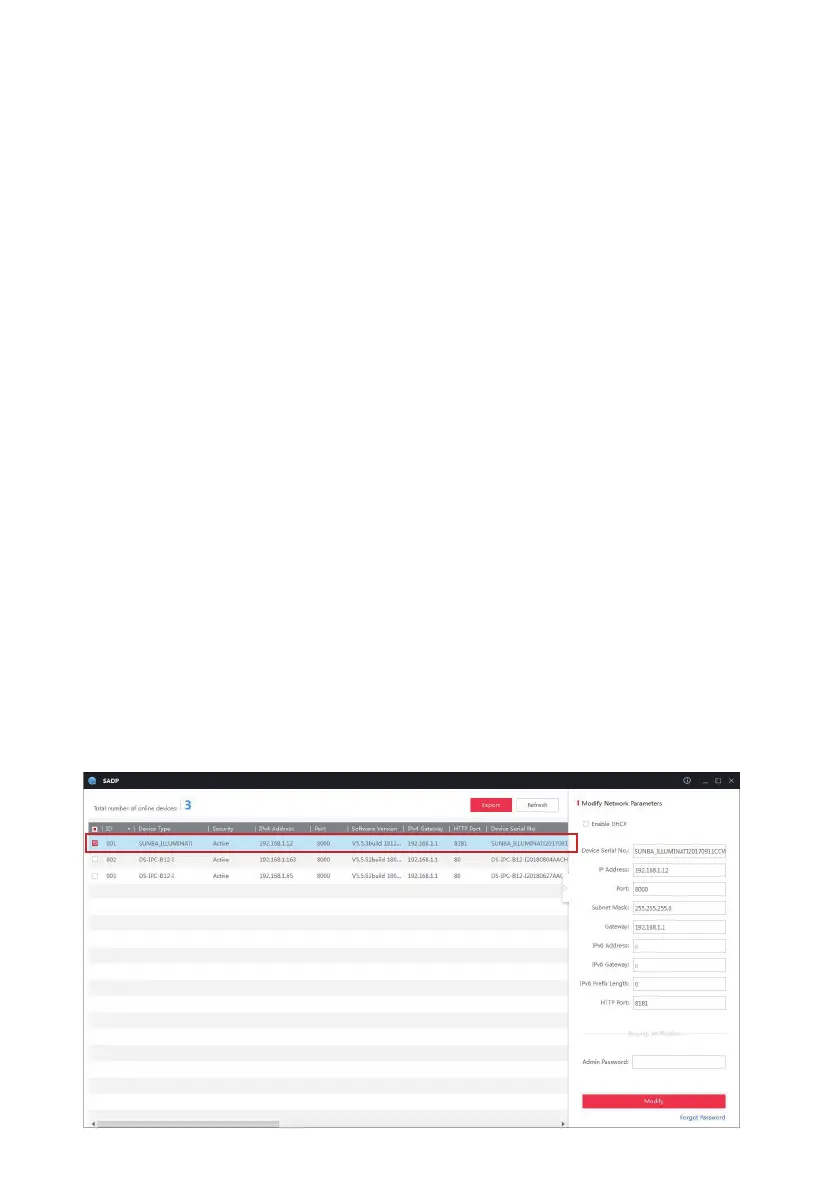
The first step of accessing the camera via a web browser is to obtain its IP,
which is the url of the camera. The IP scanning tool called SADP is required
to be installed first.
The SADP tool (Mac & Windows) can be retrieved from the CD-ROM or from
Sunba website (under download section: https://sunbatech.com/download/ )
Below is a screenshot of the tool and the “IPv4 Address” column stands for
the IP of the camera.



 To Next Page