- 27 -
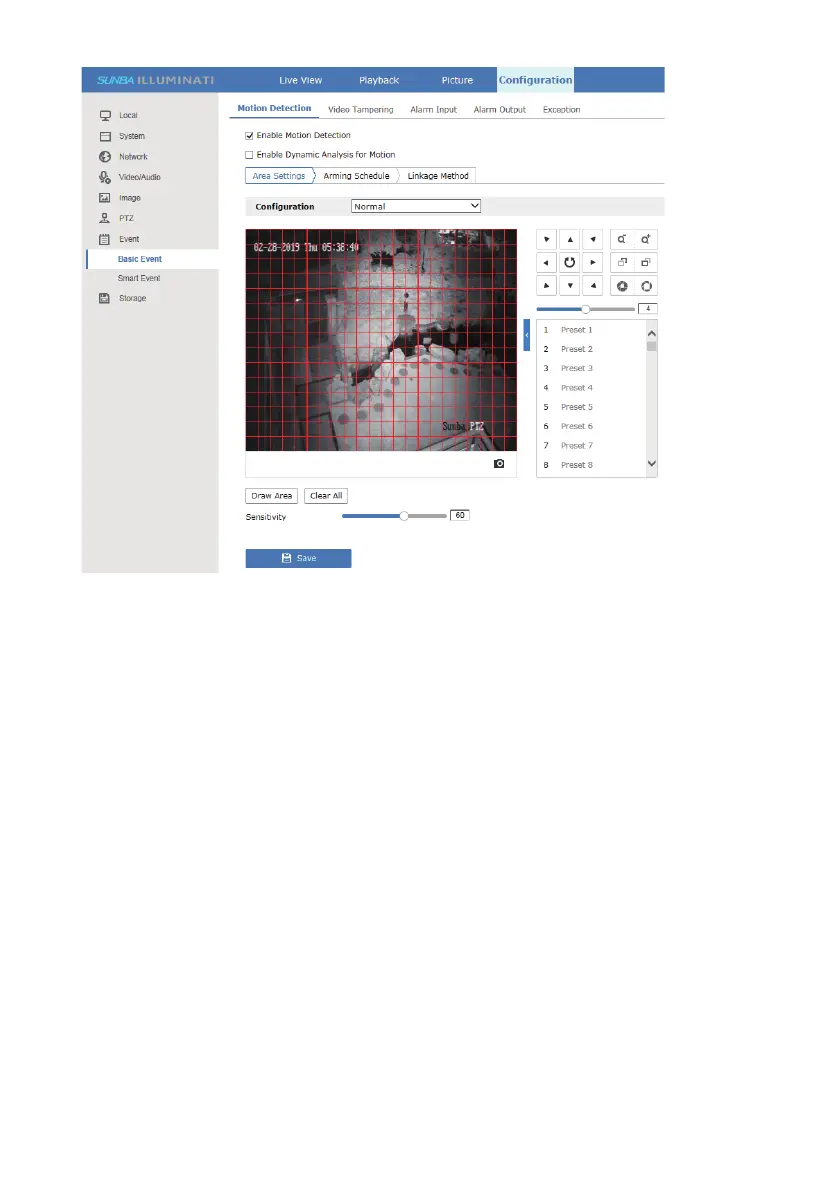
[Draw Area] Draw red squares to mark motion detection zone and avoid any
unwanted alert zone.
[Clear All] Clear all drawings.
[Scheduled Image Setting] This is set to customize the day/night motion
trigger sensitivity. The “auto switch” option will automatically separate the
day/night profile when the camera enters night vision mode. The “scheduled
switch” option allows you to separate the day/night profile by time.
[Area] Customize the day/night motion trigger sensitivity in 8 different
areas.
[Percentage] The percentage evaluates the size of the object in a motion
detected area. It is calculated as the area covered by the moving object in
the frame divided by the total area. Any percentage above the set value will
be considered as a motion event.
[Sensitivity] The bar controls how sensitive a moving object will be
recognized as motion.
You can also set more parameters under the Expert mode by browsing the
drop-down list of configuration.
The sensitivity evaluates the image pixel differences between subsequent
video frames. The higher the sensitivity, the smaller the pixel difference is
required to trigger a motion alert.



 To Next Page