- 04 -
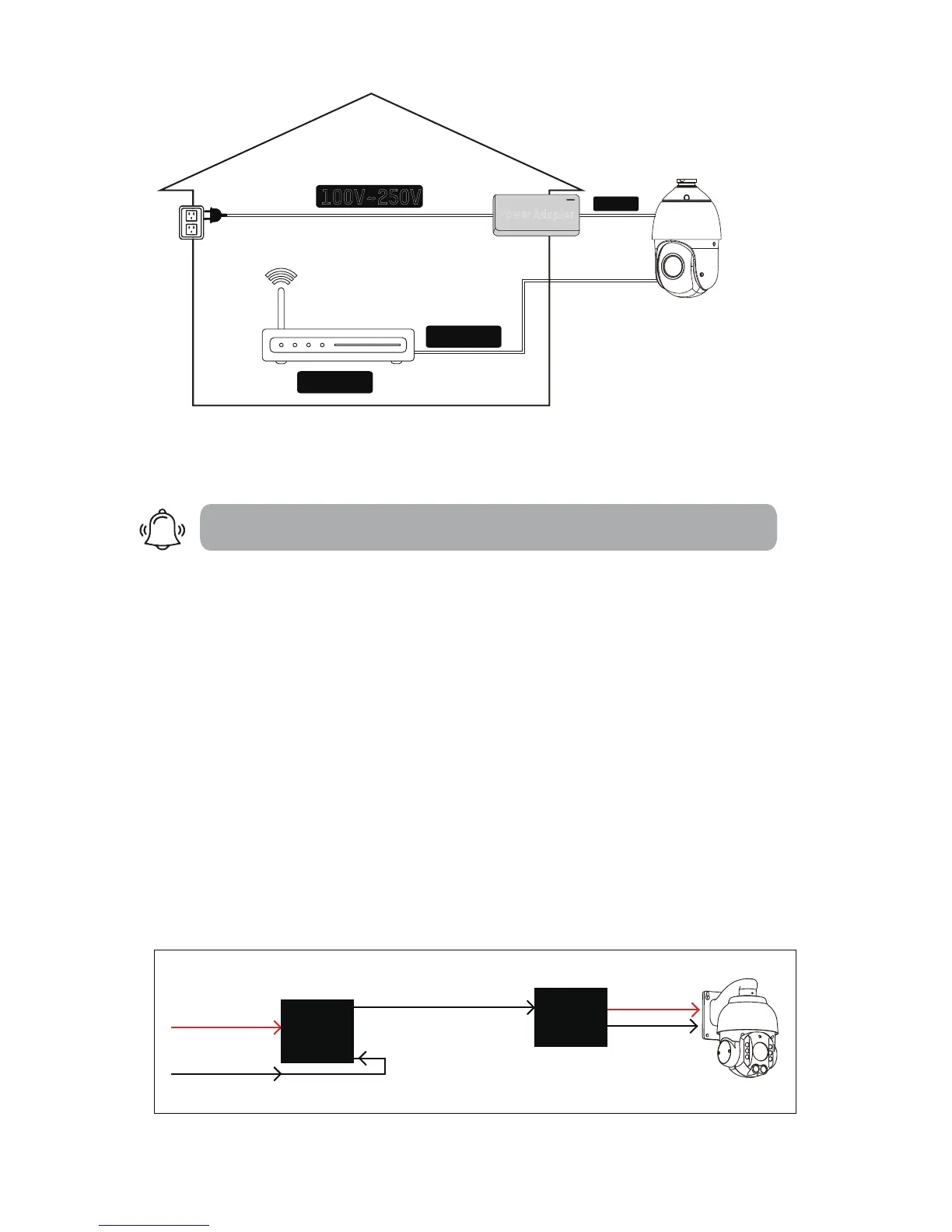
100V~250V
Data in
Router
Non-PoE
ELE (Force Electricity)
Wiring method:
Extended AC Line
DC 12V
Power Adapter
2.How to power the camera
There is an old saying that PTZ cameras are POWER-ful. So do NOT pull the
old setup from your bullet and apply it directly to your new PTZ.
2.1 For Non-PoE Camera (if you extend the power):
The camera may not work properly if the power reaches the camera is be-
-low 12V due to resistance along the extended DC line (distance depend-
-ent). If that happens, please make your AC power source near the camera,
and connect it with our default adapter you received from the package.
For extension, you can select from AC power extension cable (no distance
limit) or thick (≥18 AWG) DC power extension cable.
Risk Relevant
1.Using 24VAC or higher voltage adapter (16V, 24V) will immediately dam-
-age the camera and void the warranty.
2.The camera will be exposed to high risks of motherboard damage and
void the warranty if you use passive PoE injector/splitter.
AC110-220V in
802.3at ≥30W
RJ45 in
48V 0.5A DC out
PoE (cat5/5e/6)
DC12V out
RJ45 out
Active
PoE injector
Active
PoE splitter
Active PoE Injector/Splitter are allowed if you use PoE to power non-PoE camera.



 To Next Page