- 07 -
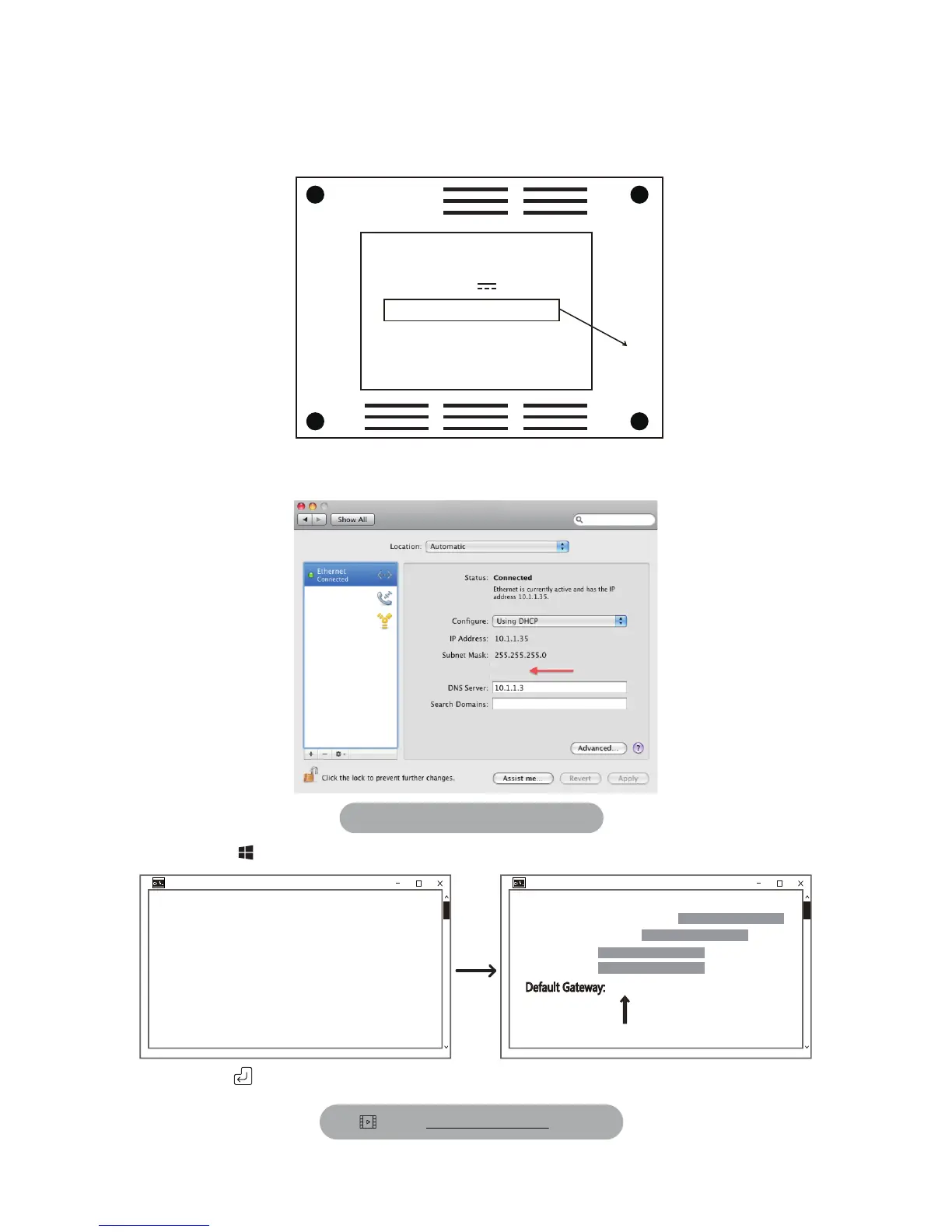
Step 2: Know the Router IP/Gateway of Your Network
Method 1: Check Bottom of Your Router Sticker
ROUTER
CHECK
THIS
Model :
Power : 12V 1A
Router IP : 192.168.10.1
User ID : admin
Password: admin
Method 2: Check from your Computer.
Network
Router: 10.1.1.1
MAC :
System Preference->Network
Check gateway.sunba.net for video
PC:
In Start Menu of Windows, type “cmd.exe” and enter ipconfig as follows:
Press enter key and locate the “Default Gateway” from the list:
Command Prompt Command Prompt
Microsoft Windows
(c)2015 Microsoft Corporation. All rights reseved.
C:\Users\Administrator>ipconfig
Ethernet adapter Network Bridge
Connection-specific DNS suffix:
Link-local iPv6 address:
IPV4 address:
Subnet Mask:
Default Gateway:
10.0.0.1



 To Next Page