- 08 -
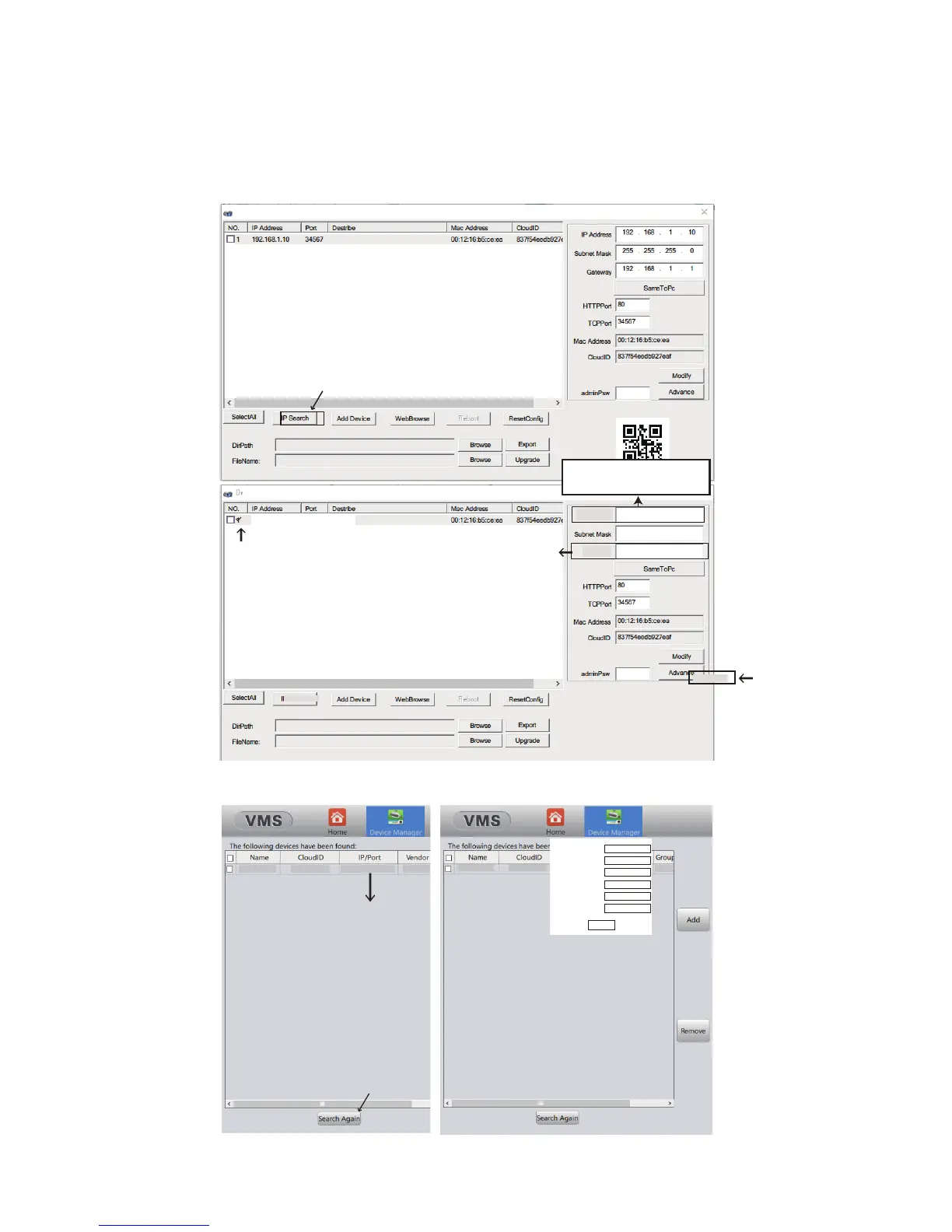
Step 3: Download the IP Cong Tool and Congure the IP address
PC : Please refer to Chapter 3. Software and download “Device Manager”
under English-> Software. Then modify the IP address and Gateway acco-
-rding to what you found from Step 2.
DecviceManager
192.168.1.10 34567
10 . 0 . 0 . 15
10 . 0 . 0 . 1
255 . 255 . 255 . 0
Change to what you found
in step 2.
Gateway
IP Address
DeviceManager
Do NOT change TCP Port or HTTP Port to 554
or 8899, which will conict with the RTSP and
ONVIF port of the camera and lock the device.
No same value for two different ports.
IP Search
Modify
192.168.1.10 192.168.1.10:34667
Sunba
Not Available
192.168.1.10 192.168.1.10:34667
Sunba
IP
Port
Submask
Gateway
UserName
Password
Defa...
Not Available
Change gateway and IP correspondingly
to match your network.
Double Click
10 . 0 . 0 .15
10 . 0 . 0 .1
34567
admin
255.255.255.0
OK
MAC: Please refer to Chapter 3. to download VMS for Mac under English-> Software.
The rst 3 segments should
match the new gateway .



 To Next Page