28
Sunstone Welders User Manual: CDDP-A
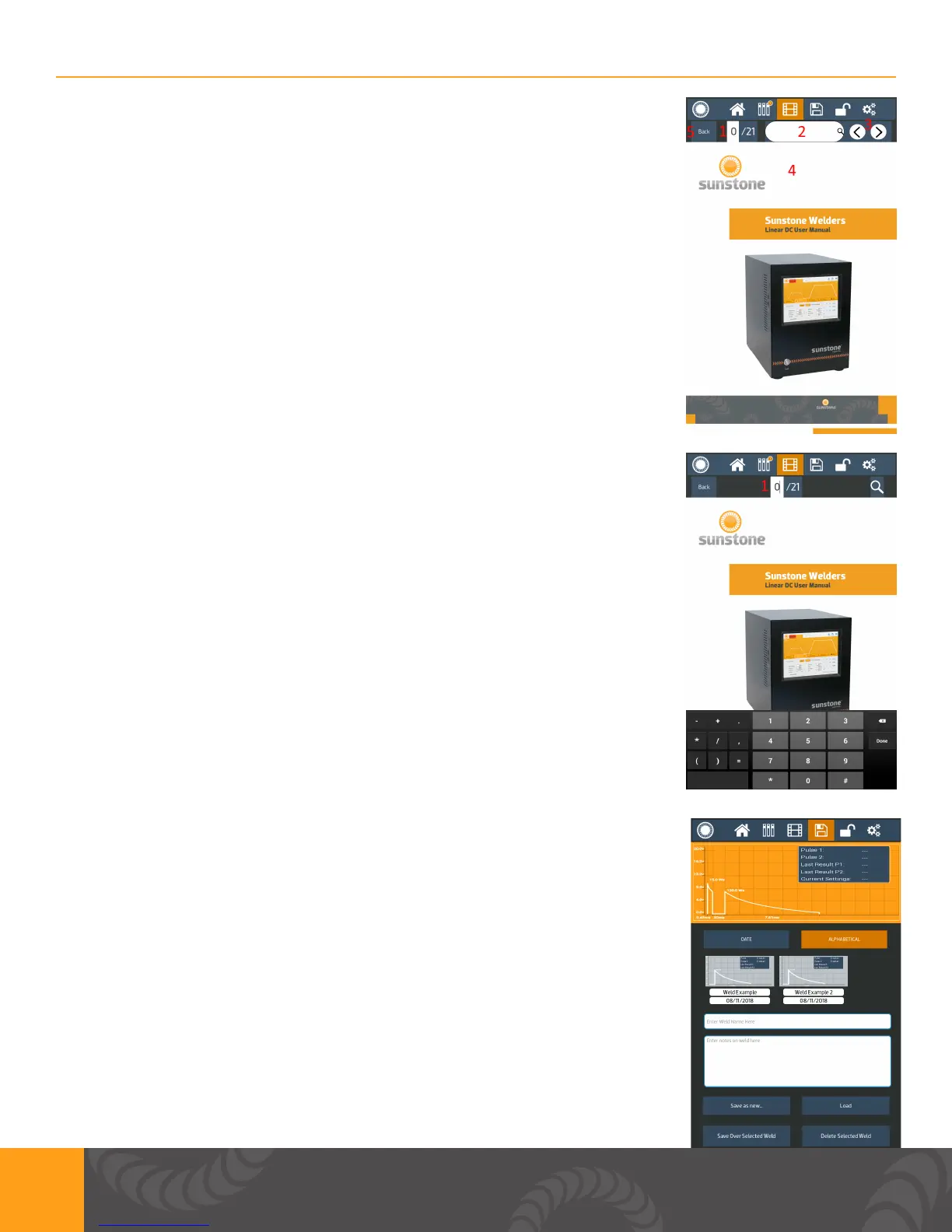
1. Shows page number of PDF you are currently viewing. User can press
the page number to go to a different page number.
2. Allows user to search PDF for keywords.
3. Allows user to scroll through searched keywords.
4. This is where the PDF will be displayed.
5. Use can press the “Back” button to go back to the main media screen.
1. If user presses the page number, they can type in a page number and
press done. The PDF viewer will navigate to that page.
Save/Load Screen
1. In this screen the user has the ability to save and/or load weld settings
a. The waveform for current settings or selected settings is displayed on
the top of the screen.
2. You can choose to list the saved settings by date or by alphabetical
order.
3. When saving a new saved setting, the desired name will be entered
here. If selecting an existing saved setting, the saved name will appear
here.
4. When saving a new saved setting, enter any notes here. If an existing
saved setting is selected, the existing notes will appear here.
1
5
7
8
6
4
3
2















 To Next Page