23
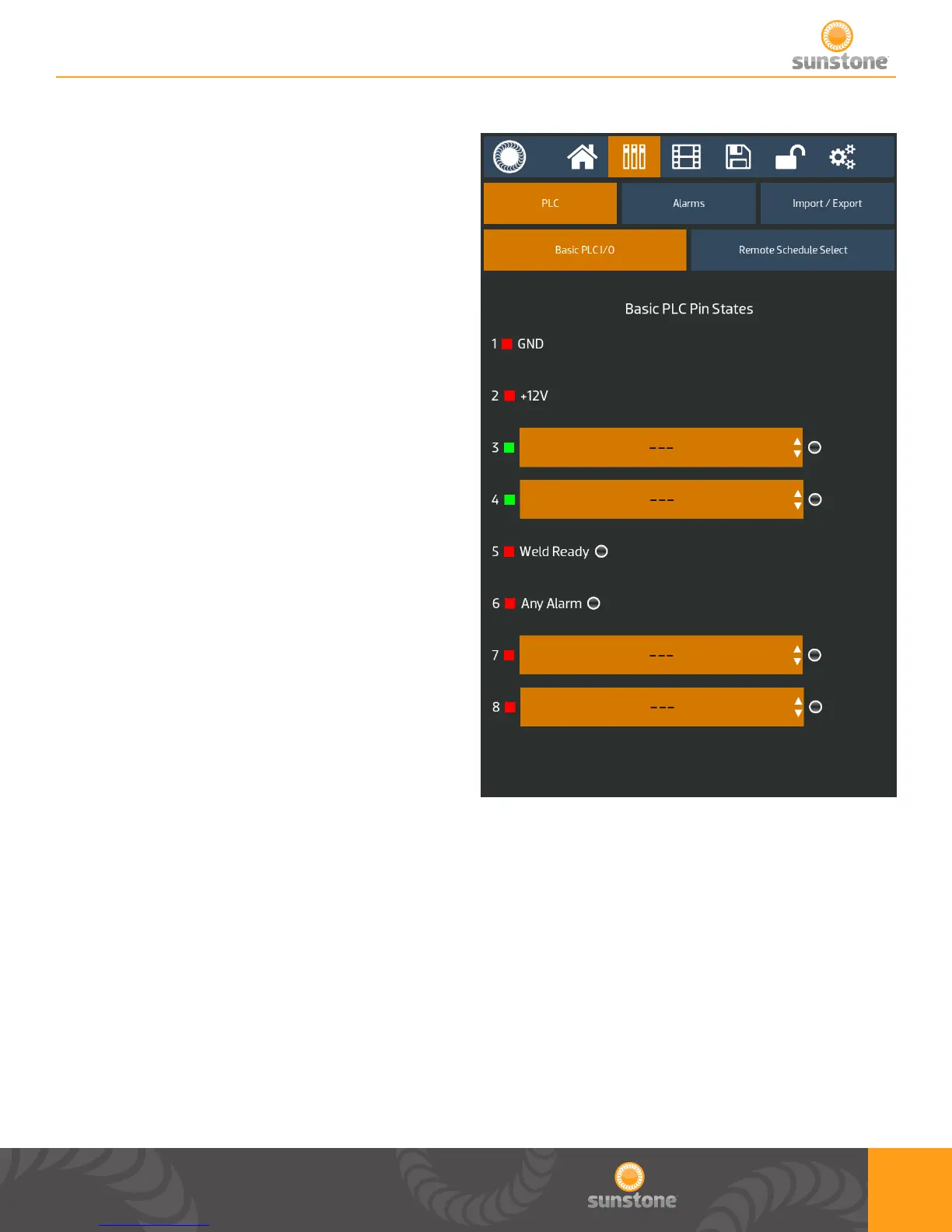
Basic PLC I/O
1. PLC tab within communication screen
2. Basic PLC I/O sub tab
a. Basic PLC PIN States displays the status
of PINS 3-8 on the 8DIN connector
i. Inputs are the green squares and
Outputs are red squares
ii. The circle’s on 3-8 change to green
for high and black for low
b. PINS 1, 2, 5, and 6 are constant outputs
c. User can select between 5 inputs
a. Clear Alarm
b. Primary Trigger
c. Secondary Trigger
d. Lockout
e. Remote Schedule Select
i. If chosen, both inputs are used and
user can choose which saved welds are
associated with the Remote Schedule
Select slots in the “Remote Schedule
Select” sub tab within the PLC tab
d. User can select between 17 outputs
a. Weld Ready
b. Weld Good
c. Weld No Good
d. Any Alarm
e. Any Warning
f. Emergency Stop
g. Alarm: Temperature
h. Alarm: Comparator Failures in a row
i. Alarm: Electrode Stuck
j. Alarm: Weld Counter Preset Limit
k. Alarm: Invalid Remote Schedule Selection
l. Alarm: Wrong trigger detected
1.
2.
m. Alarm: Trigger in No Weld State
n. Alarm: Part Check Failed
o. Warning: Temperature
p. Warning: Comparator Failures in a
Row
q. Warning: Weld Counter Preset Limit















 To Next Page