30
Sunstone Welders User Manual: CDDP-A
Lock screen
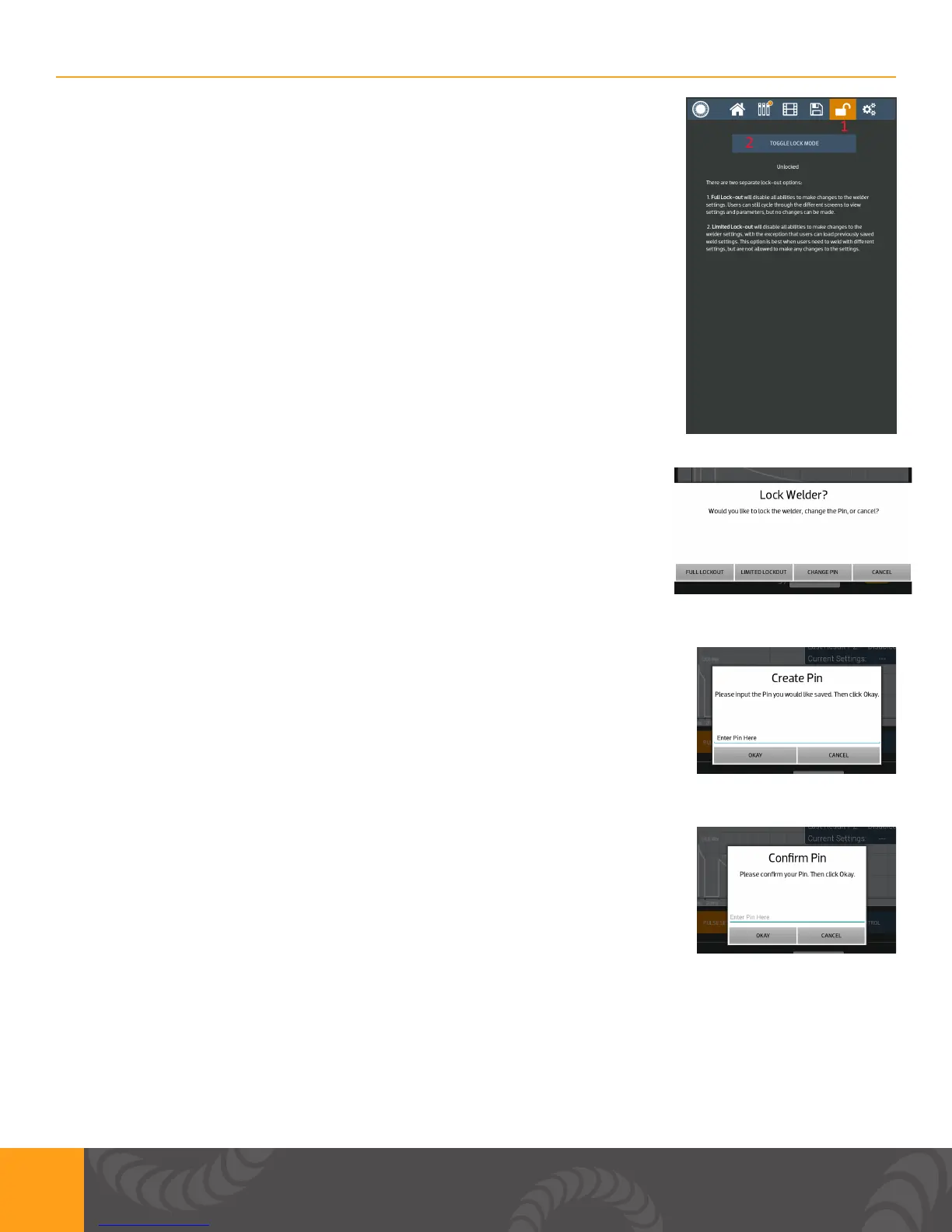
1. User has the ability to lock the screen.
a. Full lock – Blocks the user from making changes to the welder
settings. Users can still cycle through the different screens to view
settings and parameters, but no changes can be made.
b. Limited Lock – Blocks the user from making changes to the welder
settings, with the exception that users can load previously saved weld
settings. This option is best when users need to weld with different
settings, but are not allowed to make any changes to the settings.
c. The current lock state is listed on this screen.
2. This button toggles between the screen being locked and unlocked.
1. Lock Welder Pop up
a. User can choose a full or limited lock.
b. User can change PIN in this screen
c. Press the cancel button and go back to the system settings screen.
1. Create PIN Pop up
a. Input desired PIN. PIN has to be a 4 digit number.
b. Press the cancel button and go back to the lock screen.
1. Conrm PIN Pop up
a. A prompt for a PIN to be entered will occur when you select Full
Lockout, Limited lockout or change PIN after pressing the Toggle Lock
Mode.
b. User needs to type in PIN two times.
c. Press the white space to enter a PIN and then select “Okay”
d. Press the cancel button to go back to the lock screen.















 To Next Page