Page | 41
5.15. Grid Supply Voltage and Frequency – Grid Supply Page
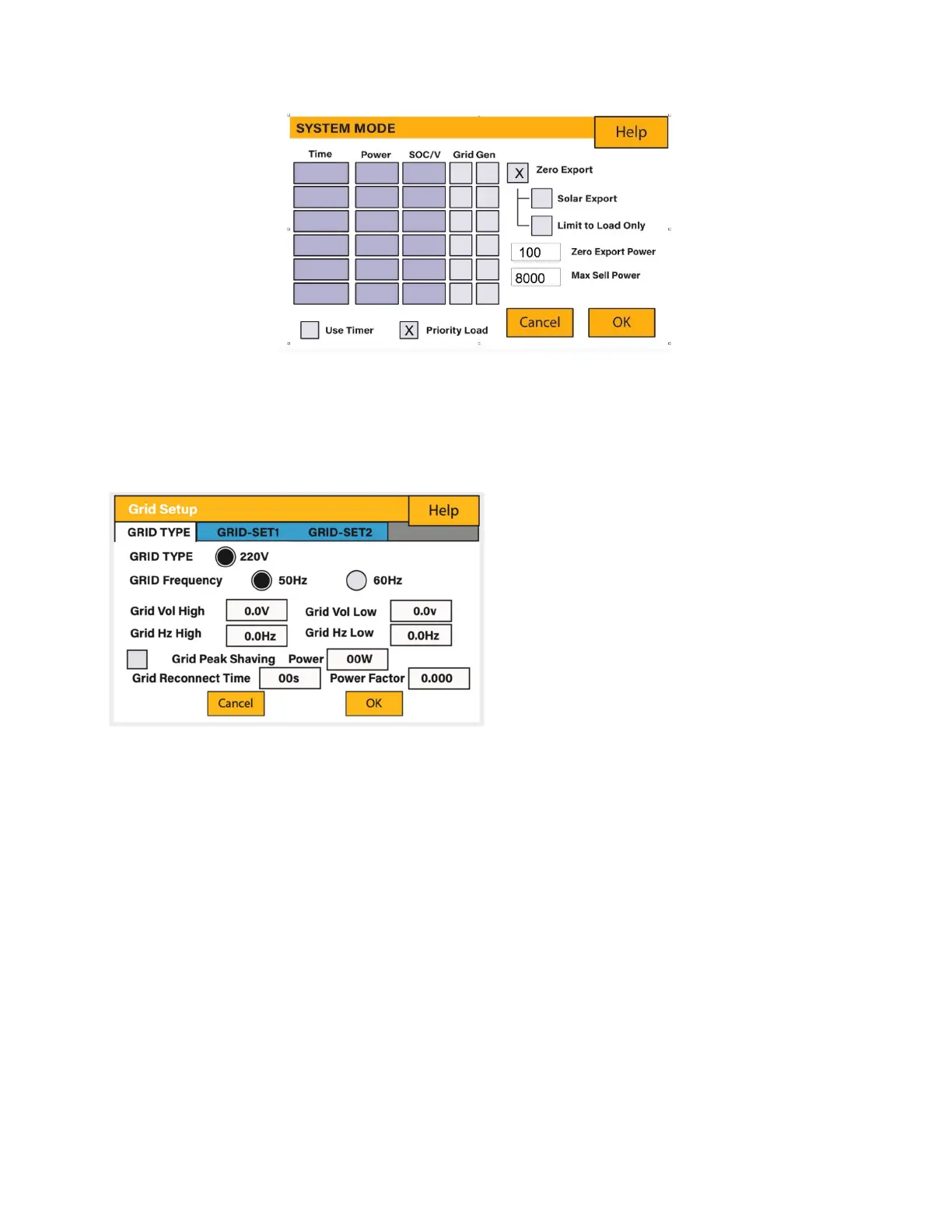
On the Settings Menu, click on the GRID icon.
Set the Minimum Grid Input Voltage (‘Grid
Vol Low’).
Set the Maximum Grid Frequency (‘Grid Hz High’).
Set the Minimum Grid Frequency (‘Grid Hz Low).
Select the correct Grid Type in your local area, otherwise the machine will not work or
be damaged.
Select the correct Grid Frequency in your local area.
Active Power and Reactive Power Setting (Go to GRID-SET2): The inverter is capable of
producing reactive power and feeding it into the Grid through this setting. Feed-In
management can be controlled directly by the Grid company through a dedicated
communication port.
5.15.1. Reactive power setting (QV)
Example: Setting V1=207V and Q1=0.3.
What this page displays:
Grid frequency setting.
Grid type (normally 230V three-
phase).
What you can do from this page:
Change grid’s frequency setting
(normally 50 Hz).
Set the Maximum Grid Input
Voltage (‘Grid Vol High’).







 To Next Page