Page | 40
power from the Grid to minimise the tripping of sensitive pre-paid electricity meters if
‘Reverse Power Detection’ occurs.
5. This controls the maximum overall power, both to the ‘Load’ and ‘Grid’ ports combined.
It is set to Low if an ‘over-current’ fault occurs
6. Tick this box if you wish to set the solar panels give power to the ‘Load’. If you un-tick
this box the solar will send power to charge the batteries.
Example:
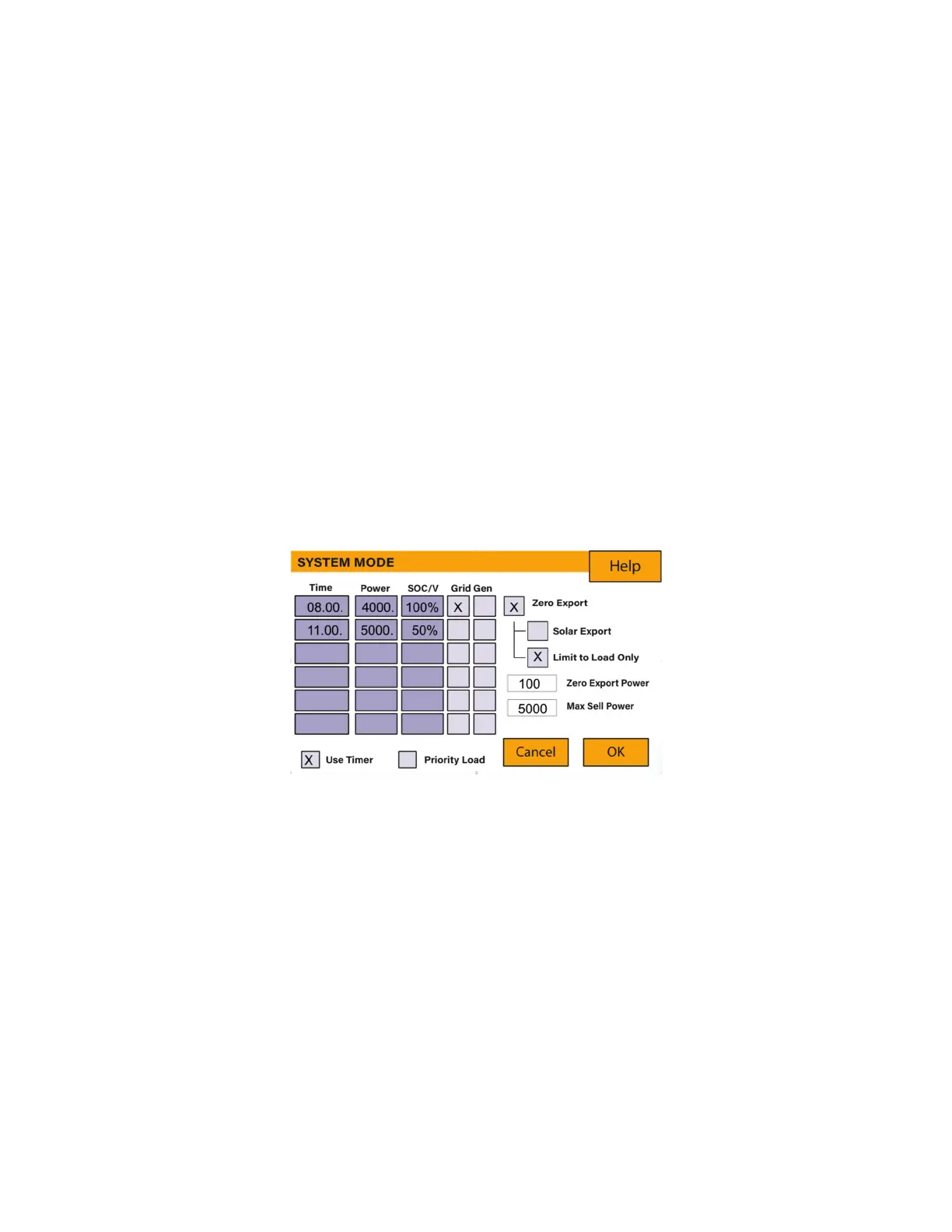
This example shows the battery being charged up to 100% by both the Grid and Solar PV
from 8 a.m. to 11 a.m. and then being able to supply up to 4kW of battery-power to the
‘essential’ loads from the ‘Load’ Port until the battery SOC drops to 50%.
IMPORTANT - When charging the batteries from the Grid or Generator, please ensure
you have set the correct correct battery-charging settings on the battery charge as shown
in Section 4.10 ‘Battery Setup’ Home Page. If the ‘Use Timer’ function is activated then
the inverter will use the battery power according to your settings when the Grid is present.
If this function is not set, the batteries WILL ONLY be used for backup when there is no
utility grid power.
Example:
This is a zero-export power to the grid example.
The power produced is supplying the ‘Non-Essential Load’ while the inverter is set at a
maximum power of 8kW (Max Sell Power). The inverter is connected to the grid, but no
export is performed. The unit allows small amounts of power to flow from the Grid (100W
Zero Export Power) to prevent any back-flow. In this example, the solar PV is prioritised
to supply the Load first and then subsequently, charge the battery.







 To Next Page