61
3.2.5 Multifunction monitor system
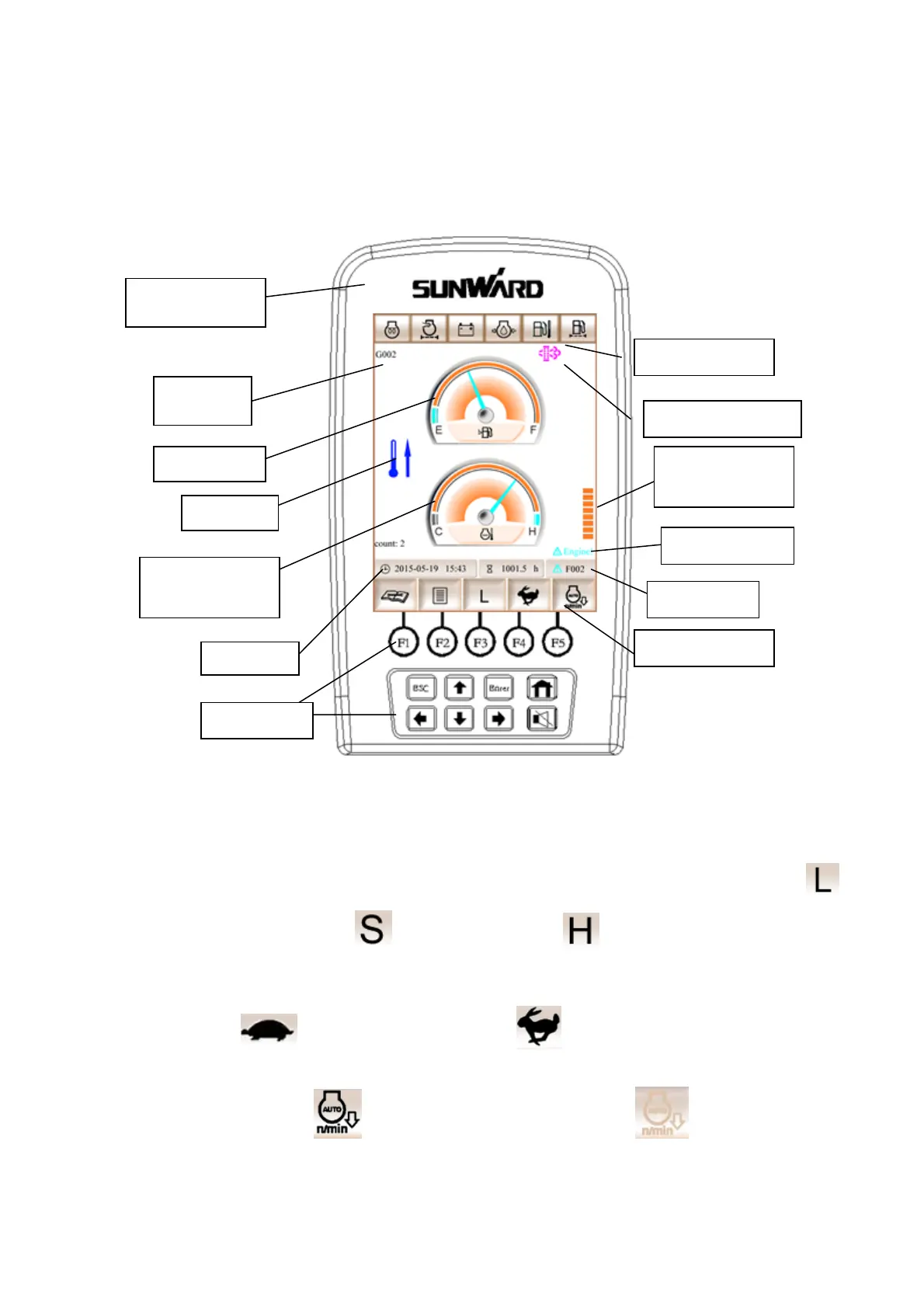
3.2.5.1 Main interface
In this interface:
(1) Press F1 and enter into maintenance information interface. This icon will turn red if
machine need to maintenance.
(2) Press F2 and enter into menu interface.
(3) Press F3, then display mode will switch among L、S and H. The icon of mode L is ,
The icon of mode S is ,The icon of mode H is .
Attention: L is light load mode, S is standard mode, H is heavy load mode.
(4) Press F4, travel speed is switched between high speed and low speed, icon of travel low
speed is , icon of travel high speed is
(5) Press F5, work state is switched between automatic idle and non-automatic idle, icon of
automatic idle is icon of non-automatic idle is (grey)
(6) If the buzzer is ringing, please press muffle, Buzzer will go on to ring if there has
different kinds of warning.
Sunward LOGO
GPS code
Fuel oil level
Cooling liquid
temperature
Warning lamp
Accelerograph
shift
Failure code
Function menu
Time
Function key
Warming
Regeneration lamp
Engine warning



 To Next Page