63
3
3-3. Media operation
Audio/visual system
3-3.Media operation
The USB memory operation screen
can be reached by the following
methods: P.53
Connecting a USB memory
(P.54)
When an Apple CarPlay/Android
Auto connection is established,
this function will be unavailable.
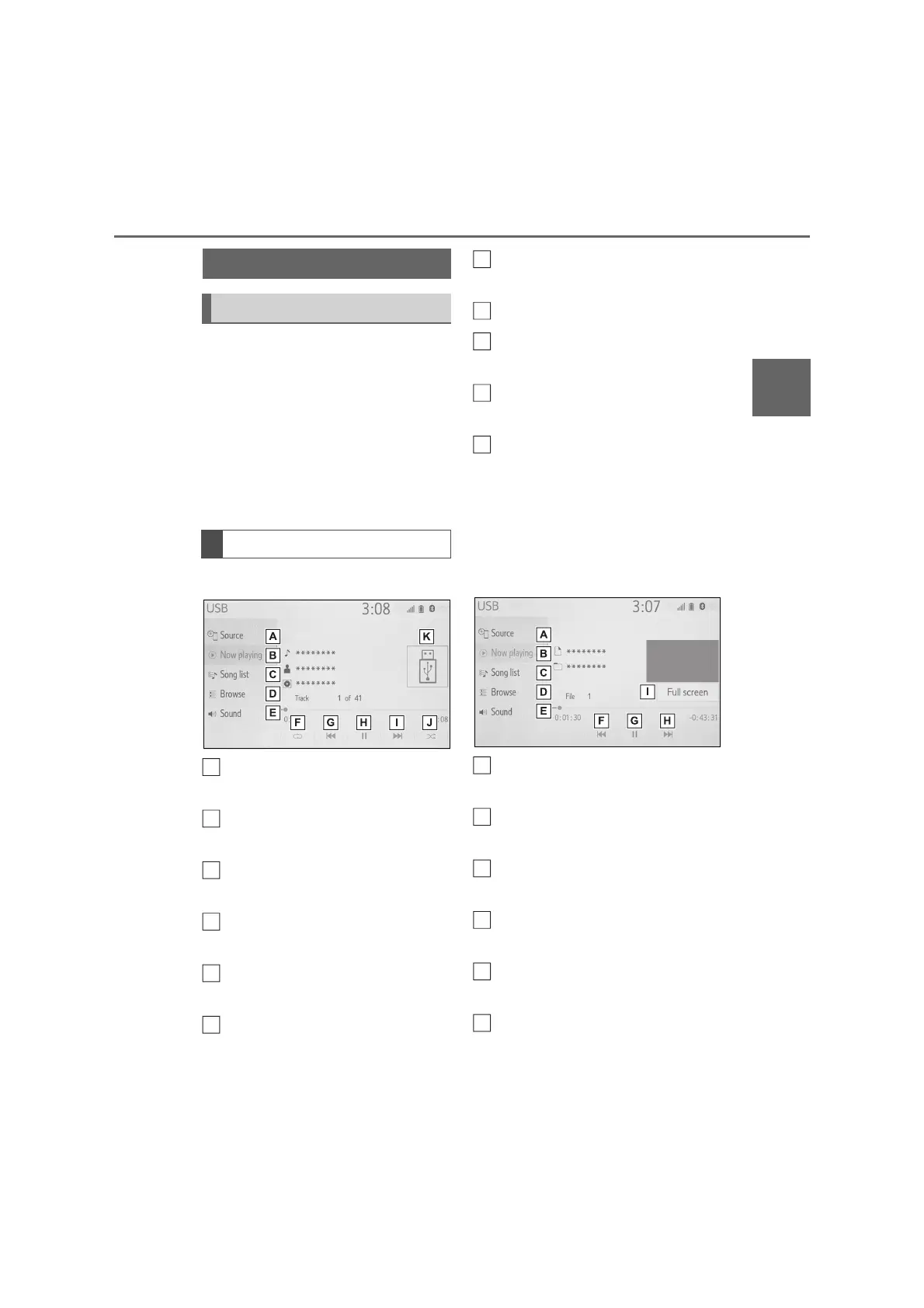
USB audio
Select to display the audio
source selection screen.
Select to return to the top
screen.
Select to display a song list
screen.
Select to display the play mode
selection screen.
Select to display the sound set-
ting screen. (P.54)
Select to set repeat playback.
(P.64)
Select to change the file/track.
Select and hold to fast rewind.
Select to play/pause.
Select to change the file/track.
Select and hold to fast forward.
Select to set random playback.
(P.64)
Displays cover art
USB video
1 Select “Browse”.
2 Select “Videos”.
3 Select the desired folder and
file.
Select to display the audio
source selection screen.
Select to return to the top
screen.
Select to display a song list
screen.
Select to display the play mode
selection screen.
Select to display the sound set-
ting screen. (P.54)
Select to change the file.
Select and hold to fast rewind.
USB memory
Overview
Control screen
B
D
E
F
H
I
J
K
A
C
E
F



 To Next Page