11. CAMERA/VIDEO/FUSION-Link
11-9
11.7 FUSION-Link
FUSION-Link allows compatible Multi-Function Display to interface and achieve con-
trol of specialized FUSION marine entertainment equipment.
11.7.1 How to access the FUSION screen and controls
The FUSION controls can be accessed 3-ways:
• From the home screen (full screen)
• Slide-out menu (minimized screen)
• Gesture ([Fusion] option)
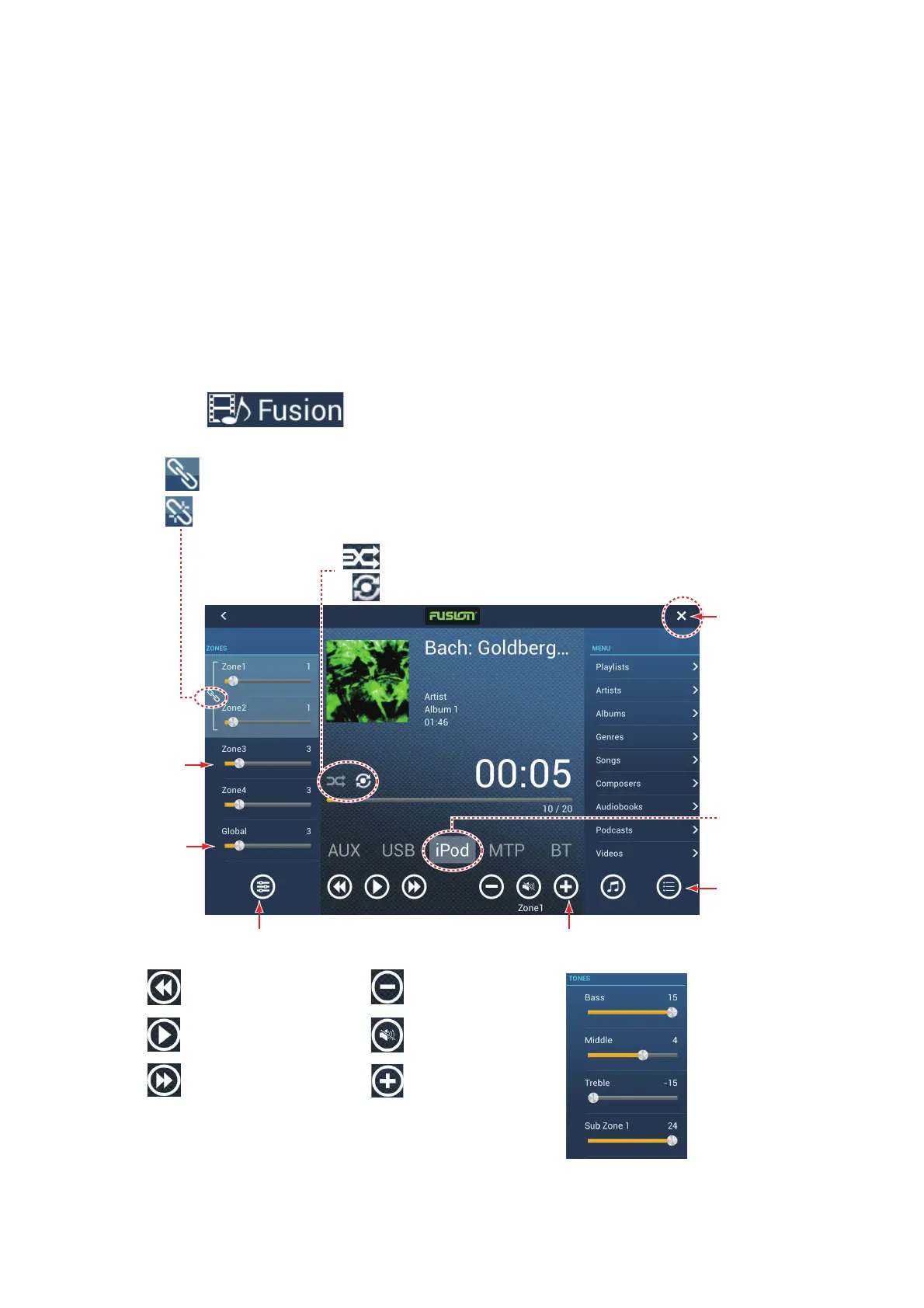
Method 1: Tap [Fusion] on the home screen to get the full screen FUSION display.
Example1: iPod in the full screen
Drag
slider to
adjust
volume.
Show or hide [ZONES] panel.
Show or hide
[MENU] panel.
Tap: Goto previous title.
Hold down: Go back.
Close
button
Tap: Goto next number.
Hold down: Fast forward.
Swipe to
change
source.
Show or hide [TONES] panel
(tone controls).
Playback
Lower volume.
Raise volume.
Mute/unmute.
: Select tracks or albums.
: Repeat one or all.
Globally
adjust
volume.
Zones 1 and 2 volumes synched.
Zones 1 and 2 volumes independent.


 To Next Page